









As large language model (LLM) chat patterns become an increasingly widespread fixture across the modern web, ensuring their universal accessibility is critical to guaranteeing that everyone can access the information, tools, and digital opportunities they offer. Drawing on extensive professional experience improving these complex interfaces, accessibility expert Eric Bailey has shared practical frameworks and technical considerations designed to make chat-based web and desktop experiences more accessible and usable for individuals who rely on assistive technologies.
Accessibility remains a core component of any functional digital experience. However, as the immersive LLM chat pattern continues to spread rapidly throughout the digital ecosystem, developers risk actively excluding a significant portion of the population if these interfaces are built without accessibility as an inherent consideration from the ground up. Exclusion in this context represents far more than a technical oversight; it translates directly to the loss of critical knowledge, educational and economic opportunities, functional utility, employability, and entertainment.
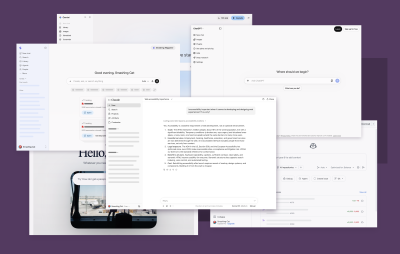
An immersive LLM chat experience serves as a catch-all term for full-screen applications and web platforms such as Claude, ChatGPT, GitHub Copilot, Gemini, America.gov, Glean, and other similar websites and web applications. The core principles governing these environments apply equally to standalone web applications and native desktop wrappers built using popular frameworks like Electron or Tauri. These immersive environments differ fundamentally from simpler interface patterns, such as transient pop-up chat widgets, inline text generation utilities, or basic summarization tools, which carry distinct functional expectations and require separate considerations.
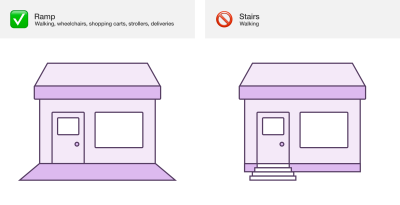
When viewed through the established guidelines of the Web Content Accessibility Guidelines (WCAG), chat-based user interfaces are fundamentally interactive systems constructed using standard web technologies. The access barriers present in poorly designed chat environments, along with the accompanying legal liabilities, mirror those found across any other segment of the web. This dynamic reinforces the social model of disability, which posits that physical and digital environments create exclusion through design choices. Just as a physical building with stairs rather than a ramp creates an artificial barrier for individuals with mobility impairments, digital environments frequently institute invisible architectural roadblocks that alienate users of assistive technologies.
Software creation is heavily influenced by an overwhelming visual bias rooted in a predominantly visual culture. Unconsciously, digital outputs reflect and reinforce this bias, necessitating a deliberate shift toward evaluating non-visual considerations during the development phase. While disabilities encompass a wide spectrum of lived experiences, core interactions within an LLM-based chat environment require specific accommodations for individuals who are blind or experience low vision.
In a standard visual interaction, a user types a prompt, submits it, and observes the interface update as the model streams its response into a visual chat bubble. Conversely, a user navigating via a screen reader often receives no immediate auditory or tactile indication that new content has successfully populated the screen. Without proper technical intervention, the interface remains silent, leaving the user unaware that the system has processed their request and delivered a response.

To bridge this gap and establish an equivalent user experience, developers must implement robust live region announcements. Properly configured live region announcements allow a user to receive immediate updates regarding the model’s response without requiring them to shift their keyboard focus away from the primary prompt input field. This mirrors the natural behavior of a sighted user who might glance upward to read an incoming response while keeping their hands positioned near the keyboard or mouse.

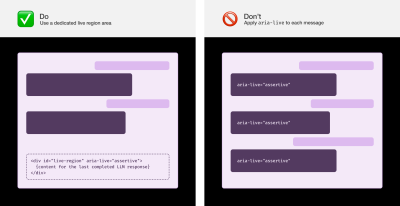
Industry experts caution against common technical pitfalls, such as haphazardly applying live-region attributes to individual message bubbles as they appear, which often results in unpredictable behavior and fragmented screen reader output. Instead, developers are encouraged to utilize a single, dedicated live region container positioned strategically within the Document Object Model to handle announcements reliably. Furthermore, usability research highlights the importance of withholding announcements until a message has completely finished streaming, preventing the jarring and confusing auditory experience that occurs when screen readers attempt to parse words dynamically as they update on screen.

Managing user expectations while a request is processing represents another critical element of accessible chat design. Because LLM responses frequently require several seconds or even minutes to formulate, sighted users generally rely on visual cues such as loading spinners, progress bars, or placeholder text to understand that the system is actively working. Without equivalent accommodations, users relying on assistive technology may incorrectly assume the application has frozen or crashed.

To maintain parity, developers should ensure that visible loading indicators are accompanied by synchronized live region text updates. For longer processes, introducing timed announcements at regular intervals helps reassure users that the system continues to process their request, while randomized phrasing can prevent user fatigue during extended wait times. While emerging platform features like the ariaNotify() application programming interface hold significant promise for standardizing these notifications in future web development, current cross-browser inconsistencies and polyfill limitations mean established live-region patterns remain the most reliable path forward.

Navigating long conversational histories also demands careful structural planning. For screen reader users, heading elements remain the single most popular method for exploring a page. Inserting visually hidden heading elements before each message within a conversation allows users to scan through past exchanges efficiently. Prefacing these headings with clear identifiers, such as indicating who authored a specific message, successfully replicates the contextual clarity that sighted users derive from the left or right alignment of chat bubbles.
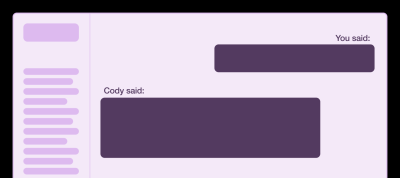
Similarly, implementing overarching landmark regions helps users understand the broader layout of the application without overwhelming them with an excessive number of nested regions during long-running sessions. Developers can further enhance navigation by providing dedicated skip links that allow users to jump directly to the main conversation area, as well as designing conversation lists as composite widgets that support efficient keyboard navigation via standard arrow keys rather than repetitive tabbing.
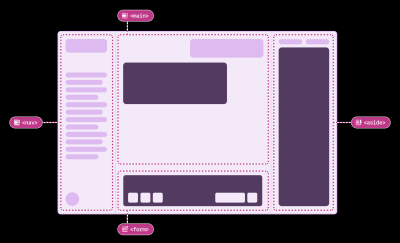
Additional enhancements, such as supporting traditional desktop application navigation patterns through keyboard shortcuts, double-checking interface behavior during high browser zoom levels, and providing robust user preferences, empower individuals to tailor the experience to their specific needs. Preferences that allow users to control announcement granularity, disable distracting animations, turn off app-specific sound effects, or re-bind keyboard shortcuts ensure that the digital environment remains adaptable. Ultimately, incorporating inclusive user research and centering the lived experiences of disabled individuals ensures that chat-based artificial intelligence tools remain equitable, usable, and accessible as the technology continues to mature across the global web.