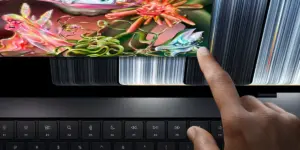










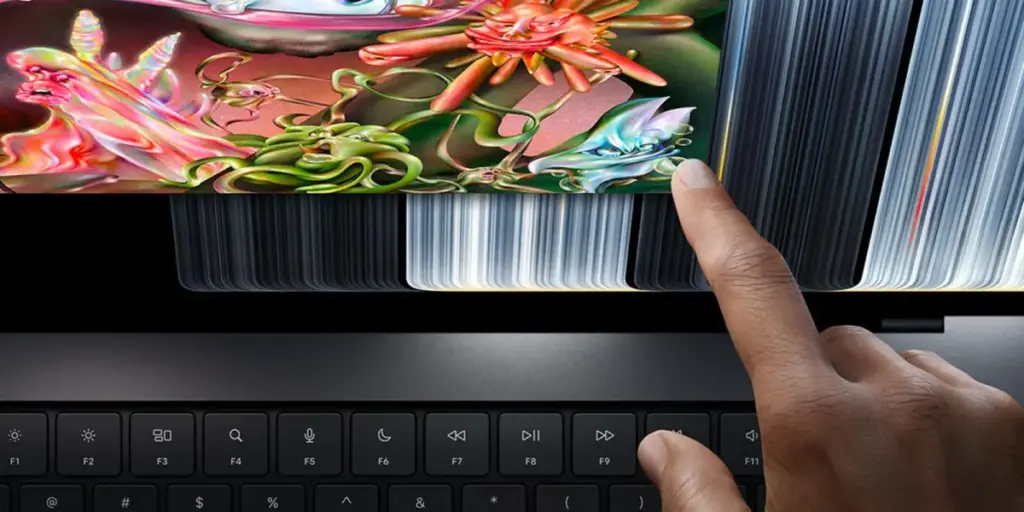
In a landmark moment for the company’s personal computing division, Apple has officially unveiled the new MacBook Pro featuring the revolutionary PROLED XDR display. This release marks a significant departure from Apple’s long-standing philosophy regarding Mac hardware, as it introduces the company’s first-ever laptop equipped with a touch-sensitive screen. For years, the integration of touch into the macOS environment was a subject of intense speculation and industry debate, but with the arrival of the PROLED XDR model, Apple has clearly signaled that the future of the Mac includes tactile interaction.
While the foundation for this transition was laid earlier this year with the introduction of macOS 27 Golden Gate—which included a suite of preliminary touch-based optimizations—the hardware launch has brought a more comprehensive vision to light. Apple has not merely slapped a digitizer onto an existing screen; it has meticulously refined the user experience to ensure that macOS remains a desktop-class operating system while embracing the intuitive nature of direct touch input.
Refined UI Elements for Precision Interaction
The primary challenge of bringing touch to a desktop operating system is the inherent difference in precision between a mouse cursor and a human fingertip. To address this, Apple has implemented a series of subtle but impactful UI adjustments. One of the most noticeable changes involves the "traffic light" icons—the red, yellow, and green buttons located in the top-left corner of every application window. On the new touchscreen MacBook Pro, these icons dynamically scale when the system detects a user’s finger approaching or touching the screen. By increasing the touch target size, Apple has effectively mitigated the risk of accidental clicks, ensuring that window management remains fluid and frustration-free even when the user is reaching out to manipulate the screen directly.

This design philosophy extends beyond simple window controls. Throughout the interface, Apple has prioritized "touchability" without sacrificing the information density that power users have come to expect from macOS. When interacting with context menus in the menu bar, users will find that each selectable item expands slightly to provide a larger surface area for a fingertip. While some of these changes may be nearly imperceptible to a user accustomed to traditional mouse interaction, they represent a fundamental shift in how the OS processes input, ensuring that the interface feels responsive and forgiving.
Bridging the Gap: Gesture-Driven Navigation
The introduction of touch on the MacBook Pro is not intended to replace the trackpad, but rather to complement it. Apple has successfully mapped the familiar gesture library of the trackpad to the display itself, allowing for a seamless transition between input methods. Whether a user is performing a three-finger swipe up to invoke Mission Control, swiping between full-screen spaces, or executing a precise pinch-to-zoom gesture on a high-resolution image, the experience feels consistent with the high-fidelity feedback users expect from Apple hardware.
Perhaps most impressive is the integration of system-level navigation features. Users can now summon Spotlight search directly from the Dynamic Island, mirroring the behavior seen in the iOS 27 ecosystem. This unified approach to navigation creates a sense of continuity between Apple’s mobile and desktop platforms, effectively lowering the learning curve for users who are already deeply invested in the iPhone or iPad experience. By bringing these familiar interactions to the Mac, Apple is acknowledging that the boundaries between mobile and desktop workflows are increasingly porous.

A New Standard for App Development
While general users will benefit from the improved navigation, the most significant impact of this hardware release may be felt by the software developer community. Historically, testing touch-based interactions on a Mac required developers to use complex workarounds or tethered devices to simulate how an app would behave on a touchscreen. With the new MacBook Pro, the iOS simulator has been fully overhauled to support native touch navigation.
Developers can now interact with their apps within the simulator exactly as they would on a physical iPhone or iPad. This capability eliminates the need to map touch gestures to trackpad movements, allowing for a much more accurate and efficient debugging process. By providing a native environment for touch testing, Apple is clearly encouraging developers to rethink their Mac software, potentially opening the door to a new generation of applications that leverage the MacBook Pro’s touch-sensitive display as a primary or secondary input method.
The Evolution of macOS 27
The touch-centric features found on the new MacBook Pro are part of a broader evolution occurring within macOS 27. The Golden Gate release introduced several quality-of-life improvements that are now being distributed to the wider Mac ecosystem. Features such as "pull to refresh" in the Safari web browser—a gesture that has been a staple of mobile browsing for over a decade—have finally arrived on the Mac, making web navigation feel more natural on touch-enabled devices.

Furthermore, Apple has increased the spacing between items in the menu bar across the entire macOS 27 platform. This adjustment serves a dual purpose: it cleans up the visual aesthetic of the interface while simultaneously providing more room for touch-based interactions. These incremental updates suggest that Apple is preparing for a future where touch support becomes a standard feature across the entire Mac lineup, rather than a niche capability reserved for the premium MacBook Pro tier.
Looking Toward the Future
The launch of the MacBook Pro with PROLED XDR is clearly just the beginning of a larger roadmap for Apple. The company has explicitly stated that it is only getting started when it comes to optimizing the Mac for touch-based workflows. As the hardware becomes more ubiquitous, it is widely expected that subsequent updates to macOS will introduce deeper, more sophisticated ways to integrate touch into professional workflows, such as video editing, digital illustration, and complex data visualization.
Industry observers and enthusiasts alike are now looking ahead to the next Worldwide Developers Conference (WWDC), where Apple is expected to provide further details on its long-term vision for the touch-enabled Mac. With the hardware now in the hands of users, the conversation has shifted from "if" Apple would ever bring touch to the Mac, to "how" that touch experience will evolve to redefine the professional laptop.

For now, the new MacBook Pro stands as a bold statement of intent. By balancing the precision of the traditional desktop experience with the immediacy of touch, Apple has created a device that feels both familiar and fundamentally new. Whether this transition will eventually encompass the entire Mac family remains to be seen, but the initial reception suggests that users are eager to see how this tactile interface will change the way they work, create, and interact with their computers. As Apple continues to refine its software and hardware integration, the line between the Mac and the mobile experience will likely continue to blur, ushering in a new era of computing that is as versatile as it is powerful.