








The design community has entered a period of conversational tunnel vision. Because Large Language Models are fundamentally trained on dialogue data, the tech industry has collectively decided that the chat bubble is the natural home for every single artificial intelligence capability. While the conversational interface is undeniably a viable and powerful option for many tasks, it remains merely one tool in an expansive toolkit. UX and product design teams must now become far more intentional about the modalities they choose for how users provide data and commands, and how intelligent systems present their resulting outputs.
Modality defines the way a person uses their senses to interact with a system: seeing, hearing, touching, speaking, or typing. To pick the absolute best method for any digital product, developers and designers need to evaluate what the user actually wants to achieve, where they are physically located, and how much cognitive effort they are already expending in that environment.
Consider a common, high-stress scenario: a traveler jogging through a loud airport terminal after a sudden gate change, dragging a heavy roller bag and carrying a cup of coffee in the other hand. They desperately need to open their airline app to ask the AI assistant where to go. Under current common designs, the tool immediately fails the input modality test. It forces the traveler to stop walking completely, balance their hot coffee, and type a long booking reference number into a tiny, unforgiving chat box. When they finally hit send, the system fails the output modality test as well. Instead of flashing a large, high-contrast gate number that can be absorbed in a split second, the AI returns a dense paragraph explaining the atmospheric weather patterns causing the flight delay, burying the actual gate number at the very bottom.
While that traveler might eventually make their flight, they will not forget the acute moment of anxiety they felt while grappling with a poorly designed AI tool. Instead of serving as a triumphant example of user experience excellence, the interaction validates the widespread consumer perception that large companies simply do not care about or understand the real-world friction customers face. In this scenario, the airline built a genuinely smart backend tool, but the interface fundamentally failed the human user. The input required physical dexterity the traveler lacked at that exact moment of need, while the output demanded a level of reading focus they simply could not spare.
The Myth of the Do-It-All Chatbot
The allure of the standard chatbot is easy to understand from a product development and business standpoint because it presents a blank slate, suggesting that the underlying system can handle anything the user provides. However, a text-heavy interface frequently causes a massive adaptation load. This load increases cognitive demands on users, eventually turning into a psychological tax that a person pays whenever they are forced to alter their natural thought processes to accommodate a machine.
When an interface relies solely on conversation, it imposes a heavy dual burden: a linguistic challenge for input and a cognitive challenge for output. A blank chat box creates a major hurdle for users trying to discover what a tool can actually accomplish. In a standard graphical interface, menus, buttons, and visual cues clearly signal every available option. A chat box, by contrast, frequently leads to choice paralysis because users are forced to guess what the AI is capable of, remembering the exact phrasing or technical terms required to get the desired result.

Designing for input means recognizing that composing a prompt is inherently a creative act. It requires a person to translate a vague thought into a precise command. For many professionals, this introduces an unnecessary linguistic barrier. When an AI responds in long blocks of text, it transfers all interpretive work directly to the user. Text is a serial medium, meaning the human brain must read one word after the next to extract meaning, which takes valuable time and mental energy.
This cognitive tax compounds quickly when professional stakes are high. A medical professional asking for a patient’s vital signs needs a clear numerical display, not a narrative description of the readings. A financial trader looking for a price spike needs an immediate line graph, rather than a written summary of market movements over the past hour. In both critical scenarios, a text response forces professionals through a slow, error-prone extraction process precisely when speed and accuracy matter most.
Re-Evaluating Interaction Through Task Audits
To overcome these pervasive design shortcomings, practitioners need a shared vocabulary of input and output modalities and a structured framework for selecting them. Selecting the correct interaction method should always begin with a formal task audit before interface design ever commences. This investigative process moves development teams away from dangerous assumptions about user behavior and grounds their decisions in hard evidence regarding the physical, social, and cognitive context of the actual work environment.

Field research methods such as contextual inquiry, observation, focused interviews, and collaborative workshops allow designers to capture how people genuinely operate in their natural settings. Observation is particularly vital because users often perform hidden work, relying on small physical steps or mental workarounds they forget to mention during standard interviews, or environmental details they take for granted. By stepping directly into the warehouse floor, field site, or corporate office, product teams can document physical constraints like heavy protective gloves, glaring sunlight, ambient noise, or restricted movement.
Once gathered, this field evidence can be systematically mapped against various input and output modalities, ranging from simple buttons and voice commands to structured forms, graphical user interfaces, visual dashboards, and audio summaries. Every documented physical or social constraint systematically eliminates mismatched interfaces, stripping away guesswork and narrowing architectural choices down to the specific combinations that can survive the reality of the user’s environment.
Adapting Modalities for High-Risk Environments
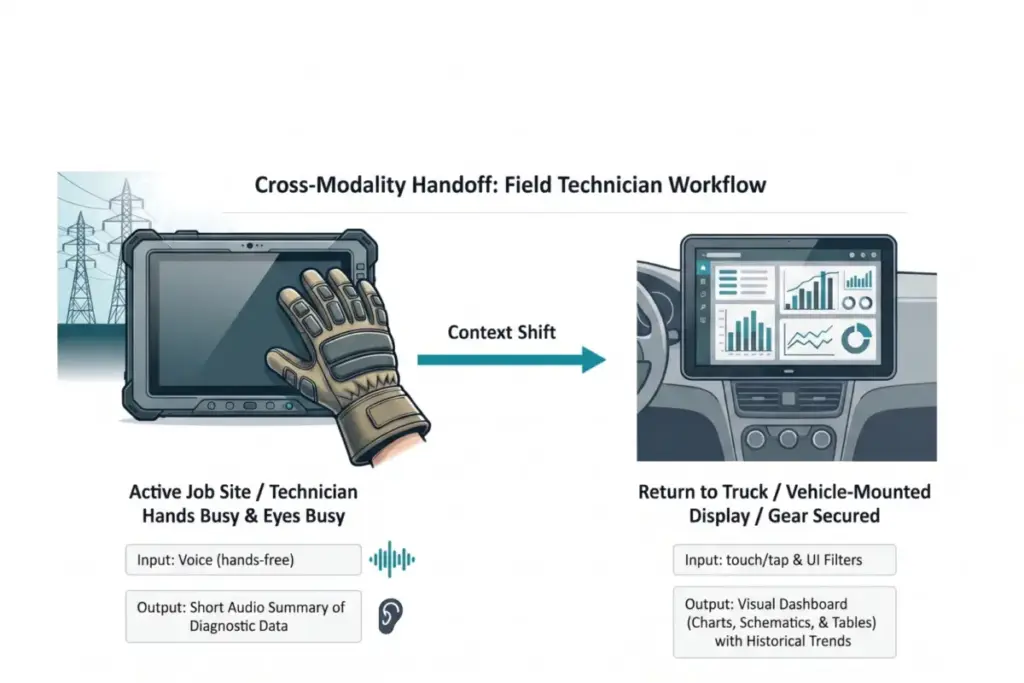
The practical application of aligning modalities with environmental context is vividly demonstrated in high-stakes industries, such as utility field operations. Field technicians servicing high-voltage electrical grids have historically faced dangerous misalignments of interface modality. Traditionally forced to rely on ruggedized tablets to access technical manuals and log status updates, technicians confronted severe physical constraints on the job, including heavy protective gloves and working at significant heights inside bucket trucks, making standard touch interfaces nearly impossible to navigate safely. Attempting to read complex, text-heavy diagnostic reports on a screen while maintaining situational awareness created extreme cognitive load and elevated the risk of severe safety errors.

Through comprehensive field research and task audits, organizations discovered that technicians frequently operated in hands-busy and eyes-busy states where any manual touchscreen input posed a major hazard. Direct sunlight caused severe screen glare, washing out displays, while physical safety depended entirely on maintaining focus on live wires and surrounding equipment rather than struggling with a tablet.
To resolve these challenges, successful implementations shifted toward multi-modal handoff solutions. While actively working on a job site, technicians utilize voice input to query the system, allowing them to remain productive while wearing thick protective gloves. The artificial intelligence responds with a brief audio summary of immediate diagnostic data, bypassing screen glare entirely and enabling technicians to maintain situational awareness of the hazardous grid without looking away from equipment. Once technicians return to their vehicles and secure their safety gear, the system automatically transitions workflows to a large vehicle-mounted visual dashboard capable of displaying complex schematics, electrical grid maps, and historical trend data.
Adapting interaction modalities to match the physical reality and cognitive state of the user at the moment of interaction fundamentally transforms digital tooling. Building a chatbot remains fast and familiar, but designing an interface that functions as a natural extension of how people already work requires deeper commitment. By grounding design choices in real-world environments and aligning input and output modalities to human intent, organizations can successfully eliminate adaptation friction and deliver AI capabilities that are genuinely usable, safe, and effective.