










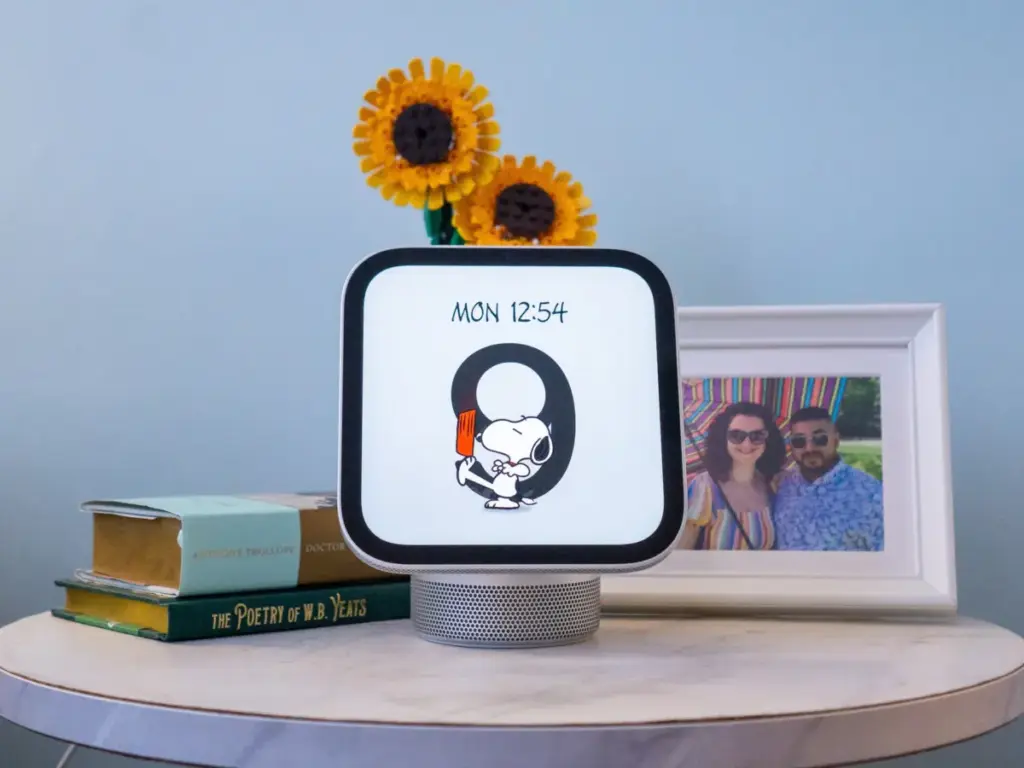
Apple’s new HomeView is not entirely revolutionary on paper. The market is already populated with smart displays featuring voice assistants, integrated speakers, cameras, and video calling capabilities. Industry favorites include Amazon’s Echo Show series and Google’s Nest Hub lineup. What makes the HomeView compelling, however, is that it marks Apple’s first dedicated hardware device designed specifically for the Apple HomeKit ecosystem. Beyond standard smart home management, it offers privacy-centric features such as personalized user profiles backed by facial authentication to handle calendars, grocery lists, and reminders.
After spending two weeks putting the HomeView to the test within a connected household, the device reveals itself as an impressive debut. Yet, prospective buyers should understand its limitations before making it the centerpiece of their smart home network.

An Attractive Screen, Premium Build, and Solid Audio
Evaluating the HomeView side-by-side with older devices highlights a significant leap in hardware quality, though design philosophies differ across the industry. Newer competitors like the redesigned Echo Show 8 offer improved HD displays, faster processors, spatial audio, and upgraded cameras, bringing performance closer to Apple’s standard. However, the HomeView immediately establishes its value through its physical presentation.
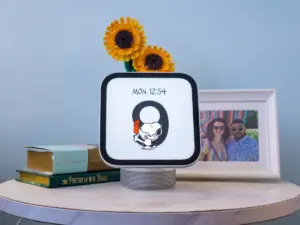
The device feels premium right out of the box, featuring a rounded, egg-like body paired with a tiltable 4:3 screen. A speaker grille runs along the bottom, resting on a soft, Apple-branded, non-slip white base. Weighing in with a solid, substantial feel, it justifies its $299 price tag.

The 7-inch Liquid Retina IPS display delivers a resolution of 1,088 by 1,088 pixels, offering a bright, vivid panel with wide viewing angles that outperform many washed-out competitor displays. Powered by the Apple A18 chip, scrolling and navigating menus happen quickly and responsively.
Audio performance is equally robust. Equipped with a 12-megapixel Center Stage camera, the HomeView also packs surprisingly loud audio powered by two full-range drivers, a down-firing woofer, and dual force-canceling passive radiators. Testing shows the audio quality easily matches the HomePod Mini, maintaining a full sound profile even when playing heavier music genres. For multi-room setups, users can connect additional HomeView, HomePod, HomePod Mini, or AirPlay-compatible speakers. Buyers opting for the wall-mounted version, however, receive a slimmed-down acoustic profile featuring just two custom drivers tuned for wall placement, omitting the woofer and passive radiators.

A Delightful Desktop and Bedside Companion
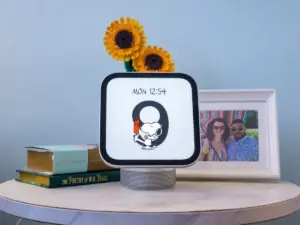
The HomeView offers a range of customizable clock faces displaying the time, date, timers, and weather, alongside modular faces with custom widgets. In many ways, it functions like an oversized Apple Watch, providing immediate information at a glance. It also doubles as a digital photo frame. Furthermore, animated watch faces like the interactive Snoopy option add a playful touch that families with children will appreciate.
As a desktop companion, its elevated speaker body minimizes the desk footprint. On a nightstand, the adjustable screen tilt makes it easy to check notifications from bed. An integrated ambient light sensor and True Tone technology automatically adjust brightness and temperature throughout the day, dimming smoothly at night without requiring manual adjustments.

The calendar and Home dashboard served as central features during daily desk work. Integrating iCloud calendars for both personal and professional accounts instantly populates upcoming events and meetings. Additionally, family members can set up individual profiles to display shared calendars, an effective tool for households managing overlapping schedules.
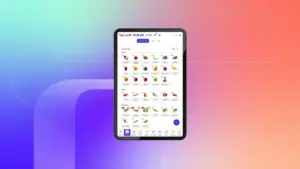
As a smart home dashboard, the HomeView connects smoothly with Matter-compatible devices like Philips Hue lighting hubs. Managing roughly 18 different lamps and bulbs directly from the desk—adjusting dimming, ambient lighting, and colors—streamlines daily routines compared to third-party shortcut setups.

Despite these strengths, the 7-inch screen size presents challenges in larger spaces. While up-close desk interactions work well, the 4:3 aspect ratio typically displays only two columns of smart home devices, requiring users to scroll for more options. Compared to larger smart displays on the market, such as the Google Nest Hub Max or oversized wall displays reaching up to 21 inches, Apple’s 7-inch screen feels restrictive when viewed from across a room.
Using the display to monitor security camera feeds also highlights this limitation. While the system can technically divide the screen into up to nine camera feeds, viewing more than a few feeds at once on a 7-inch display makes the footage difficult to parse without stepping closer to the device.

Apple and HomeKit Users Will Find a Much Stricter Walled Garden
Unsurprisingly, the HomeView operates best within Apple’s ecosystem, functioning as a seamless companion to iPhones and iPads. It supports AirPlay and Continuity, allowing users to effortlessly hand off FaceTime calls, Safari tabs, and other media.
However, the HomeView lacks a dedicated App Store, meaning users cannot download third-party apps directly to the device. The native software lineup includes FaceTime, Find My, Calendar, Messages, Live Activities, Alarms, Timers, Intercom, Safari, and Reminders, alongside Apple TV, News, Podcasts, and Audiobooks. Audible and Spotify are also accessible, but major streaming services like Netflix, Prime Video, and YouTube are notably absent as native apps. Streaming video from these platforms requires AirPlay from a nearby iPhone.

Privacy remains a central pillar of the design. Up to six users can configure personalized profiles, unlocking their respective home screens and private content via facial authentication. For instance, checking another family member’s private calendar events is restricted unless that individual is present to unlock the view. Facial recognition operates quickly and accurately, though proximity to a paired iPhone is required to unlock sensitive items like private messages. Meanwhile, shared utilities like music playback, weather forecasts, and basic smart home controls remain universally accessible.
The Intercom feature also proves valuable, allowing users to broadcast voice messages across connected Apple devices within the home, effectively replacing the need to shout across hallways or multi-story floors.

Fragmented Ecosystems Meet Apple Intelligence
While the HomeView integrates smoothly with Matter-compliant hardware like Philips Hue lighting—retaining custom modes, color temperatures, and adaptive lighting settings—other third-party devices present integration hurdles. Attempts to connect certain Matter-compatible smart locks and security apps often stall during the handshake process between the third-party application and Apple’s Home app, despite official compatibility claims.
Siri AI, powered by Apple Intelligence, provides a more conversational and context-aware experience than previous iterations of the voice assistant. It handles tasks like updating grocery lists, setting timers, and managing calendar entries efficiently. However, it can occasionally experience slight delays in executing commands compared to rival assistants, and certain off-brand smart appliances fail to establish a connection despite claiming Siri support.

Ultimately, users deeply embedded in the Apple ecosystem who utilize HomeKit accessories will find the HomeView to be a polished, albeit premium-priced, addition to their homes. Conversely, households utilizing a mixed ecosystem of Apple and Android devices, or those relying on budget-friendly smart home accessories, may find the walled garden and integration limits a more challenging sell.