









Apple’s new HomeView is not entirely a new concept. The market is already populated with plenty of smart displays featuring built-in voice assistants, integrated speakers, cameras, and video calling capabilities. Notable alternatives include Amazon’s Echo Show 8 and Echo Show 11, alongside Google’s Nest Hub (2nd Gen) and Nest Hub Max. What makes the HomeView compelling, however, is that it marks Apple’s first hardware device designed specifically for the Apple HomeKit ecosystem. Furthermore, it incorporates features designed to manage calendars, grocery lists, and personal schedules with the added privacy of personalized profiles powered by facial authentication.
After spending two weeks rigorously testing the HomeView and integrating it into an existing smart home environment, the device faced the challenge of picking up where older hardware left off. Over the test period, it was used to manage household Apple calendars, stream music, control a collection of smart home devices, generate grocery lists, and set daily reminders. Apple’s debut smart display proves to be an impressive piece of hardware, yet consumers should consider several critical factors before making the HomeView the centerpiece of their connected household.

An Attractive Screen, Premium Build, and Solid Audio Performance
This evaluation represents an extended look at the HomeView following its initial appearance at Apple’s Welcome Home event. After roughly two weeks of desk-side testing next to an aging Amazon Echo Show 8 from 2023, the physical and functional differences between the two devices are immediately apparent, even if a direct generational comparison is not entirely balanced.
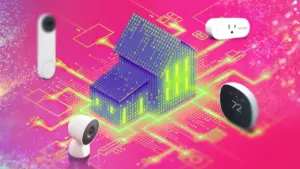
The hardware feels premium right out of the box. It features a rounded, egg-like body with a tiltable 4:3 screen extending from the upper portion, a speaker grille positioned cleanly along the bottom, and a soft, Apple-branded, non-slip white base. The device carries a satisfying weight and a solid construction that matches its $299 entry-level price tag.

The 7-inch Liquid Retina IPS display, boasting a resolution of 1,088 by 1,088 pixels, is remarkably bright and vivid. Its viewing angles outperform older competitor models, while scrolling remains fast and responsive, driven by the inclusion of the Apple A18 chip.
The hardware also houses a 12-megapixel Center Stage camera and surprisingly loud audio capabilities powered by two full-range drivers, a down-firing woofer, and dual force-canceling passive radiators. Testing the audio with music playback in a large living room revealed that sound quality matches compact standalone speakers like the HomePod Mini, maintaining a full acoustic profile even when handling heavier bass tracks. For multi-room audio, users can connect one or more HomeView units, standard HomePods, HomePod Minis, or AirPlay-compatible speakers. Consumers opting for the wall-mounted version of the HomeView, however, will receive only two custom drivers tuned specifically for wall placement, omitting the passive radiators and dedicated woofer found in the desktop model.

A Delightful Desktop and Bedside Companion
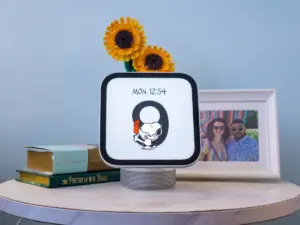
The HomeView offers a variety of customizable clock faces that display the time, date, active timers, and current weather conditions, alongside options to configure modular faces with custom widgets. In practice, the interface functions much like a super-sized Apple Watch, providing immediate information at a glance. It also doubles as a digital photo frame, a feature well-suited for displaying personal image libraries. Additionally, the inclusion of an animated Snoopy clock face provides dynamic animations that appeal directly to families with children.
As a desktop companion, the device maintains a compact footprint because the elevated speaker body lifts the display off the surface. It fits comfortably on a nightstand, and the adjustable tilt mechanism ensures the screen remains clearly visible from a lying position. At the bedside, the integrated ambient light sensor and True Tone technology automatically adjust screen brightness and color temperature throughout the day, dimming appropriately at night without requiring manual adjustments.

The calendar and Home dashboard served as core utilities during daily desk work. Linking an iCloud calendar for both professional and personal accounts instantly populated the display with upcoming events and meetings. Furthermore, family members can establish individual profiles to populate shared calendars with selected group events. This capability addresses a common challenge in multi-user households where work calendars on rival systems often block out personal visibility, allowing family members to coordinate schedules more effectively without compromising privacy.
The HomeView functioned reliably as a smart dashboard for connected accessories. Connecting a Matter-compatible Philips Hue hub allowed the system to import connected lights and settings directly. With roughly 18 lamps and bulbs integrated, the display provided immediate access to dimming, color adjustments, and ambient lighting settings directly from the desk, simplifying smart home management.

Limitations in Screen Size for Larger Living Spaces
Despite its strengths, the 7-inch display presents certain limitations when deployed as a central smart home dashboard. Up close on a desk, the interface controls function smoothly, but the 4:3 aspect ratio feels somewhat restricted in terms of physical space, typically displaying only two columns of connected devices before requiring the user to scroll downward.
The 7-inch screen is notably smaller than competing options like the 8.7-inch Echo Show 8 or the 10-inch Google Nest Hub Max, as well as larger wall-mounted smart hubs emerging in the broader market. In open living spaces or kitchens, the smaller screen size becomes more noticeable. While users can ask Siri to display upcoming calendar events, viewing detailed schedules from across a room requires a closer approach.

The interface dynamically adjusts based on the user’s proximity, presenting more dense information when viewed up close and simplified, larger elements from a distance. Nevertheless, a physical screen of this scale cannot match the visibility of larger dedicated digital calendars when viewed from afar. Similarly, while the HomeView supports viewing up to nine security camera feeds simultaneously by dividing the display into a grid, monitoring more than a few feeds at once on a 7-inch panel makes finer details difficult to distinguish without standing directly in front of the unit.
Apple and HomeKit Integration and the Walled Garden
Unsurprisingly, the HomeView operates best within Apple’s hardware ecosystem and with HomeKit-compatible accessories. Designed as a companion device for iPhones and iPads, it supports AirPlay and Continuity features, facilitating the handoff of FaceTime calls, Safari browsing tabs, and media streams between devices.

The HomeView does not feature an independent App Store, meaning users cannot freely download third-party applications directly to the display. Out-of-the-box software support is limited to core Apple services, including FaceTime, Find My, Calendar, Messages, Live Activities, Alarms, Timers, Intercom, Safari, and Reminders, alongside Apple TV, News, Podcasts, and Audiobooks. Select third-party audio apps like Audible and Spotify are also accessible.
This curated software model resembles an automotive infotainment interface rather than the open environment of a tablet. Services such as Google Calendar, Chrome, Amazon Music, Tidal, SiriusXM, Prime Video, and Netflix are not natively accessible on the device as of launch. Streaming video content from major platforms requires the use of AirPlay from a nearby iPhone, as the functionality is not built natively into the display’s software.

Privacy-First Architecture and Multi-User Recognition
The HomeView places a heavy emphasis on user privacy compared to many alternative smart displays. Each registered user—up to six profiles total—is assigned a personalized profile, home screen, and isolated content that unlocks only after facial authentication confirms their identity. The system relies on advanced facial recognition rather than dedicated hardware like Face ID.
Facial recognition accuracy during testing proved generally reliable for switching between family members, though the system occasionally hesitated when multiple people stood closely together, typically prioritizing the first detected individual. Private data, such as personal messages, remains locked unless the user’s paired iPhone is located nearby, while universal functions like music playback, weather updates, and basic smart home controls remain accessible across all profiles.

The Intercom feature provides an efficient method for communicating within a household. Using the Home app or any HomeView unit, users can broadcast voice messages to all connected devices throughout a home, replacing the need to shout across rooms or hallways.
Addressing the Fragmented Smart Home Ecosystem
The promise of a unified smart home dashboard capable of managing mixed third-party accessories and calendars without endless individual app configurations is a primary selling point for the HomeView. In practice, however, the experience varies depending on the hardware manufacturer.

With Matter-compatible accessories like the Philips Hue ecosystem, integration operates smoothly. The HomeView successfully identified the Hue hub, imported connected lamps across various rooms, and preserved existing settings and adaptive lighting schedules.
Conversely, attempts to connect other Matter-compliant devices, such as specific smart locks and multi-camera security setups from brands like Anker Eufy and Lockin, encountered persistent setup failures despite verified HomeKit compatibility. While these devices connected

reliably with alternative smart assistants, establishing a stable handshake between the third-party hardware and Apple’s Home app proved problematic during testing, illustrating that the broader smart home market remains fragmented even for platform operators.
Siri AI, Apple’s updated voice assistant powered by Apple Intelligence, offers improved contextual and conversational capabilities compared to older versions of Siri. It handles requests related to emails, reminders, calendar events, and grocery lists with greater conversational flexibility. While it executes commands for Philips Hue lighting effectively, responsiveness with third-party appliances and security devices can vary. Siri occasionally requires a noticeable extra beat to process commands compared to rival voice assistants.

Who Should Consider the HomeView?
For consumers deeply embedded in the Apple ecosystem who already utilize HomeKit accessories or plan to invest in Apple’s smart home hardware line, the HomeView justifies its $299 price point. As Apple’s inaugural smart display, it delivers polished hardware performance and privacy features, though it carries a distinct brand premium. Buyers must also decide between the desktop stand version and the hardwired wall-mounted model.
For households utilizing a mix of Apple and Android devices, or those relying on a wide variety of budget-friendly smart home accessories across multiple brands, the HomeView presents a more challenging recommendation. While the home dashboard handles primary integrations well, it does not serve as a universal bridge for every third-party device on the market due to ongoing ecosystem fragmentation. Android users and budget-conscious buyers seeking versatile streaming and smart home control will likely find better value in alternative smart displays from established competitors.