









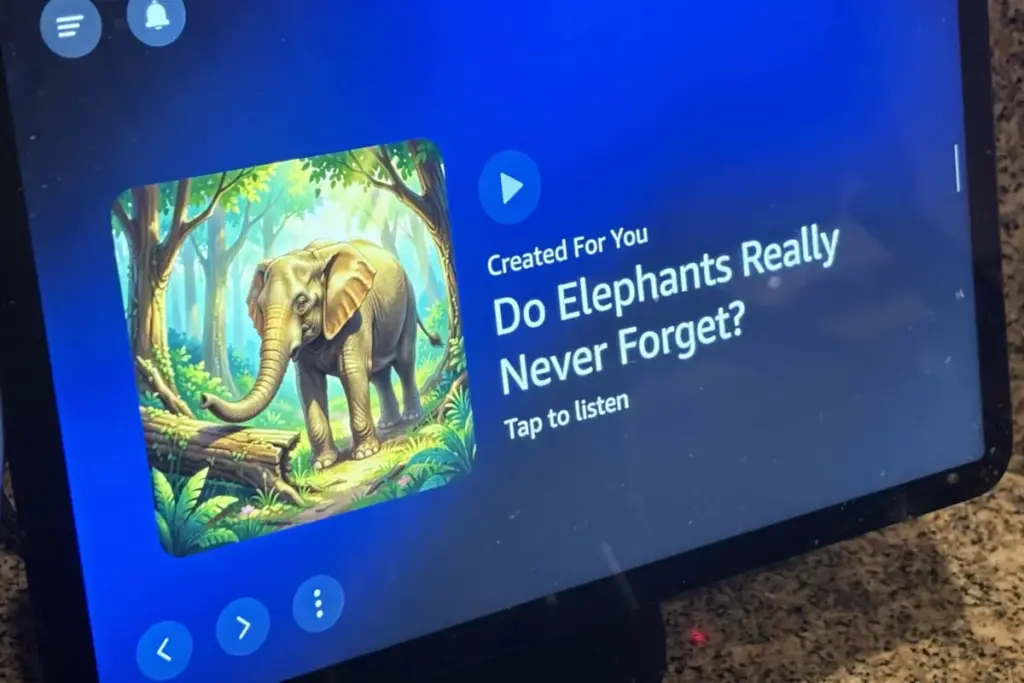
As Amazon prepares to launch its new Echo Show 16 to directly challenge Apple’s upcoming HomeView ecosystem, smart displays are experiencing a major surge in industry attention and consumer interest. However, for everyday users sitting in their kitchens or living rooms, a frustrating new trend has taken root within the software interface. Over the past couple of weeks, owners of Amazon’s popular smart displays have noticed an influx of uninspired, vaguely targeted, and poorly produced artificial intelligence content materializing under the device’s playback features, specifically through a content rotation category known as "Created For You."
This sudden wave of generative media has quickly become a common grievance among smart home enthusiasts. Not only is this automated content largely uninformative and accompanied by clunky, visibly artificial imagery, but it also completely misses the mark when it comes to personalization and user tracking. Instead of reflecting the recorded preferences, recent listening habits, or smart home interactions of the household, the slides alternate between trivial trivia and generalized curiosities. Content ranges from speculative questions about how squirrels locate buried nuts and instructions for navigating local cornfield mazes to unexpected historical facts regarding daylight saving time.

For many users, this general and often bizarre content is the exact opposite of what they want appearing on a central, family-facing hub in their homes. Rather than providing quick, useful updates or ambient beauty, the displays are increasingly cluttered with canned media that feels out of place and intrusive.

Industry observers and tech analysts suspect that this latest wave of automated content is part of a broader push by Amazon to promote its expanding portfolio of AI-driven podcasts, conversational audio features, and associated digital services. Following recent strategic acquisitions centered around podcasting technologies within Amazon Music, the company appears eager to surface audio-centric experiences across its hardware ecosystem. Yet, when these promotional efforts take the form of generic, poorly executed generative video loops and static cards, they often cross the line from helpful recommendation to outright annoyance.
For consumers who have no interest in viewing or listening to these canned clips, the experience can become a persistent headache. Fortunately, a closer examination of the device’s software configuration reveals that users are not entirely powerless against the automated takeover. By digging into the on-device settings, it is possible to steer an Echo Show away from these AI-generated creations and steer the display back toward more relevant and personalized content.

How Do I Turn Off These AI-Generated Slides?
The encouraging reality for frustrated Echo Show owners is that Amazon does provide the tools to curate what appears on the screen, provided users know which menus to navigate. While managing display preferences through the companion smartphone app can sometimes feel overly convoluted, a much more direct and effective approach involves using the physical touchscreen on the smart display itself.
The first line of defense begins the moment an unwanted AI-powered slide surfaces on the screen. By tapping the traditional three-dot menu button associated with the content card, users can immediately register their dissatisfaction by selecting the thumbs-down option. While this feedback mechanism is not an instant silver bullet, it helps signal user preferences to the underlying algorithm and gradually weeds out similar types of promotional material over time.

For a more comprehensive fix, users can swipe down from the top of the Echo Show screen to access the main system menu and open the settings panel. From there, navigating to the display and appearance options opens up the content categories menu, which serves as the primary control center for managing what populates the rotation.
Within this menu, users are presented with a couple of distinct paths to reclaim their screens. The most direct approach involves manually toggling off individual content categories, specifically targeting the feeds responsible for generating the unwanted algorithmic clips. By disabling these specific topics while keeping preferred information channels active, households can preserve the useful aspects of the assistant while filtering out the promotional noise.
Alternatively, users can enable the rotate-once setting, which restricts Amazon’s promotional slides to a single appearance rather than letting them cycle endlessly throughout the day. This serves as an effective compromise for those who want to minimize disruptions without entirely disabling the device’s broader recommendation features.

Another popular alternative for users who want to bypass the ecosystem’s content altogether is to transition the Echo Show into a dedicated digital photo frame. By configuring the device to cycle exclusively through a chosen personal photo album, owners can completely eliminate automated slides, news snippets, and algorithmic recommendations. While this sacrifices some of the device’s proactive utility—such as contextual recipe suggestions or routine weather alerts—it ensures that the screen remains a private gallery of family memories rather than an automated billboard.
By taking a few moments to adjust these onboard preferences, smart display owners can significantly reduce the frequency of automated images and restore a cleaner, more tailored visual experience. As smart home platforms continue to evolve and incorporate increasingly aggressive promotional strategies, users will likely need to remain vigilant about their display configurations to keep their living spaces free from unwanted digital clutter.