









As the smart home ecosystem continues to grow more complex, managing an ever-expanding array of connected devices has become a daily challenge for enthusiasts and casual users alike. Apple’s newly announced HomeView represents one of the most promising hardware additions to the market for centralized home management. However, for consumers planning to incorporate the device as the primary command center for their automated households, navigating the hardware options, pricing structures, and installation requirements requires careful consideration ahead of its official release.
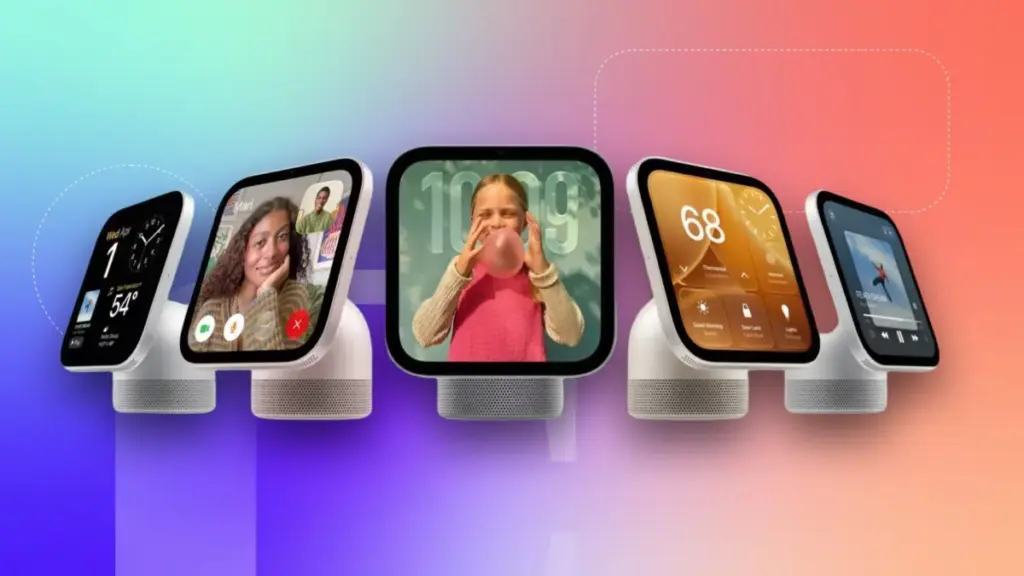
Apple is offering the HomeView in two distinct configurations, each priced at $299. The first option is a tabletop model equipped with a dedicated speaker base and automatic tilting functionality. The second option is a wall-mounted model that requires users to select from a variety of mounting hardware. Opting for the wall-mounted version means sacrificing the robust audio capabilities found in the tabletop’s larger base. Furthermore, choosing the wall-mounted route introduces important decisions regarding mounting styles, wiring configurations, and potential hiring costs for professional electrical installation. Understanding these distinctions is essential for anyone preparing to preorder the device ahead of its November 13 release date.
What Do Both the Tabletop and Wall-Mounted Models Include?
Despite the physical and acoustic differences between the two configurations, both versions of the HomeView share a core set of hardware specifications and software capabilities. Each model is built around a vibrant 7-inch Liquid Retina display designed to function as the central smart screen for media entertainment, smart home management, and home security monitoring.

Both the tabletop and wall-mounted variants support advanced features such as facial recognition for personalized user accounts, seamless integration with Messages and FaceTime, and access to essential productivity tools including Calendar, Reminders, and Find My. Furthermore, both versions fully support Siri AI and other key software functionalities that anchor Apple’s ecosystem approach to home automation.
A common point of confusion in early launch coverage involves the physical design of the screen itself. Similar to other smart displays on the market, the HomeView tabletop model features a non-detachable screen that is permanently integrated into the speaker base. Consequently, buyers who choose the tabletop model for $299 receive enhanced audio output along with physical tilting and adjustment mechanics. Conversely, those who purchase the wall-mounted model for the same price of $299 do not receive the built-in speaker base and cannot purchase it separately later. There is no price discrepancy between the two foundational models, and the hardware choice is permanently locked in at the time of purchase, as buyers cannot mix and match components post-sale.
Who Should Buy the Tabletop HomeView?
For consumers seeking a straightforward setup process with minimal technical hurdles, the tabletop HomeView offers the lowest barrier to entry. The included speaker base is engineered to deliver powerful, room-filling audio, featuring down-firing woofers, two passive radiators, and two full-range drivers. Demonstrations in spacious environments confirm that the tabletop model is impressively loud, capable of producing deep, resonant sound even in large open spaces.

Beyond audio performance, the tabletop version is ideally suited for renters and individuals who prefer not to alter their living spaces permanently. Because the device relies solely on a standard power adapter and a USB-C cable plugged into a nearby wall outlet, it can be deployed flexibly on desks, kitchen counters, or bedside tables without requiring invasive installation procedures or drilling into walls.
Who Should Get the Wall-Mount HomeView and What Are the Options?
Consumers who prefer a flush, built-in aesthetic will find the wall-mounted HomeView to be a more suitable choice, provided they are willing to navigate installation requirements. Because this version omits the expansive speaker base, it relies exclusively on the smaller speakers built directly into the screen unit. This configuration makes the wall-mounted HomeView an optimal dashboard for managing smart home widgets, reviewing shared family calendars, and monitoring home security feeds.
Apple offers three distinct mounting solutions for the wall-mounted model, all manufactured by Schneider Home.

The first option is the Power Mount USB-C Wall Connector, priced at $59.95. Marketed as a self-installation solution, this kit includes the mount and an attached USB-C cable, though users must supply a separate 20-watt power adapter if they do not already own one. While it represents the most cost-effective and accessible way to mount the HomeView, it leaves a visible USB-C cable dangling down the wall to the nearest outlet. This option is generally well-suited for renters who are comfortable securing a few basic screws and wall anchors, or for homeowners who prefer a straightforward do-it-yourself project.
The second option is the Power Mount AC Wired, priced at $79.95. This hardwired alternating current mount routes power directly through the interior of the wall, allowing the display to sit completely flush against the surface. Because it involves line-voltage electricity, Apple recommends that a licensed electrician handle the installation. The hardwired connection delivers a continuous 30 watts of power through a standard single-gang wall box. While ADT installation services are also available for supported setups, this configuration is decidedly tailored for homeowners rather than renters.
Michael Malfettone, owner of Malfettone Electric and a licensed master electrician based in Jersey City, notes that the hardwired approach is typically the best path forward for property owners. For most homeowners, the AC Wired mount represents the ideal choice because it connects directly to existing home power, fits a standard single-gang box, and maintains a clean appearance with no visible cords. While the USB-C wall connector is convenient for those who do not mind an exposed cable or who already have an outlet positioned nearby, it lacks the polished finish of a flush installation.

The third mounting option is the Power Mount PoE Wired, priced at $129.95. This mount utilizes Power over Ethernet technology to deliver both electrical power and a continuous, direct internet connection through a single Ethernet cable, bypassing the need for Wi-Fi. It requires a compatible power-over-Ethernet network switch and a dedicated Ethernet line run directly to the mounting location. As the most expensive mounting accessory, it provides an uninterrupted, always-online network connection that is particularly valuable for comprehensive home security, advanced automation routines, and climate control systems.
According to Malfettone, the Power over Ethernet option is specifically designed for environments featuring extensive smart home infrastructure, a structured wiring panel, or a dedicated network closet. Because climate control dashboards operate effectively across any mounting style, the primary advantage of the PoE mount lies in network reliability rather than basic thermostat management, functioning as a low-voltage solution that avoids line-voltage AC wiring at the wall.
How Much Will a Licensed Electrician’s Installation Cost?
For homeowners opting for a professional AC-wired installation, service costs will vary depending on the existing electrical layout of the property. When a junction box or powered outlet is already located precisely where the display is intended to go, labor typically ranges from $150 to $300. However, if an electrician needs to fish a new wire through a finished wall from a nearby circuit, estimated expenses generally rise to between $400 and $600.

More complex installations involving a dedicated new circuit pulled directly from the electrical panel, or challenging architectural conditions such as plaster walls, multi-story buildings, and limited attic or basement access, can drive costs from $600 to $1,000 or more. These estimates exclude local permit fees and any necessary drywall repairs.
Malfettone cautions that line-voltage electrical work frequently requires formal permits depending on local regulations. The installation process demands a single-gang box with a 120-volt feed at the mounting site, followed by connection to the mount and subsequent wall patching. In jurisdictions like New Jersey, the addition of a new electrical box or circuit typically mandates an official electrical permit.
For installations utilizing the Power over Ethernet mount, expenses are primarily dictated by the cost of running an Ethernet cable back to the central network hardware, which generally runs between $150 and $400 per cable run. Households lacking an existing PoE switch should anticipate an additional hardware investment ranging from $100 to $250. Such networking projects are easiest to execute during new construction phases or when interior walls are already open.

While single-family homeowners maintain full control over their interior walls and electrical panels, condo owners can also pursue professional installation provided they verify building requirements and secure prior approval from their homeowners association. Regardless of the property type, integrating a smart home control interface allows residents to efficiently manage lighting, security systems, climate controls, and connected appliances.
Professionals emphasize that permanent smart home displays should be integrated thoughtfully into a property’s overarching electrical and networking infrastructure. The most successful installations prioritize reliable power delivery, aesthetic cleanliness, and long-term flexibility to accommodate future technological expansions.