









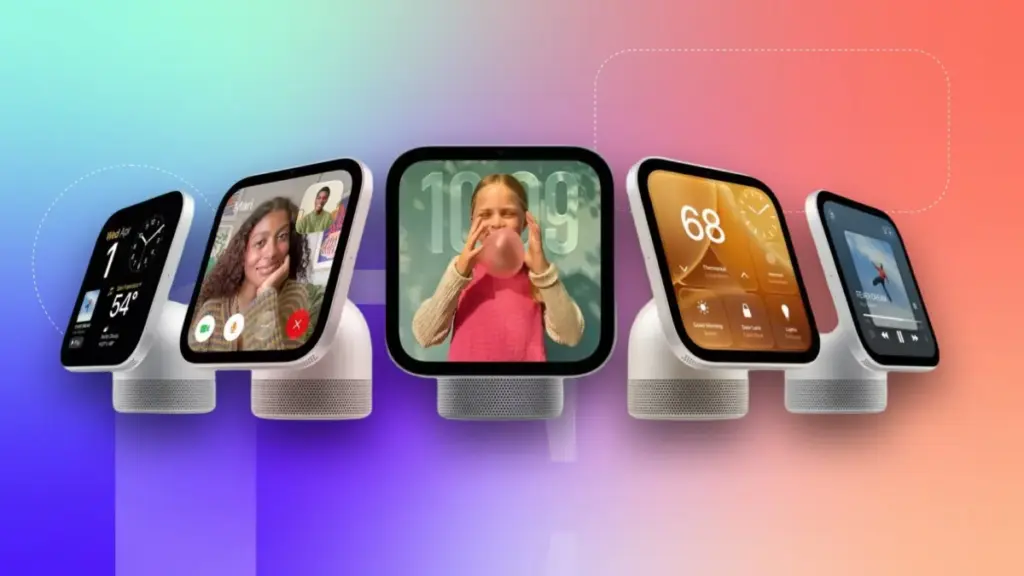
As the smart home ecosystem continues to expand and evolve, managing an ever-growing array of connected devices has become a familiar challenge for many technology enthusiasts. Apple is stepping into this space with a promising new hardware offering: the Apple HomeView. Set to hit the market ahead of its official release date on November 13, the HomeView is designed to serve as a central command station for entertainment, home automation, security monitoring, and everyday household organization. However, for consumers planning to adopt the device as the cornerstone of their smart home setup, selecting the correct model requires careful consideration of installation needs, living situations, and audio preferences.
Apple is offering the HomeView in two distinct configurations, both priced at $299. The first option is a tabletop model featuring an integrated speaker base and automatic tilting capabilities. The second option is a wall-mounted model that requires users to select from a variety of mounting hardware options. Choosing the wall-mounted version means sacrificing the enhanced speaker power found in the tabletop base, and certain mounting configurations recommended by Apple may require the assistance of a licensed electrician for a hardwired installation. With preorders opening up, prospective buyers are weighing the differences between the two units, factoring in potential installation costs, and determining which version best fits their living spaces.
Shared Features and Core Functionality Across Both Models


Despite the physical and functional differences in how they are housed and powered, both the tabletop and wall-mounted versions of the HomeView share the same core computing hardware and software capabilities. Each model is built around a vibrant 7-inch Liquid Retina display, serving as a centralized touch screen for managing media playback, checking home security feeds, and interacting with the wider smart home network.
Both configurations support advanced features such as facial recognition for personalized user profiles, seamless integration with Messages and FaceTime, and access to essential productivity tools like the Calendar, Reminders, and Find My networks. Furthermore, both models support Siri AI and other key software functions that define the Apple smart home experience.
A common point of confusion during early product coverage has been the physical relationship between the screen and the base. Similar to other smart displays on the market, the tabletop HomeView does not feature a detachable screen; the display is permanently integrated into the speaker base. Consequently, buyers must choose at the time of purchase whether they want the tabletop model with its extra audio power and adjustable tilt, or the wall-mounted model at the exact same $299 price point. There is no price discrepancy between the two versions, and customers cannot purchase the wall-mounted model and subsequently acquire a speaker base, nor can they strip the tabletop model from its base. Once the purchase is finalized, the user is committed to that specific form factor.
Evaluating the Tabletop HomeView for Renters and Audiophiles

The tabletop iteration of the HomeView offers the lowest barrier to entry in terms of setup and installation. Equipped with a dedicated speaker base, it delivers a robust, room-filling audio experience driven by down-firing woofers, two passive radiators, and two full-range drivers. In demonstration environments, the tabletop model has proven capable of producing impressively loud and deep sound, making it well-suited for larger rooms or open-concept living areas.
Beyond audio performance, the tabletop model is the more practical choice for renters or individuals who prefer flexibility in their home decor. Because it relies on a standard power adapter and a USB-C cable that plugs directly into a nearby electrical outlet, it can be deployed on any flat surface without requiring permanent modifications to walls. Users can reposition the device as needed without dealing with wiring or structural installation.
Navigating Wall-Mounted Choices and Hardware Options
For consumers who prefer a streamlined, integrated aesthetic on their walls, the HomeView wall-mounted model presents a different set of considerations. Opting for this version eliminates the bulky speaker base, leaving only the speakers integrated directly into the display unit itself. This design makes the wall-mounted HomeView an ideal tool when deployed primarily as a dedicated smart home dashboard, family calendar, and home security hub, where users can configure an array of interactive widgets for rapid access to compatible connected devices.

Apple offers three specific wall-mounting options sourced through Schneider Home, catering to different installation preferences and technical capabilities. The first option is the Power Mount USB-C Wall Connector, priced at $59.95. This is designed as a self-installation solution that includes the mount and an attached USB-C cable, though users must provide a separate 20-watt power adapter if they do not already have one. While this represents the most affordable and straightforward mounting path, it results in a visible wire running down the wall to a standard outlet. This compromise is often acceptable for renters willing to drill a few small holes for wall anchors or homeowners tackling a simple do-it-yourself project.
The second option is the Power Mount AC Wired, priced at $79.95. This hardwired alternating current mount routes power directly through the wall, creating a clean, flush appearance. The hardwired connection delivers 30 watts of continuous power through a standard single-gang wall box. While Apple recommends hiring a licensed electrician for this installation, the setup is particularly well-suited for homeowners who want a permanent, integrated smart home hub without visible cords.
Michael Malfettone, a licensed master electrician and owner of Malfettone Electric, notes that the AC-wired mount is generally the best recommendation for most homeowners. It ties directly into existing home electrical infrastructure, fits standard electrical boxes, and eliminates visible wiring. He explains that while the USB-C wall connector is convenient for those comfortable with visible cables or existing outlet locations, it lacks the polished appearance of a fully recessed installation.
The third mounting choice is the Power Mount PoE Wired, priced at $129.95. This system utilizes Power over Ethernet technology to deliver both continuous electrical power and a direct, high-speed internet connection through a single Ethernet cable, bypassing the need for a Wi-Fi connection. This setup requires a compatible Power-over-Ethernet network switch and an Ethernet cable run to the mounting location. Because it maintains a direct, always-online link independent of wireless network fluctuations, it is particularly attractive for advanced home security and climate control configurations.

Malfettone points out that PoE installations are primarily intended for tech-savvy users who maintain extensive smart home networks, structured wiring panels, or dedicated network closets. Because it relies on low-voltage networking rather than line-voltage AC wiring at the wall plate, it serves a specialized niche within the broader smart home market.
Understanding Professional Installation Costs and Considerations
For homeowners pursuing a hardwired installation, professional labor costs will vary depending on existing infrastructure and the complexity of the home’s architecture. According to Malfettone, if an electrical box or powered outlet is already present at the desired mounting location, labor costs typically range from $150 to $300. However, if a technician needs to fish a new line through a finished wall from a nearby electrical circuit, estimates generally increase to between $400 and $600. More complex scenarios involving dedicated new circuits running from the main electrical panel, difficult access points, plaster walls, multi-story layouts, or properties lacking attic and basement access can drive costs between $600 and $1,000 or more, excluding permit fees and necessary drywall repairs.
Line-voltage electrical work often requires municipal permits, depending on local regulations. Malfettone emphasizes that adding a new electrical box or circuit usually triggers permit requirements under state electrical codes, necessitating professional execution. For Power-over-Ethernet installations, expenses are largely driven by the cost of running Ethernet cable back to central networking equipment, typically estimating between $150 and $400 per cable run, with an additional $100 to $250 required if a PoE network switch is not already installed. These projects are most efficiently executed during new construction or major home renovations when wall cavities remain open.

While single-family homeowners maintain full control over their interior walls and electrical panels, condominium and apartment residents face additional administrative steps. Condo owners must typically consult their homeowners associations and verify building regulations regarding licensed contractor work before proceeding with modifications.
Ultimately, industry professionals advise treating permanent smart home displays as integral components of a residence’s broader electrical and networking infrastructure rather than as isolated gadget purchases. The most successful installations prioritize reliable power delivery, clean aesthetics, and long-term adaptability as smart home technology continues to evolve.