









For many web developers working within the Drupal ecosystem, the decision to omit automated testing from a project workflow usually stems from a familiar assumption: that writing tests introduces unnecessary complexity, additional expense, and project overhead without providing a tangible return on investment. Developers often view testing frameworks as cumbersome additions that slow down delivery schedules, particularly for fast-moving client projects or agile development environments where time-to-market is critical.
However, industry perspectives on front-end testing are shifting, driven by the emergence of powerful, developer-friendly open-source tools designed to streamline quality assurance. Among these, Cypress has gained significant traction across the web development community for its modern architecture, developer experience, and ability to simplify end-to-end testing. For Drupal teams looking to bridge the gap between back-end robustness and front-end reliability, incorporating a tool like Cypress offers a viable path toward catching regressions, verifying user workflows, and ensuring consistent site performance without disrupting existing development pipelines.
To help development teams transition into automated testing, industry practitioners have increasingly focused on how to integrate Cypress smoothly into standard Drupal workflows. Examining this integration involves three core areas: setting up the testing environment alongside a standard local Drupal build, writing and executing basic test specifications to verify front-end functionality, and customizing the framework through specialized commands tailored specifically to Drupal architectures.

Install Cypress
Setting up Cypress within a modern Drupal development environment typically begins with a standard local configuration. For many developers, this involves a local development environment built using the drupal/recommended-project template, often paired with localized orchestration tools such as Lando for Drupal deployments. While setting up the foundational local environment is a distinct phase of web development, establishing a clean project structure is a prerequisite for introducing automated testing tools.
A standard project layout generally encompasses a core directory structure featuring vendor libraries, web document roots, configuration files, and Composer dependencies. Integrating Cypress into this environment starts at the package management level using Node.js and npm. By initializing a project configuration through standard command-line interfaces, developers generate a foundational package manifest that tracks project dependencies and scripts.
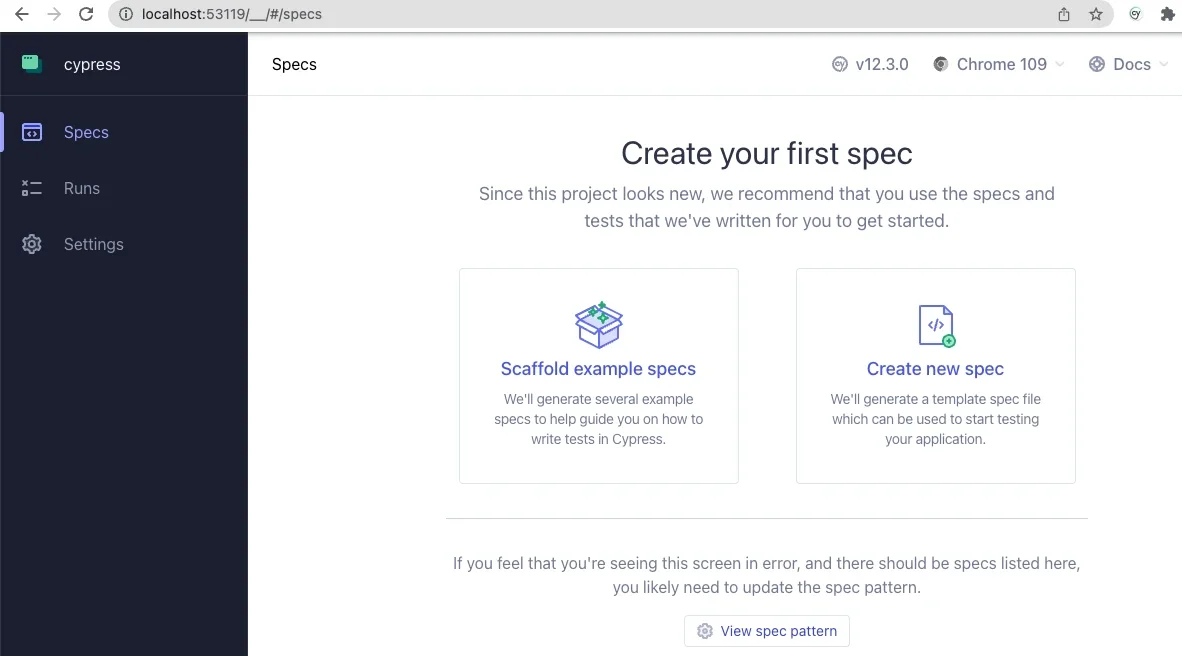
Installing Cypress as a development dependency integrates the testing framework directly into the project repository. Running the application for the initial time launches the interactive Cypress desktop environment, which automatically detects the absence of pre-existing configuration files and provides an onboarding interface. Developers can configure the tool for end-to-end testing by selecting the appropriate environment settings, which prompts the framework to generate the necessary directory scaffolding and configuration files within the project root.

Once the initial configuration files are generated, developers can select their preferred testing browser—typically a Chromium-based browser—to run test suites. The interactive application opens a dedicated browser window alongside a control panel, allowing developers to scaffold example specifications. These template files serve as a practical introduction to the JavaScript-based testing syntax, which is generally intuitive and readable for developers familiar with modern web standards.
Configuring the primary project settings involves updating the central configuration file located in the project root to map out directory paths for components, integration tests, support files, and video recordings. Crucially, developers must define the base URL to match their specific local development environment address. This configuration directs the testing framework to the correct local server instance, ensuring that test scripts execute against the active Drupal application rather than a generic sandbox.
Write and Run Basic Tests Using Cypress
With the foundational configuration complete, developers can begin authoring custom test specifications to evaluate site behavior. Organizing test files within a dedicated integration directory allows the framework to automatically discover and execute test suites. A basic test specification typically involves grouping related assertions using descriptive blocks that outline specific user interactions and expected outcomes.
For instance, a standard testing suite might verify that the site front page loads correctly and that the primary page title element exists within the Document Object Model. Beyond simple page loads, testing user authentication workflows is a critical application for end-to-end frameworks. A typical authentication test might simulate a user navigating to the login interface, inputting incorrect credentials into specific form fields, submitting the form, and asserting that the application correctly displays an appropriate error message regarding unrecognized credentials.
Executing these tests within the interactive application provides real-time visual feedback. As the test suite runs, a left-hand panel displays each step of the active specification in sequence, while a simulated browser window on the right demonstrates the actual user experience in real time. This visual debugging capability often reveals subtle interface behaviors that might otherwise go unnoticed during standard manual testing.
For example, real-world development challenges—such as complex CSS flexbox styling on submit buttons that temporarily obstruct programmatic interaction—can be diagnosed and resolved by observing how the testing framework interacts with the Document Object Model. By incorporating explicit assertions that verify element states and text content prior to interaction, developers can ensure that automated scripts accurately replicate genuine user behavior, confirming that the testing methodology delivers practical value.
Customize Cypress for Drupal
Beyond standard end-to-end navigation and form submission tests, developers can extend the framework by authoring custom commands tailored to specific content management workflows. The testing framework utilizes support files that automatically load custom command definitions, leveraging JavaScript’s flexible module resolution to parse custom logic without requiring explicit file extensions.
Custom commands can encapsulate repetitive tasks into reusable functions. For example, developers can define a custom logout command to ensure that user sessions are systematically cleared prior to executing authentication tests. Building upon basic routines, more complex commands can orchestrate multi-step processes, such as navigating to login pages, populating username and password fields securely, and submitting the authentication form.
Furthermore, integrating command-line tools commonly used in Drupal administration—such as Drush—expands the testing framework’s capabilities into back-end management. By leveraging environment variables, developers can create custom commands that execute Drush routines directly within their testing workflows. A notable example is utilizing the Drush user-login command, commonly known as a one-time login link, to authenticate users programmatically via their unique user ID.
This approach offers significant security advantages by eliminating the need to read, transmit, or store plaintext user passwords within testing repositories. The ability of a front-end testing framework to interface with back-end administrative tools highlights the versatility of modern development workflows, bridging the gap between interface validation and system-level management.
As development teams continue to explore automated testing, additional features such as data fixtures—external files used to store test data—and advanced navigation strategies provide further opportunities to handle complex user interfaces and dynamic, Ajax-enabled forms. Industry resources, community webinars, and open-source repositories maintained by digital agencies offer ongoing insights into advanced use cases for implementing automated quality assurance across Drupal projects.