













Adopting automated testing on a Drupal project begins with establishing a reliable local development environment. For many in the Drupal community, building out a local project using the standard drupal/recommended-project template via Composer is the established norm. While setting up a local environment—such as utilizing local development stacks like Lando—forms the foundation of modern Drupal workflows, incorporating testing tools requires a separate layer of configuration within the project directory. A typical Drupal project structure includes core directories like vendor and web, alongside configuration files such as composer.json. Integrating Cypress into this existing ecosystem relies on Node.js and the Node Package Manager, commonly known as npm, which allows developers to install the testing framework directly into their project workspace.
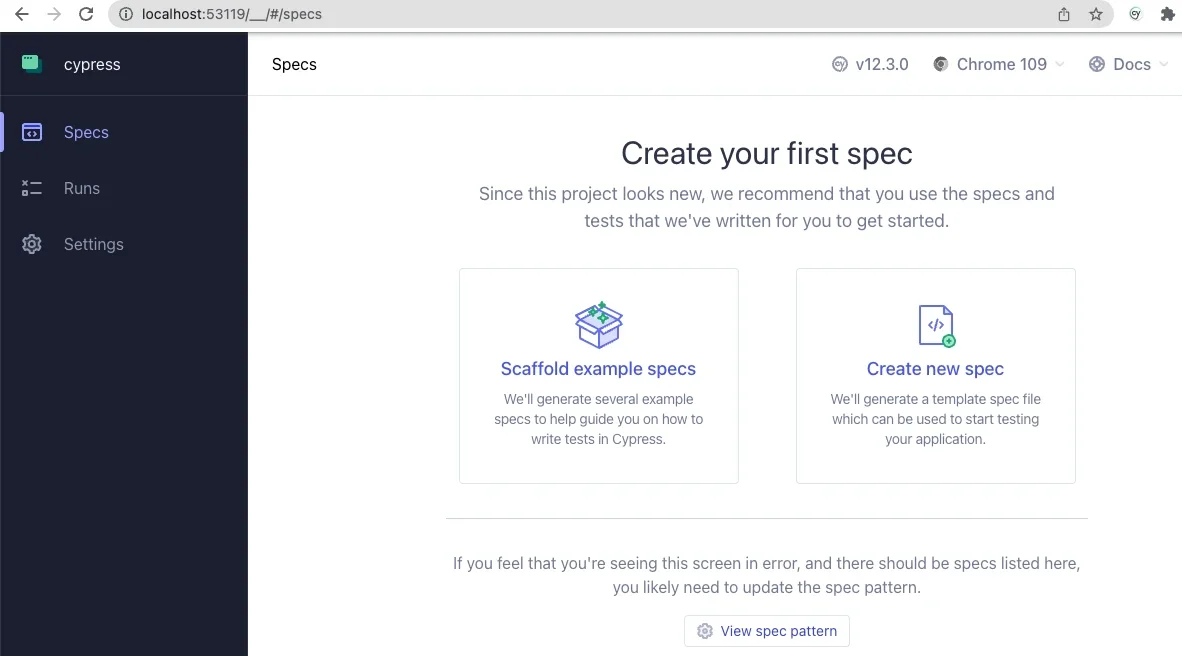
Initializing a Node environment via npm generates a package.json file, which serves as the manifest for project dependencies and scripts. Once initialized, installing Cypress as a development dependency integrates the testing framework into the local ecosystem. Running the framework for the first time opens the interactive Cypress application interface. Because a fresh installation lacks pre-existing configuration files or test suites, the application presents a welcome screen designed to guide developers through the initial setup process. Configuring the project for end-to-end testing automatically generates the necessary directory structure and configuration files, seamlessly integrating Cypress folders alongside existing Drupal directories such as vendor and web.
Selecting a preferred browser within the Cypress interface launches a dedicated testing window, providing access to a suite of example specifications. Reviewing these sample files within a standard code editor reveals a JavaScript-based syntax that is remarkably intuitive and straightforward to read. The Cypress test runner features a dual-panel interface that provides deep visibility into test execution. On one side, a text panel outlines every individual step within an active test specification, while the other side displays a simulated browser window, allowing developers to visually observe the actual user experience as Cypress interacts with the website in real time.


Configuring the testing environment for a local Drupal installation requires updating the primary configuration file, typically named cypress.config.js, located in the project root directory. By adjusting the configuration settings, developers can define important parameters such as viewport dimensions and direct the framework toward specific resource folders. Most importantly, updating the base URL within the configuration file to match the local development environment’s web address ensures that Cypress executes its tests against the correct local instance of the Drupal site. These adjustments establish the necessary pathways for the framework to locate and execute test scripts against the local application.
Writing and executing basic tests involves creating dedicated directories within the Cypress folder structure to house custom test specifications. For instance, creating a test script designed to load the website front page allows developers to verify fundamental site availability and check for the existence of specific HTML elements, such as the primary page title. Expanding these scripts to test authentication workflows provides immediate practical value. By simulating user behavior—such as navigating to the user login page, populating form fields with invalid credentials, submitting the form, and asserting that the appropriate error message appears—developers can thoroughly validate complex interactive features.
The practical value of automated end-to-end testing often becomes apparent during the script-writing process itself. For example, attempting to automate a login form submission might reveal subtle rendering quirks, such as CSS flexbox styling on submit buttons that temporarily impedes a testing framework’s ability to register a click event. By writing explicit assertions—such as confirming that a submit button contains specific button text before attempting interaction—developers can refine their tests to accurately reflect genuine user interactions. This iterative refinement demonstrates that automated testing not only validates functionality but also uncovers underlying front-end interface issues that might otherwise go unnoticed.
Beyond basic page navigation and form submissions, developers can significantly extend the capabilities of Cypress by writing custom commands tailored specifically to Drupal workflows. The framework’s support files allow teams to define reusable command functions that simplify complex testing scenarios. For instance, developers can create custom commands to handle routine actions like logging a user out of the application or authenticating with standard credentials. Defining a foundational logout command ensures that the testing environment consistently clears active sessions before attempting subsequent actions, preventing authentication conflicts during test runs.
Advanced customization can even bridge the gap between front-end testing and back-end site management. By leveraging environment variables, developers can integrate command-line tools like Drush directly into their testing logic. This integration enables sophisticated workflows, such as programmatically logging a user into the Drupal site by their unique user ID via a Drush user-login command. Rather than hardcoding or reading sensitive user passwords during testing routines, developers can retrieve secure login URLs dynamically. This capability highlights the versatility of a front-end testing framework interacting seamlessly with back-end administrative tools.
As teams delve deeper into automated quality assurance, the broader ecosystem surrounding Cypress offers numerous resources for handling complex scenarios, such as managing test data through fixtures or testing Asynchronous JavaScript and XML elements like Ajax-enabled forms. Public repositories and community webinars provide extensive examples of how organizations successfully implement these testing strategies within their Drupal projects. By adopting tools like Cypress, the Drupal development community continues to find efficient, scalable ways to enhance software reliability and deliver polished digital experiences.