










For many web developers working within the expansive ecosystem of Drupal, implementing a robust automated testing suite has long been viewed as an optional luxury rather than a fundamental necessity. The prevailing sentiment among development teams often dictates that writing and maintaining tests introduces unnecessary layers of technical complexity, inflates project budgets, and consumes valuable development hours without yielding a proportional return on investment. However, as modern web applications grow increasingly sophisticated, the tolerance for unexpected regressions and post-deployment bugs continues to shrink.
Enter Cypress, an open-source end-to-end testing tool that has steadily gained traction across the web development community for its developer-friendly architecture and comprehensive feature set. Originally popularized in the broader JavaScript ecosystem, Cypress offers significant advantages for teams looking to automate their quality assurance processes without the traditional headaches associated with legacy testing frameworks. By bridging the gap between front-end user experience and rigorous back-end validation, Cypress provides a streamlined pathway for Drupal developers to introduce automated testing into their existing workflows.
For teams ready to explore the potential of automated testing, integrating Cypress into a standard Drupal development environment—such as a local setup built using the widely adopted drupal/recommended-project template and managed via tools like Lando—can be accomplished with a few straightforward configurations. Standard project structures typically encompass a core set of directories and configuration files, including vendor packages, web roots, and composer dependencies. Building upon this foundation requires initializing a Node.js environment within the project directory to manage JavaScript dependencies and package scripts.


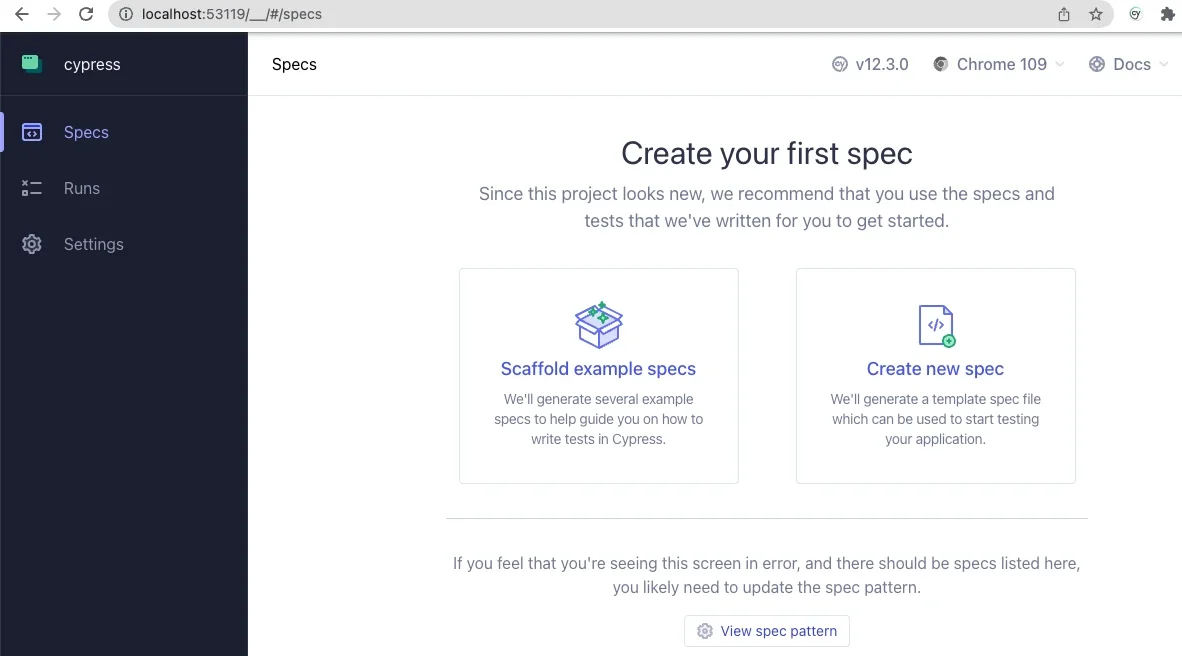
Installing Cypress is handled efficiently through the Node Package Manager via standard command-line interfaces. Once the installation process concludes, developers can launch the Cypress application interface to initialize the project structure. Upon launching the testing utility for the first time, users are greeted by a configuration dashboard that guides them through setting up end-to-end testing environments. Choosing to configure end-to-end testing prompts the utility to generate the necessary directory architecture and configuration files within the project root, seamlessly integrating testing assets alongside existing Drupal files.
Configuring the environment involves updating the primary configuration file to establish the appropriate base URL for the local development server and directing the testing runner toward the correct resource folders and test specifications. Pointing the configuration directly to the local development environment URL ensures that Cypress interacts accurately with the active Drupal instance rather than a disconnected mock environment. Once these foundational settings are in place, developers can begin authoring test specifications designed to simulate real-world user interactions.
Writing and executing basic tests within this environment highlights the immediate practical value of automated quality assurance. By creating dedicated test scripts within an integration directory, developers can script scenarios that mimic user behavior, ranging from simple page load verifications to complex form submissions and authentication workflows. For instance, a basic test might verify that the primary page title exists upon visiting the front page of the site, ensuring that critical layout components render correctly. More advanced test scripts can simulate user login procedures by programmatically navigating to the user authentication page, entering credentials into designated form fields, and submitting the form to verify authentication responses.
The execution process itself provides profound visibility into the application’s behavior. As the test runner steps through each scripted instruction, developers can observe the simulation unfold within a dedicated browser window alongside a detailed textual trace of every action executed by the framework. This transparent feedback loop often uncovers subtle front-end nuances that might otherwise go unnoticed during manual testing. For example, developers frequently discover layout or styling interactions—such as flexbox configurations that temporarily impede an element’s interactivity—that must be accounted for before a test script can successfully click a submission button. Witnessing these discoveries firsthand underscores the tangible reliability that automated testing brings to a Drupal project.
Beyond basic user interactions, the framework allows for advanced customization tailored specifically to the unique architectural needs of Drupal content management systems. Developers can define custom commands within support files to encapsulate repetitive workflows, such as user authentication and session termination. By authoring specialized commands, teams can streamline their test suites, replacing verbose blocks of repetitive code with clean, reusable functions. A custom logout command, for example, can be invoked at the beginning of various test scenarios to ensure a clean slate, while a dedicated login command can handle standard credential submission seamlessly.
Furthermore, the versatility of the testing framework extends into back-end administrative tasks through the integration of environment variables and command-line orchestration tools like Drush. By leveraging Drush commands within custom testing routines, developers can achieve sophisticated administrative operations programmatically. A prime example is the ability to authenticate a user directly by their user ID via one-time login links generated on the fly. This approach not only optimizes test execution speed but also introduces crucial security benefits by eliminating the need to read, handle, or store plain-text user passwords within testing scripts. The capability for a front-end testing framework to orchestrate powerful back-end administrative commands bridges a traditional architectural divide, offering developers unprecedented control over their testing environments.
While foundational tests and custom commands provide a solid starting point, the broader ecosystem offers extensive capabilities, including data fixtures for managing complex test datasets and specialized patterns for navigating intricate user interfaces and asynchronous operations like Ajax-enabled forms. Educational resources, community webinars, and public repositories maintained by experienced agencies offer valuable reference implementations for teams seeking to expand their automated testing practices. By adopting these modern testing methodologies, Drupal development teams can significantly reduce manual QA overhead, enhance application stability, and deliver more resilient digital experiences to their users.