









For smart home enthusiasts juggling a growing ecosystem of connected devices, Apple’s upcoming hardware releases always generate significant anticipation. Among the more promising products making their way to the market is Apple’s new HomeView smart display, a centralized hub designed to streamline entertainment, smart home management, home security monitoring, and daily organization. However, consumers hoping to integrate the device into their living spaces ahead of its official November 13 release date will need to weigh a critical set of choices regarding hardware configurations and installation methods.
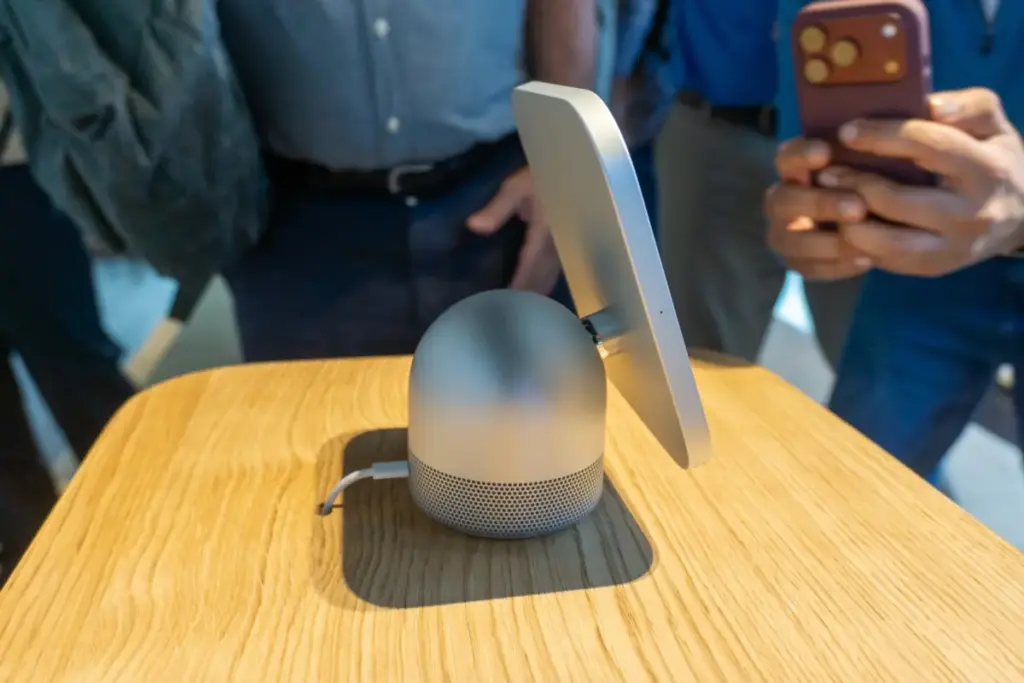
Apple is offering two distinct versions of the HomeView, both priced at $299. The first is a tabletop model featuring an integrated speaker base and automatic tilting capabilities. The second is a wall-mounted model designed to be permanently affixed to a room’s architecture. Choosing the wall-mounted version requires buyers to select from several distinct mounting hardware options—some of which Apple recommends be installed by a licensed electrician. Furthermore, opting for the wall-mounted version means sacrificing the robust audio power housed within the tabletop unit’s speaker base. These architectural and logistical variables mean buyers must carefully calculate installation costs and mounting requirements before committing to a specific configuration.

Both the tabletop and wall-mounted models share a core set of hardware and software features. Each device centers around a vibrant 7-inch Liquid Retina display capable of acting as a central dashboard for media consumption, home automation, and security tracking. Both versions support advanced facial recognition technology to automatically switch between personalized user accounts, alongside native integration with Messages, FaceTime, Calendar, Reminders, and the Find My network. In addition, both models fully support Siri AI capabilities and other key ecosystem functionalities.
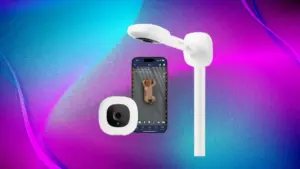
A common misconception circulating in early launch coverage is that the tabletop HomeView features a detachable screen. Similar to other popular smart displays on the market, the HomeView screen is permanently affixed to its base. This means consumers face a strict division: they can purchase the tabletop model for $299 to secure enhanced audio performance, screen tilting, and straightforward placement, or they can pay the same $299 for the wall-mounted model, forfeiting the built-in speaker base for a flush architectural profile. There is no price discrepancy between the two variants, and users cannot purchase the wall-mounted version and subsequently buy a tabletop base later, or vice versa. Once a purchase is made, the user is permanently locked into that hardware format.
The tabletop HomeView is engineered for minimal friction during setup and installation. It comes equipped with a speaker base that delivers room-filling audio driven by down-firing woofers, two passive radiators, and two full-range drivers. The audio performance is notably powerful, producing deep, resonant sound even when tested in spacious environments. Additionally, the tabletop model represents the ideal solution for renters or individuals who prefer flexibility, as it requires only a standard power adapter and a USB-C cable plugged into a nearby wall outlet, allowing it to be repositioned freely without permanent modifications to the home.

Transitioning to the wall-mounted HomeView introduces a higher degree of complexity. By eliminating the speaker base, the device relies solely on its internal audio components, shifting its primary utility entirely toward functioning as a dedicated smart home dashboard, digital calendar, and security control center. Users can configure a wide array of interactive widgets that provide immediate access and granular controls for compatible smart home appliances, lighting systems, and climate controls.
To facilitate wall installation, Apple offers three specialized mounting options manufactured by Schneider Home. The first is the Power Mount USB-C Wall Connector, retailing at $59.95, which serves as the primary self-installation choice. This kit includes the mount and an attached USB-C cable, though users must provide a separate 20-watt power adapter if they do not already own one. While it represents the most economical and straightforward mounting method—making it suitable for renters willing to drill a few small anchors or homeowners tackling a DIY project—it is also the least visually concealed option, leaving a USB-C cable visibly trailing down the wall to a standard outlet.
For a cleaner aesthetic, Schneider Home offers the Power Mount AC Wired for $79.95. This hardwired alternating current mount routes power directly through the interior of the wall. Apple recommends that this mount be installed by a licensed electrician. The hardwired connection supplies 30 continuous watts of power through a standard single-gang wall box, allowing the device to sit completely flush against the surface. While ADT security integration services are available for compatible setups, the AC-wired mount is decidedly tailored for homeowners rather than renters due to the permanent nature of the electrical work.

Industry professionals emphasize the practical differences between these mounting paths. For most homeowners planning a permanent smart home interface, a hardwired AC connection provides the cleanest aesthetic and most reliable integration with existing home infrastructure. The USB-C wall connector remains a viable fallback for those who wish to avoid electrical modifications, provided they do not mind a visible cord or happen to have an existing outlet positioned directly behind the desired mounting location.
The third hardware choice is the Power Mount PoE Wired, priced at $129.95. This mount utilizes Power over Ethernet technology to deliver both continuous power and a direct, uninterrupted internet connection through a single Ethernet cable, bypassing the need for a Wi-Fi network. It requires a compatible Power-over-Ethernet network switch and a dedicated Ethernet run routed directly to the mounting location. While ADT installation support is available for this system, it represents the most expensive and technically demanding mounting tier. Because it ensures an always-online connection independent of wireless network stability, it is widely considered the optimal choice for comprehensive home security setups and complex smart home automations. This option is typically favored by homeowners with advanced networking infrastructure, such as structured wiring panels or dedicated network closets, and is easiest to implement during new construction or major home renovations.
Homeowners exploring hardwired installations must factor professional labor costs into their budgets. Pricing for an AC-wired installation varies significantly depending on pre-existing electrical infrastructure. If a junction box or powered outlet already exists precisely where the display is intended to go, professional installation generally ranges from $150 to $300. However, if an electrician is required to fish a new line through a finished wall from a nearby circuit, costs typically escalate to between $400 and $600. Establishing a dedicated new circuit directly from the electrical panel, or navigating challenging structural obstacles such as plaster walls, multi-story buildings, or homes lacking attic and basement access, can push labor expenses from $600 to $1,000 or more, exclusive of local permit fees and any necessary drywall repairs.

Line-voltage electrical work often triggers local regulatory requirements. Adding a new electrical box or circuit frequently mandates securing an official electrical permit, depending on municipal codes. The installation process requires establishing a single-gang box at the chosen mounting location with a standard voltage feed, connecting the mount securely, and patching surrounding drywall if necessary.
For installations utilizing the Power-over-Ethernet mount, the primary expense stems from running Ethernet cabling back to the central network hardware, typically costing between $150 and $400 per cable run, with an additional $100 to $250 required if a PoE network switch must be purchased. While such systems can be installed in properties of various types, single-family homes generally present the fewest architectural hurdles because owners retain full authority over interior walls and electrical panels. Condo and apartment owners, conversely, must consult building management and review homeowners association guidelines to ensure compliance with building regulations governing licensed electrical and low-voltage modifications.
Ultimately, integrating a permanent smart home control interface functions best when approached as a foundational component of a residence’s broader electrical and networking infrastructure. Selecting the appropriate model and mounting hardware ensures that the system delivers reliable power, a polished aesthetic, and sufficient flexibility to accommodate future technological updates and home automation expansions.