










As smart home enthusiasts continue to accumulate an ever-growing ecosystem of connected devices, finding a centralized hub to manage them all can prove challenging. Apple’s newly introduced HomeView emerges as one of the most promising entries into the smart display market, offering consumers a dedicated command center for entertainment, home automation, and security monitoring. However, ahead of its official release on November 13, prospective buyers need to carefully evaluate their living spaces and installation preferences, as choosing the wrong model could significantly impact how the device integrates into their home.
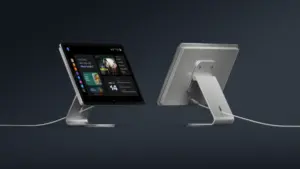
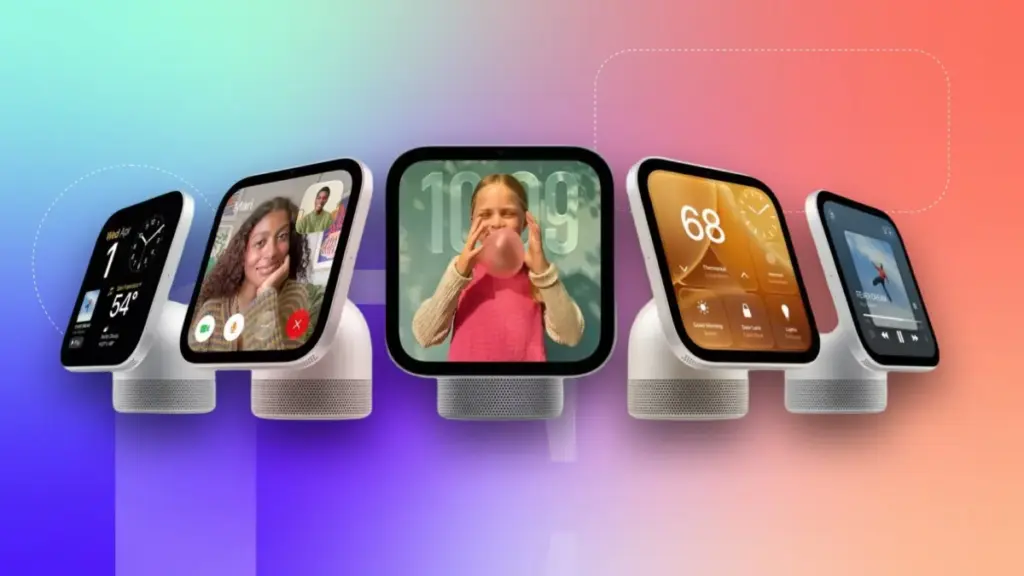
Apple is offering two distinct versions of the HomeView, both priced at $299. The first is a tabletop model featuring an integrated speaker base with automatic tilting capabilities. The second is a wall-mounted model, which requires users to select from a variety of separate mounting options. Choosing the wall-mounted version means forfeiting the powerful speaker base included with the tabletop edition, and certain mounting solutions may require hiring a licensed electrician for a wired installation. With preorders underway, understanding the differences between these configurations is essential for anyone planning to make the HomeView the centerpiece of their smart home network.
What Do Both the Tabletop and Wall-Mounted Models Include?


Despite the differences in their physical form factors and mounting requirements, both versions of the HomeView share a core set of features. Each model is built around a vibrant 7-inch Liquid Retina display, designed to function as the primary visual interface for media consumption, smart home management, and home security monitoring.
Furthermore, both iterations support advanced facial recognition technology to provide personalized user accounts, along with native integration for Apple services such as Messages, FaceTime, Calendar, Reminders, and Find My. Both models also incorporate Siri AI capabilities, ensuring users have immediate access to Apple’s voice assistant and other key system functionalities.
A common misconception circulating in early launch coverage is that the HomeView’s screen is detachable. Much like other smart displays on the market, the tabletop HomeView is permanently attached to its speaker base. This design means consumers pay $299 to receive the combined package of the screen, extra speaker power, and physical adjustment features. Alternatively, buyers can pay the exact same $299 price point for the wall-mounted version, though they sacrifice the built-in speakers housed within the base. Because there is no price difference between the two configurations and users cannot purchase a wall-mounted model and later add a base—or vice versa—buyers are locked into their initial hardware choice at the time of purchase.
Who Should Buy the Tabletop HomeView?

For consumers seeking a straightforward setup process with minimal installation hurdles, the tabletop HomeView presents the most accessible option. Beyond convenience, the tabletop model’s primary advantage lies in its audio performance. The integrated speaker base delivers room-filling sound driven by down-firing woofers, two passive radiators, and two full-range drivers. During hands-on demonstrations in spacious environments, the tabletop HomeView proved impressively loud, producing deep and resonant audio that outperforms typical smart display speakers.
The tabletop model is also the ideal choice for renters or those who prefer flexibility, as it relies solely on a standard power adapter and a USB-C cable. Users can place the device on any flat surface near a standard electrical outlet, allowing for relocation around the home without requiring permanent modifications to walls or wiring.
Who Should Get the Wall-Mount HomeView and What Are the Options?
For consumers who prefer a permanent, integrated look, the wall-mounted HomeView offers an alternative approach. Without the bulky speaker base, the wall-mounted unit relies exclusively on the speakers built directly into the screen itself. This streamlined profile makes it better suited to function strictly as a wall-mounted smart home dashboard, digital calendar, and home security hub, where users can configure a variety of widgets for quick access and control over compatible connected devices.

To accommodate different installation environments, Apple offers three distinct mounting solutions produced by Schneider Home. The first is the Power Mount USB-C Wall Connector, priced at $59.95. Positioned as a do-it-yourself option, this kit includes the mount and an attached USB-C cable, though users must supply a separate 20-watt power adapter if they do not already own one. While it represents the cheapest and easiest way to mount the HomeView, it leaves a visible USB-C cable dangling down the wall to a nearby outlet. This approach may appeal to renters willing to drill a few small holes for screws and anchors, or homeowners looking for a straightforward weekend DIY project.
The second option is the Power Mount AC Wired, priced at $79.95. This hardwired alternating current mount routes power directly through the wall, sitting flush against the surface for a cleaner aesthetic. Designed primarily for homeowners rather than renters, it delivers 30 continuous watts of power through a single-gang wall box. Apple recommends that a licensed electrician handle the installation of this unit to ensure safety and compliance with local building codes. ADT installation services are also available for this model, though specific details regarding the partnership continue to be evaluated.
Michael Malfettone, a licensed master electrician and owner of Malfettone Electric, notes that the AC Wired mount is typically the best choice for homeowners. He explains that it connects directly to a home’s existing electrical infrastructure, fits a standard single-gang box, and eliminates visible cords entirely. While the USB-C connector works well for those unbothered by a visible wire or an existing outlet, it lacks the polished appearance of a hardwired setup.
The third and most advanced option is the Power Mount PoE Wired, retailing at $129.95. This mount utilizes Power over Ethernet technology to deliver both electrical power and a continuous, direct internet connection through a single Ethernet cable, bypassing Wi-Fi entirely. Compatible with a Power-over-Ethernet network switch, this configuration is well-suited for comprehensive home security systems, extensive smart home automation, and climate control setups.

According to Malfettone, the PoE mount is specifically engineered for users who maintain robust networking infrastructure, such as a structured wiring panel or a dedicated network closet, and desire an always-online connection independent of wireless network fluctuations. Because it involves low-voltage wiring without AC power at the wall, it represents a specialized solution for advanced smart home integration.
How Much Will a Licensed Electrician’s Installation Cost?
For homeowners opting for the AC-wired installation, professional labor costs will vary depending on existing home infrastructure. Malfettone explains that if a junction box or powered outlet already exists at the desired mounting location, labor typically ranges from $150 to $300. However, if an electrician must fish a new line through a finished wall from a nearby circuit, prices generally increase to between $400 and $600. For complex installations requiring a dedicated new circuit from the electrical panel or navigating difficult architectural barriers like plaster walls, multiple floors, or homes lacking attic and basement access, costs can easily climb from $600 to $1,000 or more, excluding permit fees and necessary drywall repairs.
Malfettone also cautions that line-voltage installations frequently require electrical permits, depending on state and local regulations. The process involves establishing a single-gang box at the mounting location with a 120-volt feed, connecting the mount, and patching the surrounding drywall if necessary. For instance, in New Jersey, adding a new electrical box or circuit generally mandates an official electrical permit.

Regarding the PoE mount, Malfettone notes that expenses are largely driven by the cost of running an Ethernet cable back to central network hardware, estimating roughly $150 to $400 per run, with an additional $100 to $250 required for a PoE switch if one is not already installed. Such projects are naturally most cost-effective during new construction or major home renovations when walls are already open.
While condo owners can also benefit from smart home interfaces to control lighting, climate, and security, Malfettone advises checking with building management and Homeowners Associations beforehand to confirm compliance with regulations for licensed electrical work. Ultimately, he stresses that permanent smart home displays should be treated as a fundamental component of a residence’s electrical and networking infrastructure, prioritizing reliable power, clean aesthetics, and long-term flexibility over upfront cost.