








Engineering teams navigating cloud migrations often face a difficult balancing act: modernizing core infrastructure without causing customer-facing disruptions. A comprehensive guided lab recently detailed by cloud architects illustrates this challenge by documenting the migration of a payments application—featuring a React user interface and an Express API—from a single Amazon Web Services (AWS) EC2 instance to Google Kubernetes Engine (GKE).
![How to Migrate an Application from AWS to GKE [Full Book]](https://cdn.hashnode.com/uploads/covers/5e1e335a7a1d3fcc59028c64/8a1803ba-c9c9-496d-b2c4-58392cc655eb.png)
The migration strategy was designed to keep the public-facing URL completely unchanged for end users while gradually shifting traffic from AWS to Google Cloud a few percentage points at a time. Throughout the process, the PostgreSQL database remained anchored on AWS, deliberately narrowing the scope of the migration to isolate potential failure points and protect core payment data.
![How to Migrate an Application from AWS to GKE [Full Book]](https://cdn.hashnode.com/uploads/covers/698d563262d4ce66226a844a/a72eb451-8e75-4125-ba27-070c73054436.png)
The Architectural Blueprint and Initial Baseline
The project began by establishing a trusted baseline on a local development environment using Docker Compose to run the React interface, Express API, and PostgreSQL database locally. Developers then provisioned an AWS environment using Terraform to mirror the company’s existing production setup. This legacy architecture relied on a single EC2 Ubuntu instance running Nginx for handling HTTPS traffic on port 443 and serving frontend files, alongside a systemd-managed Node.js process forwarding requests to port 4000.
![How to Migrate an Application from AWS to GKE [Full Book]](https://cdn.hashnode.com/uploads/covers/698d563262d4ce66226a844a/8abff4c2-ba02-41d0-907f-5c167d485d31.png)
Rather than utilizing an AWS load balancer—which would have introduced unnecessary hourly costs for a single-server setup—connection stability relied on an Elastic IP address. Backend data was stored securely on Amazon RDS running PostgreSQL 16, configured without a public endpoint to ensure internal network isolation.
![How to Migrate an Application from AWS to GKE [Full Book]](https://cdn.hashnode.com/uploads/covers/698d563262d4ce66226a844a/6fd0931a-5d4d-44ff-8531-74ce76b75023.png)
Before making any modifications, engineers recorded a strict performance baseline. Using automated scripts, the team tested key metrics including health check responses, database connectivity, authentication flows, idempotency protections, and account balance debits. Load-testing metrics recorded during this phase established a critical baseline, noting a p95 latency of approximately 745 milliseconds with zero failed requests under standard concurrency loads. These metrics served as the benchmark against which the eventual Google Cloud infrastructure would be measured.
![How to Migrate an Application from AWS to GKE [Full Book]](https://cdn.hashnode.com/uploads/covers/698d563262d4ce66226a844a/b613b3b6-75c8-4b75-9cca-02750c9bab8a.png)
Planning the Multi-Cloud Transition
With the AWS baseline established, the engineering team mapped application dependencies to ensure a smooth transition. Codebase reviews confirmed that the application was stateless, relying entirely on JSON Web Tokens (JWTs) for authentication and storing no session data in local memory. This stateless design was vital for enabling both clouds to process requests concurrently during the migration phase.
![How to Migrate an Application from AWS to GKE [Full Book]](https://cdn.hashnode.com/uploads/covers/698d563262d4ce66226a844a/e734e16e-0bec-4f5e-b542-03b2cecc1980.png)
Furthermore, the team verified the application’s idempotency controls. By enforcing strict transaction keys, the system ensured that retried payment requests—which might accidentally hit different cloud environments during the phased traffic shift—would never result in duplicate charges for customers.
![How to Migrate an Application from AWS to GKE [Full Book]](https://cdn.hashnode.com/uploads/covers/698d563262d4ce66226a844a/3dfe597d-2949-4ce8-beae-285d3a5a13f2.png)
To host the modern containerized application, the engineering team designed a Google Cloud environment using eight distinct Terraform stages. This modular approach allowed architects to build infrastructure incrementally, verifying each layer before proceeding. The deployment established a dedicated Virtual Private Cloud (VPC), a private GKE Standard cluster using e2-medium node pools, Artifact Registry for container images, and Workload Identity to secure access without relying on vulnerable static key files.
![How to Migrate an Application from AWS to GKE [Full Book]](https://cdn.hashnode.com/uploads/covers/698d563262d4ce66226a844a/fff6c8f3-be7d-4bb3-a525-403f424af320.png)
Deploying to Staging and Managing Security
With the core GCP infrastructure in place, the team configured secure networking to bridge the two cloud providers. Because the GKE nodes lacked public IP addresses, outbound internet connectivity—and access to the AWS-hosted PostgreSQL database—was routed through Cloud NAT. Engineers updated the AWS security groups to allow incoming database traffic exclusively from the static Cloud NAT IP address, securing the cross-cloud communication path while keeping PostgreSQL firmly within AWS.
![How to Migrate an Application from AWS to GKE [Full Book]](https://cdn.hashnode.com/uploads/covers/698d563262d4ce66226a844a/30d53ba8-7337-4be6-8b45-3d37955315b2.png)
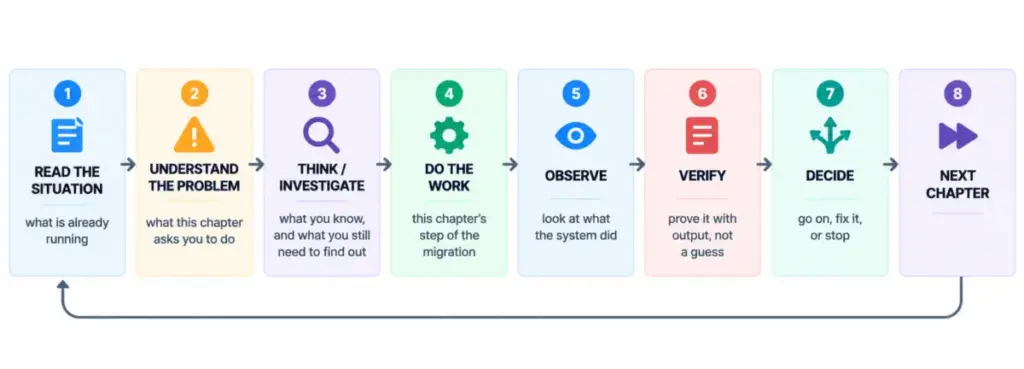
A continuous integration and continuous deployment (CI/CD) pipeline built on GitHub Actions was established to automate container builds, security vulnerability scans using Trivy, and image pushing to Artifact Registry. Upon deployment to the GKE staging namespace, engineers executed automated promotion gates. These validation scripts simulated real-world transactions to ensure the application functioned identically in its new containerized home before any production traffic was routed toward Google Cloud.
![How to Migrate an Application from AWS to GKE [Full Book]](https://cdn.hashnode.com/uploads/covers/698d563262d4ce66226a844a/02de98fe-808d-4a5a-8e96-aa9b4fcb5a18.png)
Security reviews conducted prior to production deployment verified that database connections enforced mandatory Transport Layer Security via strict connection string parameters. Additionally, audit logging was confirmed for Secret Manager and Identity and Access Management operations, ensuring strict least-privilege boundaries between the staging and production environments.
![How to Migrate an Application from AWS to GKE [Full Book]](https://cdn.hashnode.com/uploads/covers/698d563262d4ce66226a844a/fc6cf623-39f3-43f9-8c4b-82cc275a361f.png)
Executing the Phased Traffic Shift
With staging successfully validated, the team deployed production workloads to GKE and established a global external managed load balancer featuring a weighted traffic split. This architecture allowed engineers to control traffic distribution precisely between the legacy AWS server and the new GKE cluster using a single public hostname.
![How to Migrate an Application from AWS to GKE [Full Book]](https://cdn.hashnode.com/uploads/covers/698d563262d4ce66226a844a/23833564-68ec-469e-a404-cf2daca2d22c.png)
The traffic migration followed a deliberate, incremental rollout plan. Moving away from risky DNS modifications—which often suffer from propagation delays and caching issues—the team utilized load balancer weight adjustments to shift traffic progressively from an initial split of 99 percent AWS and 1 percent GKE, up through intermediate milestones, and eventually to 100 percent GKE.
![How to Migrate an Application from AWS to GKE [Full Book]](https://cdn.hashnode.com/uploads/covers/698d563262d4ce66226a844a/680819f1-1c81-49b3-9b04-4cfc2aec9cad.png)
Throughout the rollout, engineers continuously monitored latency metrics, error rates, and system logs. Synthetic health check scripts ran concurrently to detect anomalies in real time. The phased approach provided an immediate safety mechanism: if error rates exceeded predefined thresholds, automated rollback scripts could instantly redirect 100 percent of traffic back to the AWS infrastructure while flagging the active rollback state via a dedicated administrative banner in the user interface.
![How to Migrate an Application from AWS to GKE [Full Book]](https://cdn.hashnode.com/uploads/covers/698d563262d4ce66226a844a/e1df65a6-b164-403e-935b-f7bbd6500682.png)
Finalizing the Cutover and Post-Mortem Analysis
Following successful operation at full traffic capacity on GKE, the engineering team formally concluded the cutover phase. Performance metrics gathered post-migration indicated that customer-facing availability remained stable with zero dropped transactions during the final transition steps, though latency metrics reflected minor network overhead introduced by cross-cloud database queries.
![How to Migrate an Application from AWS to GKE [Full Book]](https://cdn.hashnode.com/uploads/covers/698d563262d4ce66226a844a/055183da-5e97-451b-a341-917bd5e1d198.png)
With Google Cloud successfully handling all production traffic, the team decommissioned the legacy AWS EC2 compute resources using targeted Terraform destruction scripts, eliminating ongoing compute costs while preserving the managed PostgreSQL database on Amazon RDS as planned.
![How to Migrate an Application from AWS to GKE [Full Book]](https://cdn.hashnode.com/uploads/covers/698d563262d4ce66226a844a/d52f2aab-d663-4081-a645-52871d564020.png)
Post-migration reviews highlighted critical lessons regarding resource scaling and database connection pool limits. Engineering leads noted that managing multi-cloud architectures requires rigorous advance calculation of maximum potential database connections to prevent connection exhaustion during peak autoscaling events. Ultimately, the successful transition demonstrated that complex infrastructure modernizations can be executed smoothly through disciplined planning, rigorous automated testing, and incremental, data-driven traffic routing.