







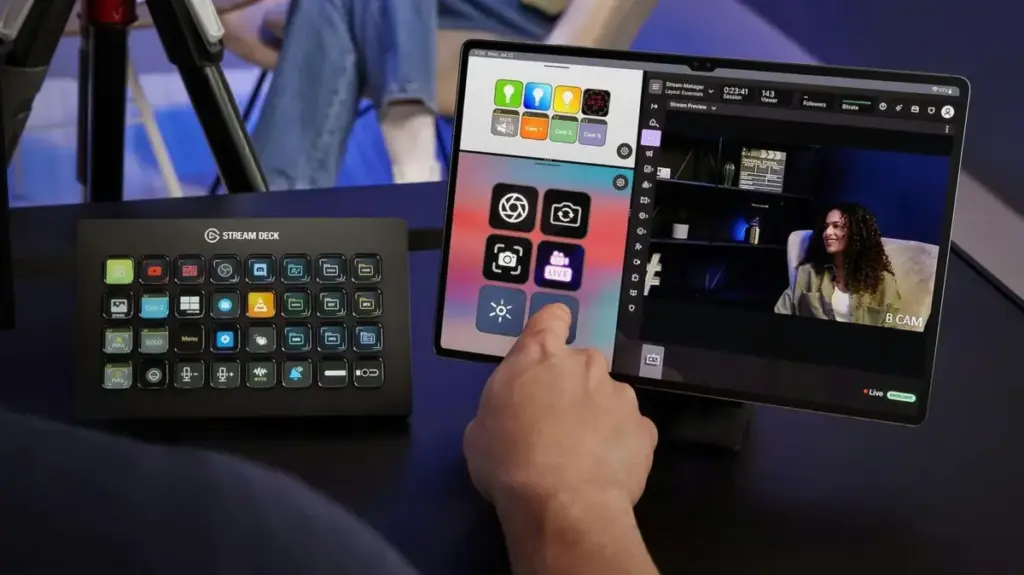
For many technology enthusiasts, the cycle of hardware upgrades often leaves a graveyard of perfectly functional devices gathering dust in desk drawers. As tablets are replaced by the latest, faster models, older iPads and Android slates are frequently relegated to a state of permanent inactivity. However, for those who participate in the vibrant world of content creation—specifically streaming on platforms like Twitch or YouTube—there is a highly effective way to breathe new life into this aging hardware. By repurposing these tablets, users can transform them into a fully functional, virtual Stream Deck, effectively bypassing the need to purchase dedicated, high-end production hardware.
This innovative approach works across both iPadOS and Android ecosystems, provided the device meets the software requirements. The Stream Deck, traditionally known as a physical peripheral featuring a grid of LCD-equipped buttons, has become a cornerstone of modern streaming setups. These devices allow creators to execute complex macros with a single touch, such as toggling microphones, switching between multiple camera angles, launching specific applications, or managing complex scene transitions in broadcasting software like OBS Studio. Because these physical units are often sold at a premium, utilizing a tablet that might otherwise be discarded represents a significant value proposition for both hobbyists and professional streamers alike.
Elgato, the industry leader synonymous with the Stream Deck brand, has recognized this trend and expanded its ecosystem beyond physical hardware. While the company continues to develop a range of high-end, tactile controllers, it has also prioritized the development of a mobile application that turns standard tablets and smartphones into high-performance control surfaces. This software-driven solution is remarkably accessible, supporting devices as legacy-focused as those running iPadOS 15 or Android 9. Consequently, the vast majority of tablets released within the last several years are fully capable of hosting this software, ensuring that even a device that feels sluggish for modern web browsing can still perform admirably as a dedicated production controller.

The process of converting a tablet into a sophisticated streaming dashboard is streamlined and efficient, designed to get users up and running in a matter of minutes. The first phase involves installing the official Stream Deck software on a primary workstation, which must be running at least Windows 10 or macOS 10.15. Once the desktop client is active, the user accesses the device picker located in the top-left corner of the interface. By selecting the option to "Add Mobile Device," the software generates a unique QR code. This code serves as the digital handshake between the workstation and the tablet; scanning it with the corresponding Stream Deck mobile app—available on both the Apple App Store and the Google Play Store—instantly pairs the two devices.
Reliability is a critical component of any live broadcast environment, and the connectivity requirements for this virtual setup are straightforward yet essential. Both the host computer and the tablet must reside on the same local network to facilitate communication. This eliminates the possibility of using cellular data connections, such as 4G or 5G, which would be too unstable for the real-time requirements of broadcast control. If users encounter difficulties during the initial handshake, the solution often lies in local network settings; specifically, Windows users may need to ensure their network profile is set to "Private" rather than "Public," as firewall settings frequently block the necessary data packets from passing between devices.
Apple users, in particular, benefit from a more robust connectivity option. The Stream Deck ecosystem for Mac and iPad allows for a physical USB connection, bypassing the need for a wireless network entirely. This wired approach is often preferred by professional streamers because it provides an inherently more stable connection, significantly lower latency, and the added benefit of keeping the tablet charged during long streaming sessions. For those relying on Wi-Fi, the setup remains functional, but ensuring the tablet is kept within a strong signal range is vital to prevent any input lag or disconnects during a live show.
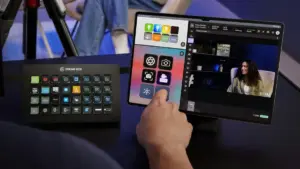
Once the connection is established, the customization possibilities are extensive. The tablet essentially acts as a blank canvas, allowing creators to drag and drop various actions from the computer’s control panel directly onto the tablet’s screen. This interface mimics the functionality of physical Stream Deck hardware, complete with customizable icons and folders. For the average streamer, the library of available plugins is comprehensive. Beyond native integration with broadcasting powerhouses like OBS Studio, Twitch, and YouTube, the software supports a wide array of productivity and environment-control tools. Users can integrate Spotify for media playback control or sync the device with smart lighting systems, including Philips Hue, Nanoleaf, and Govee, allowing for dramatic lighting changes with a single tap.
The question of whether to invest in the premium tier, known as Stream Deck Mobile Pro, is a common consideration for those looking to expand their setup. The free version of the mobile app provides access to six virtual buttons, which matches the layout of the entry-level physical Stream Deck Mini. For many, this is more than sufficient; the core functionality—muting a microphone, transitioning scenes, or ending a stream—can be easily managed within this limit. There is no trial period restriction, meaning users can operate indefinitely with this baseline configuration without incurring costs.
However, as a streamer’s workflow grows in complexity, the limitation of six buttons may start to feel restrictive. This is where the Pro subscription becomes a viable alternative. Upgrading to the Pro version unlocks a grid of up to 64 buttons, exceeding the capacity of even the largest physical flagship models like the Stream Deck XL. This expanded real estate is particularly beneficial for power users who manage intricate soundboards, multi-scene setups, and external device integrations. Furthermore, the Pro version allows for custom grid configurations and personalized backgrounds, and iPad users can utilize Apple’s Split View feature to display two separate keypads simultaneously, essentially doubling the immediate access to commands.
The pricing structure for these features is designed to accommodate different levels of commitment. Subscriptions are available at $2.99 per month or $24.99 per year, providing flexibility for those who might only stream seasonally. For those fully committed to the platform, a lifetime license is available for $49.99, which can offer long-term savings compared to recurring monthly fees.
Optimizing the tablet for this specific role requires a few practical adjustments to ensure it remains a reliable part of the production environment. Because the device is intended to be a permanent fixture, investing in an inexpensive tablet stand is highly recommended. Positioning the device at an ergonomic angle ensures it is always within the user’s line of sight, allowing for quick adjustments without breaking focus from the primary monitor. Furthermore, keeping the device plugged into a power source is non-negotiable for anyone planning to stream for extended periods, as the constant communication and screen activity will rapidly deplete the battery.
Finally, managing the tablet’s display settings is essential for a seamless experience. To prevent the device from entering sleep mode or locking its screen—which would render the buttons inaccessible—users should adjust their display settings to keep the screen active. On an iPad, this involves navigating to the "Display & Brightness" menu and setting the "Auto-Lock" feature to "Never." Android devices provide similar options, typically found within the display or advanced power settings. By taking these simple steps, a forgotten piece of technology is effectively transformed from a piece of clutter into a professional-grade tool, providing a sophisticated control interface that enhances both the streamer’s workflow and the quality of their production.