










Since its debut in 2011, AWS Elastic Beanstalk has served as a cornerstone for developers looking to offload the complexities of infrastructure management. Over the past fifteen years, it has become a trusted platform for deploying full-stack applications across a diverse array of programming languages, including Java, .NET, Python, Node.js, PHP, Ruby, and Go. By handling the heavy lifting of deployment, scaling, patching, and monitoring, Elastic Beanstalk allowed engineers to maintain their focus on core business logic. Today, AWS is taking a significant step forward in the evolution of this service, announcing a new, fully-managed "Cluster Mode" that deepens the platform’s integration with modern cloud-native architectures.
This latest development marks a transformation in how Elastic Beanstalk operates. The service has been fundamentally rebuilt to assume full operational responsibility for production environments throughout the entire lifecycle of an application. Whether developers are deploying from raw source code, Dockerfiles, or pre-built container images, Elastic Beanstalk now acts as a comprehensive manager that handles the underlying infrastructure, traffic management, and continuous maintenance. The goal is to provide a seamless experience where the developer remains responsible for the application code, while AWS shoulders the burden of the underlying operational stack.
The shift toward this new model is the culmination of years of iterative improvements to the Elastic Beanstalk engine. In recent months, AWS has introduced a suite of advanced capabilities designed to modernize the platform. Among these is AI-powered environment analysis, which autonomously diagnoses health issues and suggests precise remediations, significantly reducing mean time to recovery for complex environments. Additionally, a new official GitHub Action has streamlined the integration between version control and deployment pipelines, allowing teams to trigger deployments directly from their existing CI/CD workflows using a simple YAML configuration. These updates, combined with foundational improvements like OpenTelemetry-based observability, traffic-splitting capabilities with automatic rollback, event-driven autoscaling, and integrated secrets management via AWS Secrets Manager, have created a more robust and responsive environment for production workloads.
The centerpiece of today’s announcement is the new Cluster Mode. This feature is specifically engineered for organizations that manage a portfolio of applications rather than a single isolated service. Historically, operating multiple applications often required managing separate, siloed infrastructure, which could lead to increased overhead and fragmentation. With the new Cluster Mode, teams can run multiple applications that share a common infrastructure foundation powered by Amazon Elastic Kubernetes Service (Amazon EKS).

By centralizing the operational baseline, Cluster Mode allows multiple applications to share resources efficiently. This architectural shift ensures that as an organization’s application portfolio grows—whether they are managing ten services or a hundred—the per-application cost decreases without a proportional increase in operational complexity. Developers gain a unified management experience that applies consistent operational guarantees across every stack, ensuring that security, monitoring, and scaling policies are applied uniformly.
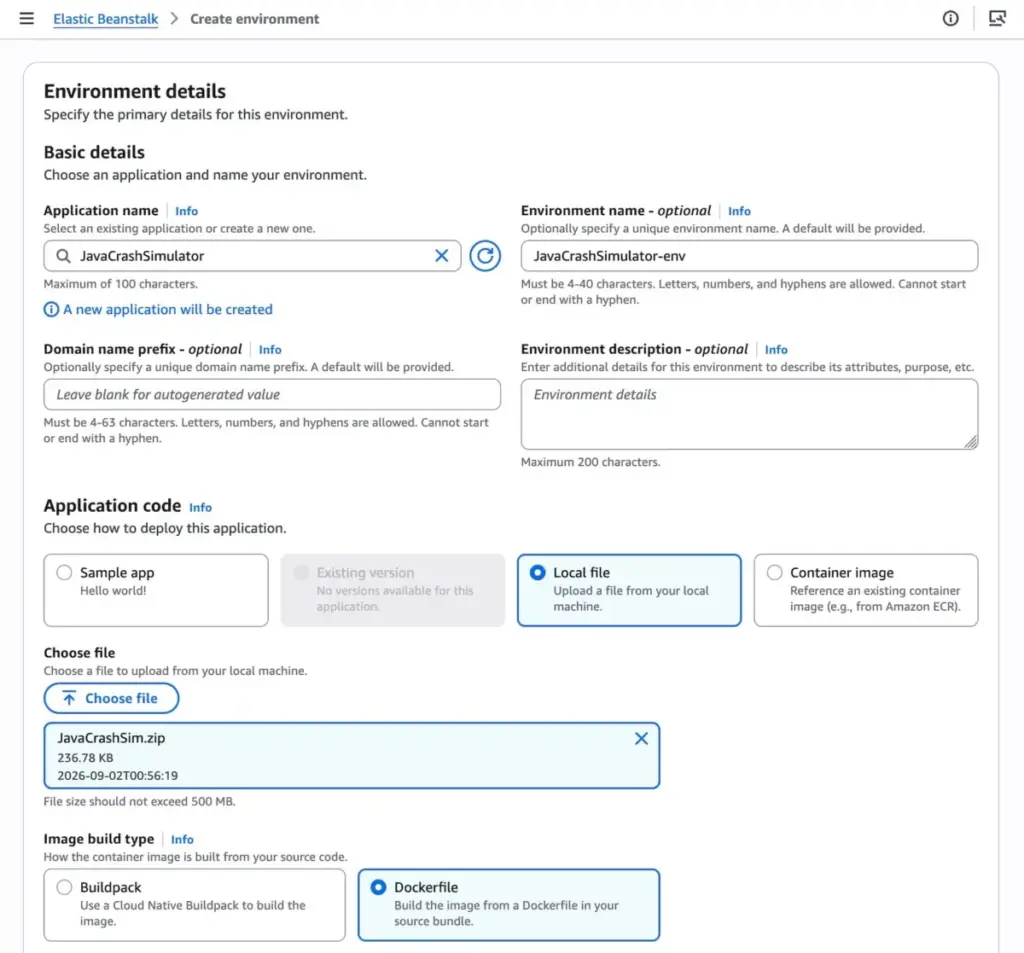
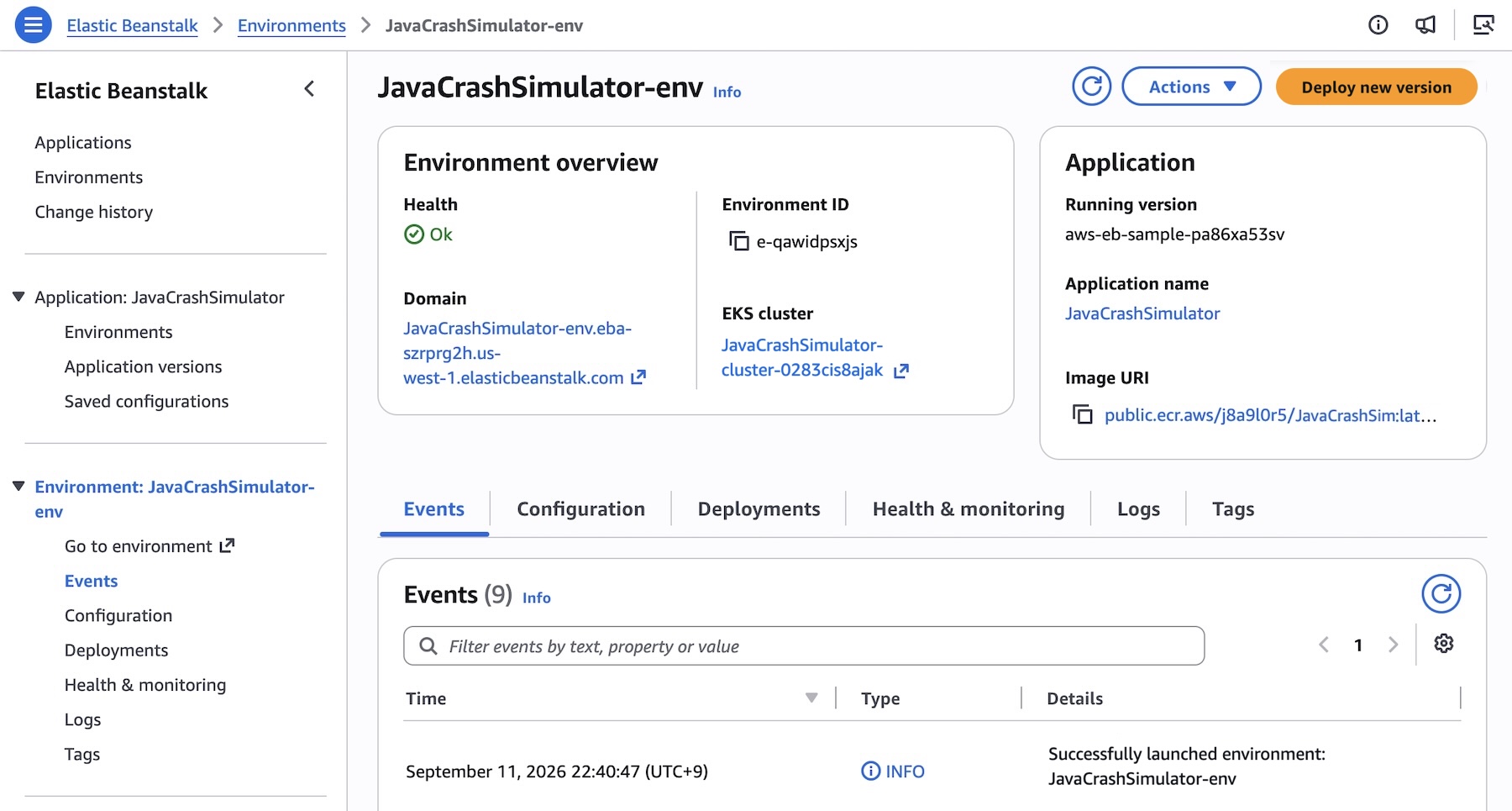
For those looking to get started with the new capability, the transition is straightforward. Within the Elastic Beanstalk console, users can create a new environment and select "Cluster" as the deployment type. The service remains highly flexible, accepting source code, Dockerfiles, or container images. When a user provides their application code—such as by selecting a local file and specifying container image build options—Elastic Beanstalk handles the orchestration of the underlying EKS cluster. While the initial deployment for a new set of subnets may take approximately ten minutes to provision the EKS cluster, subsequent deployments are significantly faster as they leverage the existing infrastructure, mirroring the efficiency of modern container orchestration.

This flexibility extends to programmatic access as well. Users can interact with the service through the AWS Command Line Interface (AWS CLI), the dedicated EB CLI, or standard AWS SDKs. For complex microservices architectures, this is particularly powerful. Developers can define application versions for various services—such as a frontend, a cart service, a payment service, and a shipping service—and register them within the Elastic Beanstalk framework. Once registered, developers can assign specific service options to each component. For instance, a frontend service might require an Application Load Balancer and a specific health check path, while backend services operate without public internet exposure. By defining these requirements in configuration files, teams can deploy and manage sophisticated, multi-service architectures with the same ease as a monolithic application.
It is important to note that this new mode does not signal the end of the traditional Elastic Beanstalk experience. The "Standard" mode, which is powered by Amazon Elastic Compute Cloud (EC2), remains fully supported. AWS has designed these two modes to run side-by-side within the same application, providing teams with the flexibility to migrate their workloads to Cluster Mode at their own pace. The platform includes validation checks to ensure compatibility before any changes are finalized, preventing forced migrations and allowing for a gradual, low-risk transition. Standard Mode continues to be an ideal choice for many traditional applications, and the decision to move to the new EKS-powered Cluster Mode remains firmly in the hands of the development teams.

The new Cluster Mode is available starting today in all AWS Regions where Elastic Beanstalk is currently supported. Users are encouraged to consult the official AWS Capabilities by Region documentation for specific availability details. To further assist with the adoption of this feature, AWS has integrated the new capabilities into the AWS MCP Server and various plugins, enabling developers to use their preferred AI tools to query documentation, check regional availability, and troubleshoot issues.
From a financial perspective, there is no additional premium charged for using the Elastic Beanstalk Cluster Mode. Users continue to pay only for the underlying AWS resources consumed by their applications. This includes costs associated with the EKS control plane, EKS Auto Mode compute, Amazon ECR, and Amazon CloudWatch metrics. It is noted that, unlike some entry-level services, the Cluster Mode is not eligible for the AWS Free Tier. Detailed pricing information is available on the AWS Elastic Beanstalk pricing page, where users can review the costs associated with the specific components used in their architecture.
As organizations continue to scale their digital presence, the need for platforms that abstract away infrastructure management while providing the power of container orchestration becomes increasingly critical. With the introduction of Cluster Mode, AWS is providing a bridge between the ease of use that defined the early days of Elastic Beanstalk and the sophisticated, scalable requirements of modern microservices environments. By consolidating these disparate operational needs into a single, fully managed service, AWS is reinforcing its commitment to simplifying the cloud journey for developers, regardless of the size or complexity of their application portfolio. Users are encouraged to explore the new functionality in the console and provide feedback through the official AWS re:Post community channels or standard support avenues.