








For years, users building websites within the WordPress ecosystem have faced a familiar set of compromises. Traditional page builders made web design significantly more accessible by removing the immediate need to hand-code layouts, yet they frequently introduced rigid structures, heavy reliance on third-party plugins, bloated codebases, and noticeable performance trade-offs. These underlying technical limitations often resulted in slower page load times and restricted creative execution for designers striving for pixel-perfection.
Enter Kirki, a newly examined entry in the market that takes a fundamentally different approach to web development on WordPress. Instead of iterating on the conventions established by older page builders, Kirki reimagines the website creation workflow by introducing a freeform visual builder featuring an infinite canvas, an integrated content management system, and a comprehensive suite of native tools. The stated goal is to provide a streamlined environment that delivers broader design freedom while generating cleaner, faster web pages. Whether targeting designers seeking precise control, developers prioritizing lightweight code output, or business owners hoping to avoid unnecessary complexity, the platform attempts to strip away longstanding barriers.

A Closer Look at Kirki
Positioned as a no-code visual website builder, Kirki bridges the gap where traditional page builders have historically fallen short. Rather than requiring numerous third-party dependencies to handle routine tasks like custom fields, forms, or pop-ups, the platform functions as an all-in-one solution. This marks a notable shift from standard WordPress deployment practices, where users commonly piece together a dozen different plugins to achieve full functionality.

Market entry points for the software are structured to accommodate various user needs, beginning with a robust free version available directly through WordPress.org. Far from being a limited preview, the free tier equips users with a fully functional infinite canvas to construct modern sites without financial commitment. For users seeking scalability, the Pro tier introduces the Starter plan at $59 per year for a single site, which unlocks all premium features without gating essential tools behind higher paywalls. Additionally, a lifetime license is available for a one-time payment of $499, offering unrestricted long-term usage without recurring renewals or surprise upgrade fees. Across all plans, core functionalities such as dynamic content management, form builders, and template libraries remain fully accessible from day one.

Website Performance Comparison
Because page performance directly influences user retention, search engine optimization, and conversion rates, comparative testing offers vital insight into how modern builders handle underlying architecture. To evaluate performance under identical conditions, independent benchmarks pitted Kirki against Elementor using clean WordPress installations running the default Twenty Twenty-Five theme. Identical layouts incorporating comparable design elements were constructed for both platforms before running Google Lighthouse audits to measure load times, responsiveness, and Core Web Vitals.

The performance divergence between the two systems became apparent immediately during code inspection. Kirki generated a significantly cleaner Document Object Model, utilizing far fewer wrapping elements and maintaining a lean, semantic HTML structure. This streamlined code output directly translated to faster load speeds and superior scores across all auditing metrics. Conversely, Elementor’s output exhibited heavily nested markup and auxiliary scripts even on the simplified test layout, pulling down its overall performance metrics. For projects where technical efficiency, rapid delivery, and clean code are paramount, the architectural differences position Kirki ahead in raw performance output.

Exploring the Core Features
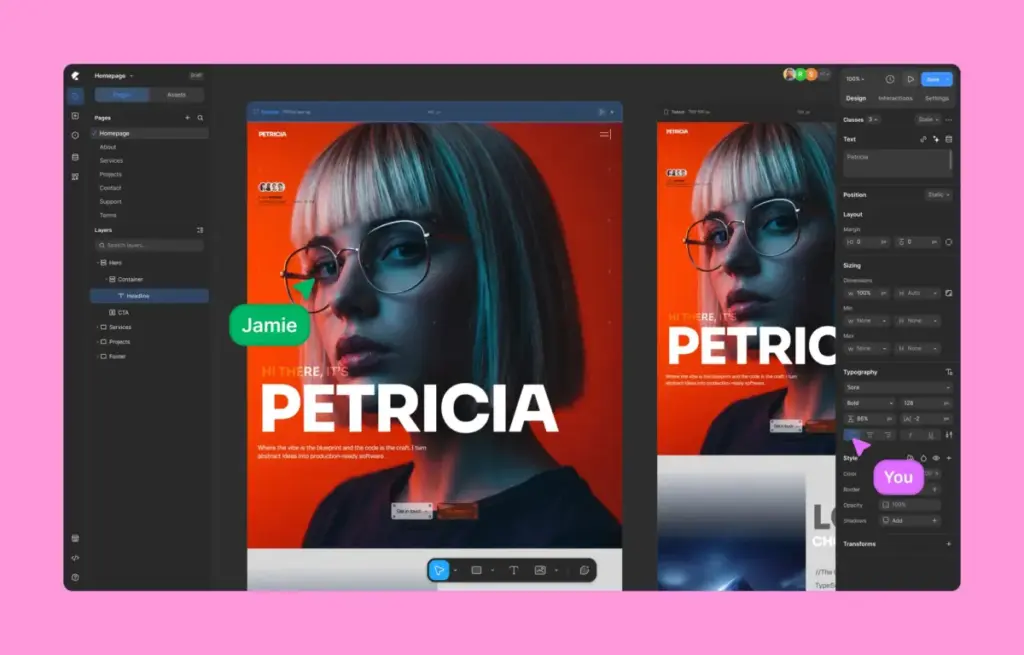
The technical advantages of the platform stem from a redesigned set of internal mechanisms tailored for modern workflows. At the center of this environment is the infinite canvas, which moves away from strict grid systems and allows creators to pan freely, zoom in and out, place elements with exact positioning, overlap sections, and layer backgrounds entirely through visual controls. The interface supports both light and dark modes, drawing design parallels to modern prototyping tools like Figma and Webflow.

Addressing responsive design challenges, Kirki introduces concurrent editing across all screen sizes simultaneously. Instead of toggling back and forth between desktop, tablet, landscape, and mobile views, users can view and edit every responsive breakpoint side by side in real time. Because the platform operates on a cascading styling system, modifications made at broader breakpoints flow naturally down to smaller screens, reducing redundant adjustments while still allowing manual overrides wherever necessary.

For design handoffs, the platform supports direct importing from Figma, enabling teams to bring existing design systems directly into WordPress without starting from scratch. These imported layouts adapt fluidly to responsive breakpoints automatically. Furthermore, the inclusion of a native Dynamic Content Manager eliminates the traditional requirement for third-party plugins like Advanced Custom Fields, allowing creators to handle custom fields, data binding, and relational content natively within the builder interface.

Scalability is further reinforced through a class-based styling system and global CSS variables. Styling an element automatically establishes a reusable CSS class, ensuring that global updates propagate efficiently across an entire site. Designers can define centralized color palettes, typography rules, and spacing tokens using variables, while advanced users retain the flexibility to inject custom CSS or page-level JavaScript when specific requirements demand it.

Interactive Design and Collaboration
Moving beyond static layouts, the platform incorporates a visual interaction builder designed for timeline-based animations and scroll-triggered effects. Creators can build hover states, click animations, and complex multi-step transitions visually. Text elements receive specialized animation handling, allowing text strings to be animated by character, word, or full block using custom triggers like scroll position or page load.

To streamline site management further, Kirki Apps centralize third-party integrations such as analytics, customer relationship management software, and email marketing tools directly within the workspace. This eliminates the need to install separate plugins for every connected service. Furthermore, the platform introduces real-time multi-user co-editing to the WordPress ecosystem. Multiple team members can work on the same page concurrently, viewing color-coded cursors and live edits as they happen, alongside an integrated commenting system that allows contributors to pin feedback directly to specific canvas locations.

Before publication, a built-in Page Audit tool automatically scans the site layout for common technical oversights, including missing image alternative text, broken links, and accessibility issues. This automated quality control mechanism aims to ensure that published pages meet modern web standards without requiring external auditing extensions.

Layout Options and Usability
To accelerate project delivery, Kirki features an expanding library of pre-designed assets. Template kits offer complete multi-page layouts tailored to various industries, while standalone pre-designed pages and modular sections—such as hero banners, pricing tables, and testimonials—allow users to assemble functional pages rapidly.

While the learning curve is steeper than basic, lightweight site builders designed exclusively for minimal five-page brochures, the platform rewards the time invested in mastering its interface. Comprehensive documentation and onboarding resources assist users in transitioning to the infinite canvas workflow. User feedback within the design and development community increasingly frames the tool as a modern alternative to standalone SaaS builders, signaling a potential shift in how complex sites are conceptualized and deployed directly on WordPress.