









When front-end developers and UX engineers are tasked with building a web interface that feels tactile, bouncy, or destructive, the industry instinct is almost always the same: reach for a physics engine. Frameworks like Matter.js, Cannon.js, or custom WebGL solutions have long since become the gold standard for creating immersive, gamified web applications. However, choosing the right technological stack for a project often requires looking past industry defaults to ensure that the architecture genuinely serves the art direction.
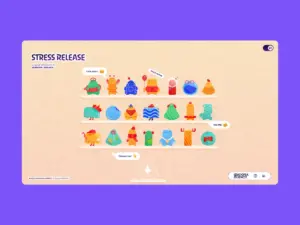
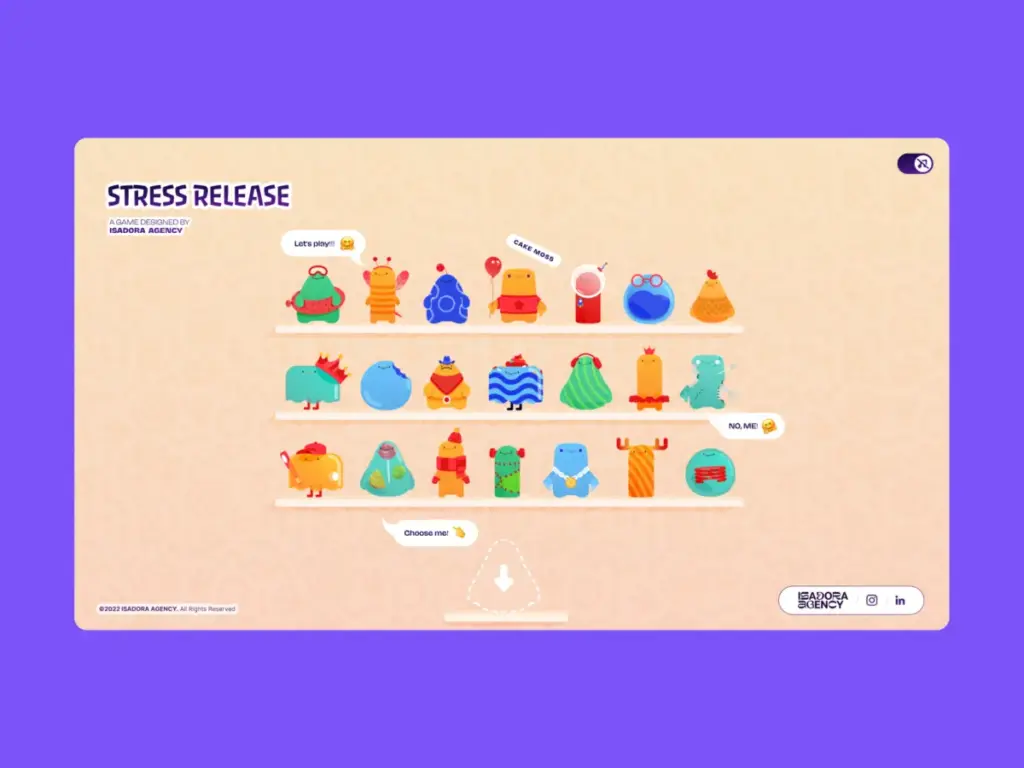
When the engineering and design team at Isadora Agency set out to build Stress Release, a digital stress-relief squeeze toy designed to let burnt-out creatives smash, stretch, and distort animated UI characters, they initially explored that traditional physics-engine route. The ultimate goal of the project was to construct a highly tactile online experience where every user click yielded a satisfying, squishy, and immediate reaction. But as the development team began prototyping the core mechanics, they realized something crucial about the intersection of code and animation: physics engines produce plausible motion, but in their case, the studio’s animators had produced intentional motion.
The development team did not need their characters to act like realistic rubber balls bouncing unpredictably and uncontrollably around an HTML canvas. Instead, they required the digital characters to react in very specific, highly choreographed ways dictated by bespoke design requirements. Consequently, the team made the bold architectural choice to scrap the physics engine entirely.

By relying instead on programmatic Lottie state controls, standard Document Object Model (DOM) manipulation, and distance-based mathematics, the agency engineered a real-time interactive experience without incorporating a single line of WebGL, Matter.js, or external physics libraries. This architectural decision prioritized absolute deterministic control over algorithmic approximation, ensuring that the final digital product stayed entirely faithful to the original creative vision.
The Design Requirements: Intentional Motion
The core requirement for the Stress Release project was absolute deterministic control over every visual asset. The agency’s animators had crafted bespoke JSON-based Lottie files that required exact, frame-by-frame sequencing to achieve their intended aesthetic and emotional impact. For instance, the signature "mega squeeze" reaction required a precise 181-frame build-up sequence followed by a specific, timed release sequence.
To honor this level of intricate design work, the engineering team needed an architecture that would not accidentally overwrite the animators’ crafted keyframes with generalized algorithmic approximations. In interactive web development, the tighter the click-feedback loop—encompassing the sequence from user click to squish reaction and subsequent score calculation—the greater the necessity for deterministic frame control.

By opting for programmatic state control utilizing Lottie’s native application programming interface, the developers ensured that the interaction layer acted as a flawless, instantaneous trigger for the animation layer. This setup guaranteed that no matter how rapidly a user clicked or interacted with the interface, the underlying software would faithfully execute the precise visual feedback designed by the studio’s animators.
Creating Tactile Feedback: Mapping DOM Elements to Lottie States
Because the underlying architecture relied heavily on Lottie and the standard DOM, all rendering was handled directly by the Lottie runtime, which internally plays vector animations as scalable vector graphics (SVGs). The development team selected elements directly by their unique identifiers and CSS classes, driving their interactive behavior using a combination of Lottie animation segments, cascading style sheet transformations, and click-event mathematics.
To achieve a deeply satisfying and convincing tactile feel upon hitting a character, the developers implemented radial input mapping. The initial step in this process involved converting the raw click coordinates from page coordinates into the character’s local coordinate space. Every user click was measured against the precise center point of the target character, and that data was subsequently translated into a score, feedback intensity, and explosion placement.

By measuring the horizontal and vertical vectors from the character’s center to the exact click point, the application calculated the straight-line distance from the center using the Pythagorean theorem. This single resulting mathematical value drove the entire downstream experience: determining the user’s score, governing the intensity of the visual feedback, and deciding precisely where the impact explosion animation would appear on the screen.
The resulting system established a series of concentric scoring zones—a perfect circle of scoring rings radiating outward from the character’s center, functioning similarly to a traditional dartboard. Critically, the visual complexity of the underlying Lottie SVG vector graphic was completely irrelevant to the hit detection mechanics, as the hitbox remained a clean, predictable circle. Furthermore, the explosion Lottie animation was dynamically repositioned to match the exact coordinate vector utilized for scoring, ensuring it always appeared precisely where the player clicked. This spatial accuracy created the tactile sensation of physically striking the character entirely through mathematics and precise DOM positioning.
Interaction Handling: Controlling the Narrative
Because the experience relied on DOM-managed SVG elements, desktop mouse clicks and mobile touch taps could be handled directly through native event listeners. This approach successfully avoided the performance overhead of extra raycasting or coordinate remapping layers, while keeping the overall interaction model closely aligned with how the animations were natively rendered in the browser.

Since the interactive game required a visual reaction at a specific point on screen, Lottie handled all the squish and bounce feelings internally through its pre-defined animation curves. Each character came equipped with a defined set of animation sections, including looping idle states, reaction frames, and end states, which were stored cleanly as specific frame ranges. When a user click landed within the active zone, the application jumped directly to the exact animation segment matching the current game state.
On every valid click, the application advanced through the pre-determined play order and fired the subsequent segment, immediately halting any ongoing animation, disabling looping so the sequence would play precisely once, and forcing the runtime to jump to the designated frames. Simultaneously, a brief lockout mechanism prevented further clicks mid-animation to maintain visual integrity. Once the segment completed its run, control was automatically returned to the idle loop, ensuring a seamless and unbroken narrative flow throughout the user’s interaction session.
For more complex mechanics, such as the aforementioned mega squeeze build-up, specific frame ranges were looped continuously until the player actively triggered the release sequence, at which point the application played the designated concluding animation before resetting the state.

The Responsive Benefit of DOM Elements
Another major factor that influenced the architectural decision to avoid physics engines was the requirement for robust responsive behavior. Because the team built the Stress Release interface directly within the DOM, they successfully bypassed the notorious complexities of scaling bounding boxes and complex collision vectors across a wide variety of mobile and desktop devices.
Instead of managing physics bodies, the agency handled responsive resizing entirely through CSS custom properties. By recalculating these CSS variables dynamically on every window resize event, the underlying layout smoothly reacted to the updated dimensions, allowing the Lottie SVGs to scale naturally inside their respective containers without ever losing their active states or breaking the user interface alignment.
Mobile Performance Optimization: The Cost of Lottie
While this DOM-and-Lottie architecture provided the development team with total, uncompromising control over the project’s art direction, it inevitably introduced a significant technical challenge: file size and rendering performance. Comprehensive Lottie JSON files can frequently become quite heavy, and the project featured 21 different character animations alongside multiple explosion variants that all needed to be loaded efficiently.

To ensure the web experience remained fluid and responsive—particularly on resource-constrained mobile devices—the team implemented several aggressive optimization strategies. For the character selection shelf screen, where 21 distinct animations played simultaneously, the developers initialized the Lottie instances with reduced rendering quality settings to cut down on heavy interpolation calculations, alongside lowered playback speeds to decrease the number of frame calculations required by the browser per second. Conversely, on the primary gameplay screen where only a single character was actively focused and interacting with the user, full rendering quality was restored to guarantee visual crispness.
Ultimately, the architectural journey behind Stress Release underscores a fundamental principle of web development: when determining the appropriate technology stack for a highly gamified and interactive web experience, the underlying design requirements must dictate the engineering choices. By opting for programmatic state control over emergent physical simulation, the development team empowered their animators to define the exact look and feel of the interactive experience, leaving the code to execute its core responsibilities of listening, calculating, and triggering with absolute precision.