










When migrating a modern Node.js application from a localized development environment to a cloud-native infrastructure, engineering teams frequently encounter unexpected hurdles. Recently, during a routine migration of a frontend-compiled Node.js application to the Azure Container Registry, developers faced a perplexing build failure. Despite working seamlessly inside a browser-hosted development environment, the automated container image build repeatedly collapsed with a concise yet frustrating error message: sh: 1: vite: not found.
At first glance, the diagnostic path seemed straightforward. The Vite build tool was explicitly listed among the project’s dependencies under devDependencies, and the containerized build stage faithfully executed npm ci prior to initiating the compilation script. Because the underlying Dockerfile appeared conventional and followed standard industry practices, initial troubleshooting theories revolved around standard dependency selection anomalies or misconfigured environment variables such as NODE_ENV. However, a deeper investigation revealed that the missing binary was merely a downstream symptom of an earlier, more subtle failure during the package installation phase.
Prior to reaching the compilation step, the npm ci command had attempted to download hundreds of tarball dependencies from a specialized package host that existed exclusively within the isolated parameters of the original browser-based development environment. Because this internal host was entirely unreachable from the external cloud container registry, the installation process stalled, printed an abrupt termination notice reading Exit handler never called!, and left the critical node_modules directory completely empty. Because npm failed silently without returning a conventional, easily identifiable fatal status code to the immediate layer, Docker proceeded to the subsequent layer. The following step immediately attempted to execute the standard build script, only to crash the moment it searched for the missing executable file.

This underlying disruption stemmed directly from the project’s lockfile, which pointed the package manager toward an unreachable network host. Resolving the incident required a methodical examination of the installation logs, a rigorous audit of the affected tarball uniform resource locators, and a targeted adjustment of the public package URL prefix without altering any underlying application code, package versions, or cryptographic integrity hashes.
Before You Begin
Addressing this specific container build failure requires a standard Node.js development environment equipped with a primary application manifest, a version 2 or version 3 package lockfile, comprehensive container build logs, and a functional Docker daemon. Typical configurations rely on supported modern runtime images, such as a stable Node release, paired with a frontend build toolchain that routes its compiled output to a dedicated distribution directory.

Before implementing modifications to URL prefixes or modifying build scripts, engineering teams must carefully verify whether the affected packages originate from a public or private software registry. Blindly altering network paths without confirming package provenance can introduce severe security vulnerabilities or break dependency resolution entirely.
How the Build Reached the Failure
The root cause of the incident bridged two fundamentally distinct computing environments. The application’s initial lifecycle took place inside a browser-hosted development platform that acted as a localized proxy for public npm packages. During routine package management operations within that ecosystem, the system automatically regenerated the lockfile, embedding internal, proxy-specific uniform resource locators directly into the resolved fields of the dependency tree.
When the codebase was subsequently transferred to the Azure Container Registry for automated image construction, the build runner attempted to execute the installation process using those embedded internal paths. Because the external build runner lacked network access to the proxy host, the package downloads failed catastrophically. The installation command terminated prematurely, resulting in an unpopulated dependency directory. When the subsequent container layer attempted to invoke the build script, the process immediately failed upon encountering the absent build utility.
Investigating the issue required working backward through the execution chain—starting from the missing executable error message, tracing the failure back to the package locations defined in the lockfile, rewriting the outdated network prefixes, and implementing stringent build-time validation checks to ensure future stability.
Checking Dependency Installation Integrity
Because the project utilized strict continuous integration installation commands designed for repeatable builds, the failure mode was exceptionally transparent. Standard package manager documentation dictates that this particular command removes any pre-existing dependency directories prior to initiating a fresh download, while simultaneously treating the lockfile as a frozen blueprint rather than attempting dynamic updates.
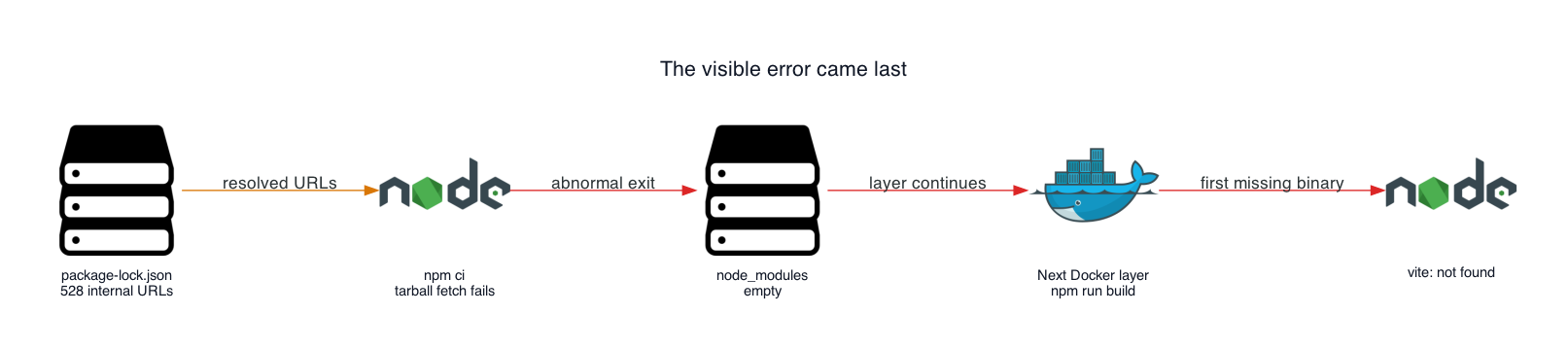
These protective properties ensured that the build could not silently fall back on cached packages from earlier local experiments. Once the tarball downloads failed, the dependency directory contained nothing of functional value. Inspecting the container’s intermediate state revealed that the directory housing installed packages was entirely devoid of contents, confirming that the build failure originated well before the application compilation stage.
Auditing the Lockfile Infrastructure
A detailed examination of the project’s lockfile exposed the widespread nature of the issue. A generalized dependency entry within the historical file pointed directly to the unreachable internal domain rather than the official public registry. While the build runner’s globally configured registry environment variable pointed to standard external endpoints, npm honors the explicit tarball locations defined within the resolved fields of the lockfile, effectively bypassing global configurations for those specific assets.
An automated audit of the historical lockfile revealed that a significant majority of the total dependency entries carried the unreachable internal hostname. Each of these entries pointed toward a network location that failed to resolve within the external cloud build environment. Analyzing the raw debug output from the failed build confirmed that these network resolution errors consistently preceded the abrupt exit handler warnings, conclusively linking the empty dependency tree to unreachable download targets rather than missing configuration flags.
Rewriting Public Package Prefixes
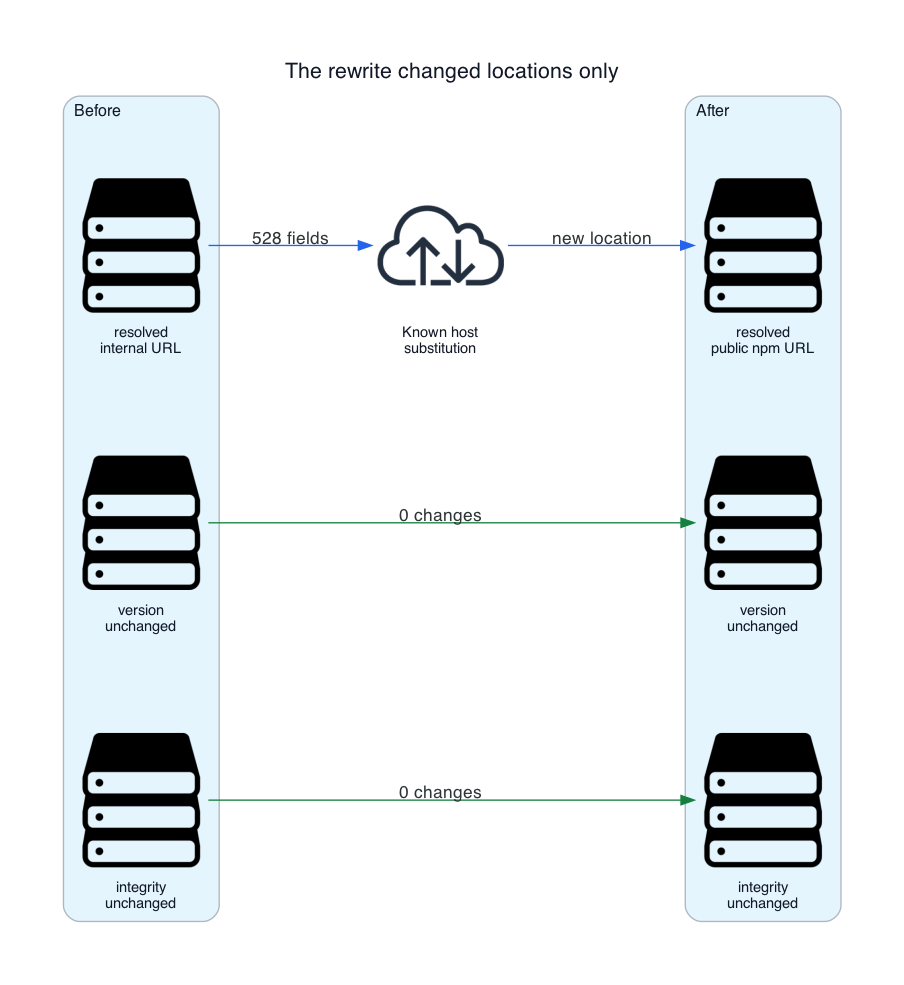
To resolve the issue without disrupting package versions or invalidating cryptographic integrity values, engineers implemented a targeted automated script designed exclusively to update the affected URL prefixes. Rather than regenerating the entire lockfile—which risks introducing unintended dependency updates or mixing registry configurations—the remediation script systematically replaced the obsolete internal hostname prefix with the official public registry prefix for every verified public package.
The script incorporated strict validation checks, throwing explicit errors if any targeted package lacked an expected integrity hash or if any residual internal hostnames remained hidden beneath unexpected URL prefixes after the transformation concluded. By isolating the changes strictly to the download paths, the project preserved the exact dependency tree used in development while establishing seamless portability for the cloud container registry.
To maintain a clean container image, auxiliary configuration files and local development directories were explicitly excluded using standard ignore files, ensuring that local artifacts could not contaminate the pristine build context.
Implementing Build-Time Validation Guards
To prevent similar failures from slipping past continuous integration pipelines in the future, engineering teams integrated automated validation checks directly into the container build sequence. By structuring the Dockerfile into distinct multi-stage builds, the environment successfully decoupled dependency installation from source code compilation, ensuring that routine source modifications would not unnecessarily invalidate the heavy dependency layer.
Within the dependency installation stage, the build process now automatically executes the URL rewrite script, performs the clean package installation, and immediately tests the resulting binary directory to guarantee that critical compiler executables are physically present and fully functional before allowing the build to proceed. If the essential utility is missing, the container build halts immediately at that specific layer, providing developers with an instantaneous and accurate diagnostic error rather than failing later during the application compilation phase.
This multi-tiered validation approach guarantees that both local continuous integration runners and remote cloud container registries evaluate the lockfile through the exact same rigorous safety standards, ultimately restoring reliable, automated deployments to the production infrastructure.