









Running artificial intelligence language models directly on local hardware has evolved to a point of remarkable simplicity. For developers, data scientists, and hobbyists alike, the fundamental hurdle of getting a model up and running has largely shifted away from complex setup procedures toward more nuanced operational challenges. Tools like Ollama have streamlined the initial deployment phase to a single command, quietly handling the heavy lifting of pulling model weights, maintaining an HTTP server on port 11434, and presenting any client with an OpenAI-compatible endpoint pointed directly at the user’s local machine. This seamless accessibility has democratized local AI experimentation, allowing anyone with compatible hardware to run powerful language models in privacy and without recurring cloud API costs.
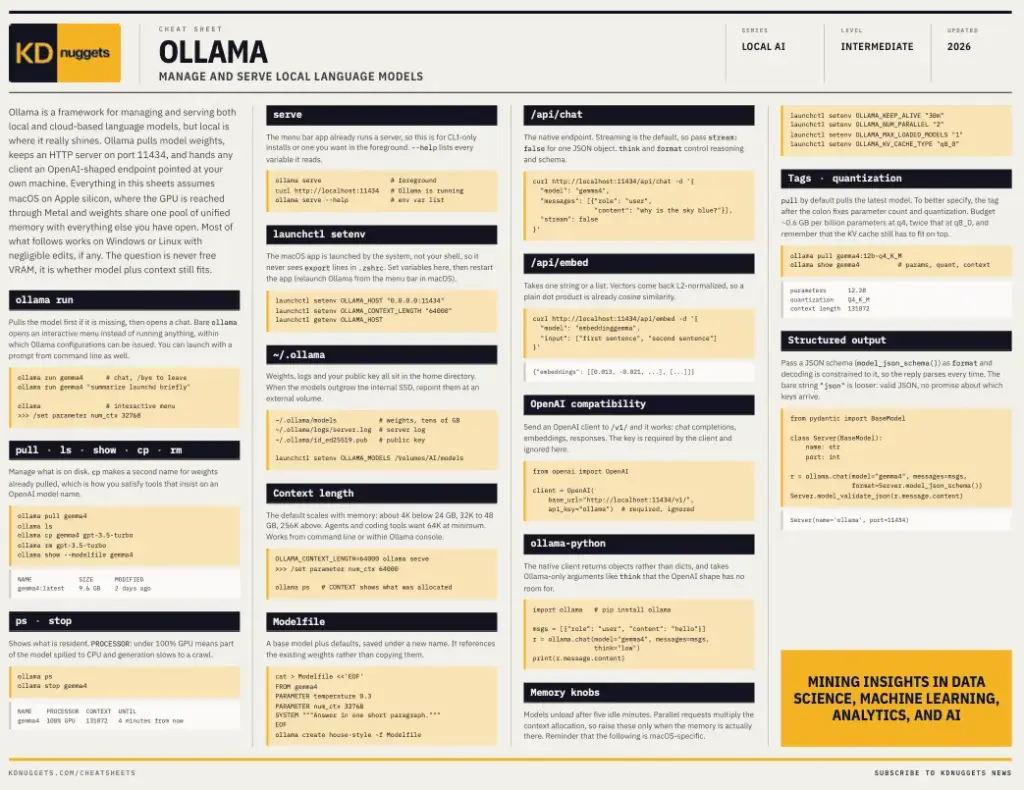
However, bridging the gap between a successful initial launch and maintaining a robust, high-performance local environment introduces an entirely new set of technical considerations. While getting a model to respond takes minimal effort, ensuring that the model and its associated context window fit comfortably within the available system memory is where many practitioners encounter bottlenecks. To address these everyday engineering hurdles, data science and AI resource platform KDnuggets has officially released a comprehensive new cheat sheet designed to help developers navigate the complexities of managing local language models using Ollama.
The newly published reference guide tackles several of the most common friction points developers face when moving beyond basic experimentation. Among the primary diagnostic tools highlighted in the resource is the command line utility ollama ps, which offers immediate insight into resource allocation. Alongside displaying which models are currently resident in memory, the utility features a crucial processor column. A reading under one hundred percent GPU utilization serves as an immediate indicator that a portion of the model has spilled over into the central processing unit, a shift that typically causes text generation speeds to slow down dramatically. Furthermore, the command exposes the exact context length that has been allocated, a figure that frequently catches developers by surprise when it differs from what was explicitly requested or expected. Understanding how to interpret and defuse these local model sizing decisions becomes critical for anyone looking to maintain responsive local applications.
Beyond hardware resource management, the cheat sheet addresses the often-perplexing interactions between Ollama and local operating systems, a domain where many newcomers stumble. A particularly common pitfall involves the desktop application version of Ollama. Because the desktop interface is launched directly by the host operating system rather than from a terminal shell, it never encounters environment export lines configured within shell profile files such as a .zshrc. Consequently, configuration variables that appear entirely correct when verified in a terminal window have zero practical effect on the background application. On macOS systems, for instance, these variables must be explicitly configured through launchd using commands like launchctl setenv. This architectural nuance is frequently the underlying reason why context lengths or designated model directories refuse to change, leaving developers scratching their heads despite seemingly correct configurations.
As local language models are increasingly integrated into production pipelines and automated workflows, the demand for reliable, structured output has grown significantly. The KDnuggets resource delves into the operational nuances of handling structured data generation within Ollama-served models. Passing a structured schema, such as a JSON schema, directly as the format parameter constrains the decoding process so that the generated reply strictly adheres to that designated shape every single time rather than merely most of the time. In contrast, passing the bare string version provides a looser alternative that ensures valid JSON formatting but offers no concrete guarantees regarding which specific keys will ultimately arrive in the payload. Mastering this distinction is vital for developers building applications that rely on deterministic data parsing downstream.
The remainder of the newly released cheat sheet rounds out the essential fundamentals required for comprehensive local model administration. It covers necessary disk management commands, details the primary application programming interface endpoints such as /api/chat and /api/embed, and explains the functionality of the /v1/ compatibility layer. This compatibility layer is especially valuable because it allows existing applications built for OpenAI clients to switch their target to localhost without requiring any fundamental code rewrites. Additionally, the guide explores the utility of Modelfiles, which enable developers to save a base model bundled alongside their own customized default parameters, alongside the various environment variables that govern vital operational behaviors, such as determining how long models remain loaded in memory and how many concurrent instances are permitted to run simultaneously.
As the ecosystem surrounding local artificial intelligence continues to mature, resources that bridge the gap between basic installation and advanced system administration remain invaluable for technical practitioners. The availability of this practical reference material comes at a time when running local language models is transitioning from an experimental endeavor into a standard component of the modern developer toolkit. By consolidating critical operational commands, configuration workarounds, and syntax guidelines into a single portable reference, the cheat sheet aims to smooth out the learning curve associated with local AI infrastructure, enabling builders to focus on creating innovative applications rather than troubleshooting environment configurations.