












For many web developers working within the Drupal ecosystem, writing automated tests has long been viewed as an optional luxury—or worse, an unnecessary burden that introduces steep complexity and unwarranted expense without delivering tangible benefits. In a fast-paced development cycle, the pressure to deliver features quickly often pushes quality assurance to the sidelines, leaving teams to rely on manual checks that can miss subtle regressions. However, the landscape of modern web development tooling is evolving, and open-source solutions are making robust testing more accessible than ever before. Among these tools, Cypress has emerged as a powerful front-end testing framework offering numerous advantages for teams seeking to safeguard their digital platforms.
The integration of automated testing tools into content management systems traditionally presented a steep learning curve, often requiring convoluted setups that separated back-end logic from front-end user interactions. Yet, bridging this gap is essential for maintaining the integrity of enterprise-grade web applications. By adopting modern JavaScript-based testing frameworks, development teams can simulate real-world user behavior, verify complex interface interactions, and catch interface bugs before they ever reach a production environment.
Implementing this testing methodology within a standard local development environment requires a structured approach to project configuration and tool initialization. Developers typically operate within a containerized or local server setup using standard project scaffolding, such as the composer-based drupal/recommended-project architecture. Within this established directory layout—which cleanly separates vendor libraries from web-accessible assets—incorporating a testing framework involves leveraging Node.js package management to bring the testing suite directly into the development workspace.

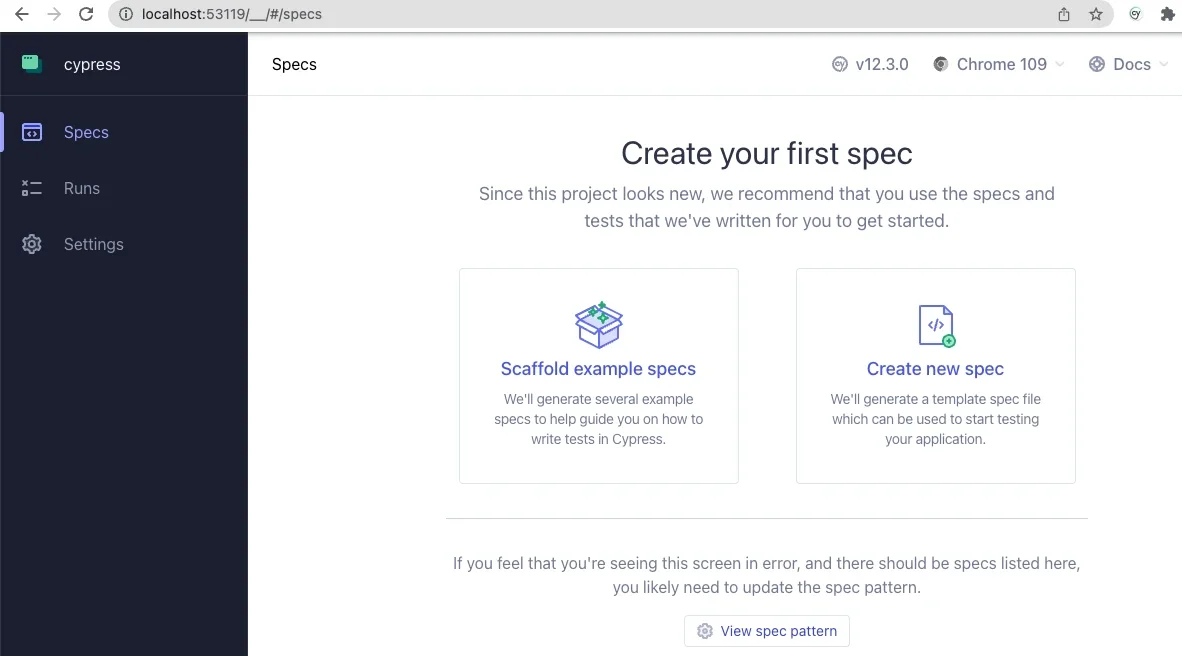
Initializing the package manager establishes the foundational configuration file that tracks project dependencies, allowing developers to safely incorporate the testing framework into their local development repositories. Once the testing suite is installed via command-line utilities, running the application for the first time launches an interactive graphical environment designed to guide developers through the initial configuration stages. Because a fresh installation lacks predefined testing specifications or configuration files, the application prompts users to define their testing parameters, automatically generating the necessary directory structures and configuration assets within the project root.

This configuration phase is critical for bridging the testing framework with a local Drupal environment. By adjusting the primary configuration file, developers can explicitly define crucial parameters such as the local base URL, viewport dimensions, and asset directories. Pointing the testing suite directly to the local development environment ensures that subsequent test runs accurately target the local instance, allowing the framework to interact with the site’s themes, modules, and custom content types seamlessly.
Establishing a reliable testing routine involves authoring basic specification files designed to verify core functionality, such as page rendering and authentication mechanisms. By organizing these specifications within dedicated directories, developers can write scripts that mimic user interactions—ranging from verifying the existence of primary page elements to testing form submissions and error handling. For instance, testing a user login workflow involves instructing the automated browser to navigate to the authentication path, input credentials into specific form fields, and trigger the submission action.
This level of automated interaction often uncovers subtle front-end nuances that manual testing might overlook. During the implementation of login verification scripts, developers frequently encounter scenarios where complex CSS styling, such as flexbox layouts, can temporarily impede a testing framework’s ability to interact with specific input elements. Incorporating explicit assertions—such as confirming that a submit button contains expected text strings before attempting a click action—resolves these hurdles and demonstrates the practical value of automated quality assurance in identifying interface vulnerabilities.
Beyond basic page navigation and form submissions, teams can significantly enhance their testing capabilities by authoring custom commands tailored specifically to Drupal’s architecture. The framework’s modular support structure allows developers to define reusable functions that handle repetitive tasks, such as session management and user authentication. By establishing custom commands for logging users in or out, developers can streamline complex test scenarios, ensuring that each test begins from a clean, predictable state.
Furthermore, advanced configurations enable front-end testing tools to interface directly with back-end management utilities like Drush. Through the use of environment variables and custom command definitions, developers can execute back-end operations—such as generating one-time login links via user identification numbers—directly within their testing scripts. This capability offers profound security and efficiency benefits, eliminating the need to hardcode or store sensitive user passwords within testing repositories while seamlessly connecting front-end user interface testing with back-end administrative controls.
The broader adoption of these testing methodologies across the Drupal community highlights a growing recognition that automated quality assurance is vital for long-term project stability. Organizations and agencies specializing in enterprise open-source development have increasingly embraced these practices, sharing resources, webinars, and public repositories to help other teams implement comprehensive testing strategies. As these tools continue to evolve, the integration of front-end testing frameworks into standard workflows promises to reduce maintenance overhead and elevate the reliability of digital experiences built on open-source platforms.