







Naming is hard. The language we use shapes the way we think about things, but also the conversation we have about it. That is why so much confusion surrounds colors, icons, UI components, and features across modern digital projects, leading to persistent struggles when teams attempt to name design tokens, HTML classes, and variables.
Throughout the lifecycle of a digital product, the names chosen can often prove problematic. Sometimes, the designations are far too generic, making it difficult to understand what is precisely meant. In other instances, they are overly specific, leaving little room for flexibility, scalability, and reuse. Choosing the right names and establishing effective conventions remains a central challenge for designers and developers alike.

How To Name Things
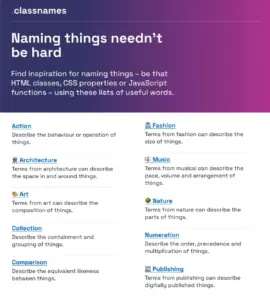
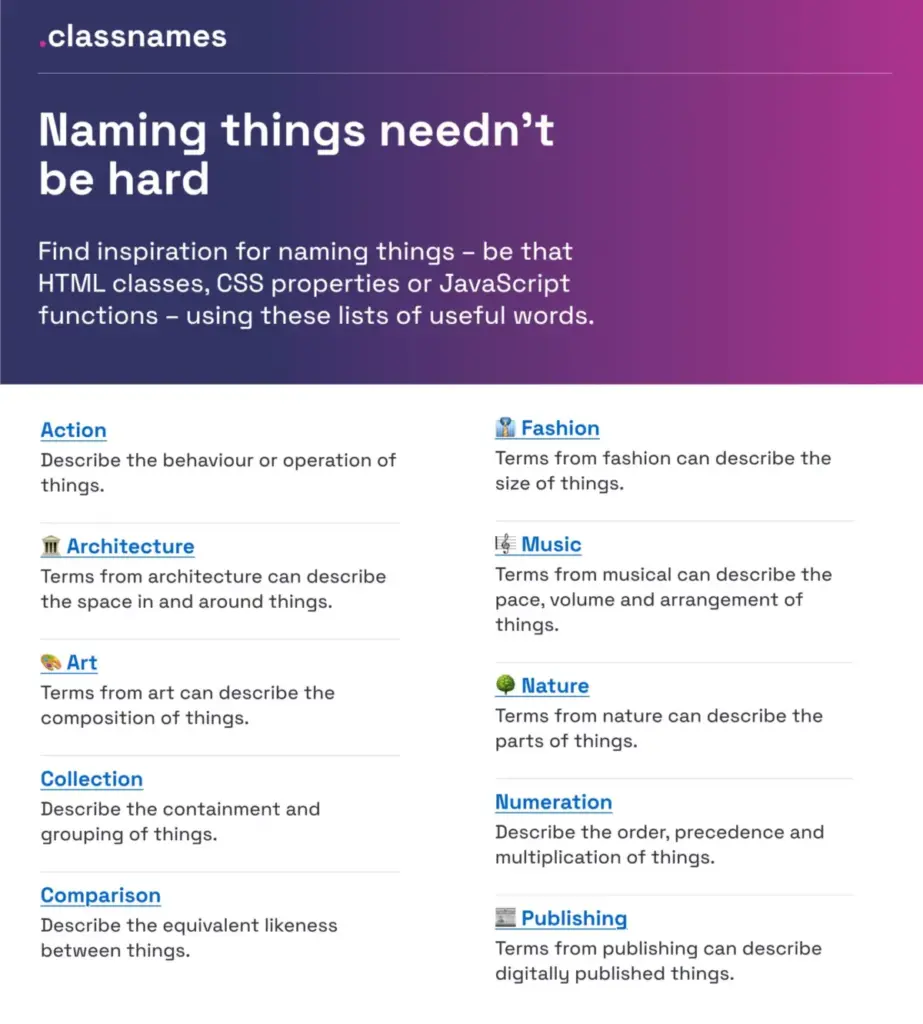
Finding inspiration for naming HTML classes, CSS properties, or JavaScript functions can frequently demand creative problem-solving. Developers and designers seeking to think outside the box can turn to Classnames, a resource jam-packed with ideas designed to break standard mental loops.
The platform provides thematically grouped lists of words that are ideal for codebases and design systems. Users can find terms to describe different kinds of behavior, likeness between things, order, grouping, and association. Furthermore, the repository features themed collections of words that would not instantly come to mind when dealing with code, including vocabulary drawn from nature, art, theater, music, architecture, fashion, and publishing.

How To Name Colors
Establishing a clear and scalable system for colors often raises questions about how to choose the right identifier for a given shade. To assist with this challenge, David Aerne maintains a repository of color names sourced from various references and thousands of user contributions.
Containing tens of thousands of unique color names, the repository serves as a massive reference point for digital creators. It is accompanied by color pickers and name search utilities, such as Color Parrot, which originally emerged from a social media experiment and now allows creators to look up or assign names to specific hexadecimal values effortlessly.

How To Name Layers and Groups
Maintaining organization within design files requires a disciplined approach to structure. Javier Cuello summarized a comprehensive set of naming best practices designed to help teams name their layers, groups, and components in a consistent and scalable way.
As Cuello highlights, an effective name possesses a logical structure, remains concise, carries clear meaning, is universally understood across the team, and avoids direct ties to temporary visual properties. By outlining clear do’s and don’ts, these guidelines address the fine details that must be considered when naming sizes, colors, groups, layers, and components.

How To Name Design Tokens
Building a flexible design token taxonomy that functions seamlessly across multiple products represents a significant architectural hurdle for large organizations. This was precisely the challenge faced by the team at Intuit. The parent company behind major brands such as Mailchimp, QuickBooks, TurboTax, and Mint developed a flexible token system designed to extend far beyond individual brand themes, serving instead as a foundational system for a diverse array of products.
Nate Baldwin detailed these efforts in a comprehensive case study sharing insights into the creation of Intuit’s design token taxonomy. The documentation dives deep into the pain points of previous taxonomy systems, outlines the criteria established for the new iteration, and explains the creation process, offering valuable takeaways for organizations looking to build robust and adaptable token structures.

Frequent Names For UI Components
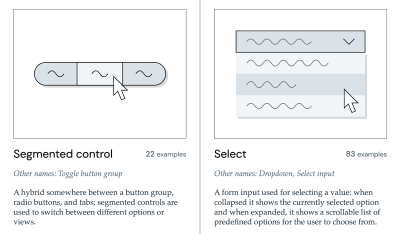
When teams struggle with nomenclature, observing how other professionals label similar interface elements provides a practical starting point. Rather than getting lost in the broader design system landscape, Iain Bean conducted the necessary research to compile the Component Gallery.
This collection includes concrete examples and documentation for more than fifty UI components, ranging from accordions to visually hidden elements, while also cataloging alternative names that these components commonly go by in various real-world design systems. Additional resources, such as Name That UI, offer visual dictionaries that further clarify common UI components for cross-functional teams.
How To Name New Features
New features within digital products frequently suffer from low adoption rates due to poor discoverability. Feature adoption requires time; a functionality must first be discovered, then understood, tried, learned, and eventually integrated into a user’s existing workflow. Erin Gannon addressed these hurdles in a practical guide examining how to ensure these adoption steps occur successfully.
According to these guidelines, effective feature names are driven by user needs and problems. They should signal the value or outcome of a feature, aligning directly with the job-to-be-done. Most importantly, successful names tap into the user’s own language, encouraging product teams to ask users to explain features in their own words and subsequently adopt that terminology.

How To Name Variables and Taxonomy Maps
Managing nomenclature for complex multi-brand and multi-themed ecosystems requires sophisticated organizational maps. A notable example comes from the Vodafone UK Design System team, whose Variables Taxonomy Map breaks down the anatomy and categorization of design tokens into a well-orchestrated system of collections.
The map illustrates the four distinct collections required to support the system, charting connections between tokens from brand and primitives to semantics and pages. Building upon foundational work by figures like Nathan Curtis, this taxonomy enables team members to determine where a token is used and what it represents simply by evaluating its name. Additional Figma kits and resources offer further exploration into diverse approaches for managing design tokens.

Design Token Naming Guide and Inventory
To assist practitioners further, Romina Kavcic developed an interactive tool focused on naming design tokens. The platform guides users through the fundamentals of token mechanics, effective naming strategies, and the configuration of custom naming structures encompassing components, categories, states, and roles.
Complementing this guide is the Design Token Names Inventory spreadsheet, which provides a simple four-level structure to give teams a bird’s-eye view of their design tokens. The system allows practitioners to add rows, themes, and modes easily without losing track, facilitating straightforward token filtration across complex projects.

Naming Products or Services
For teams seeking to establish names for entirely new products or services, Onym serves as an open-source repository organizing tools and resources for brainstorming, vetting, methodology guides, sprints, and etymological research. The collection provides cautionary tales, directories of naming agencies, and curated reading lists to support holistic branding efforts.
Wrapping Up
Ultimately, the right name is the one that is clearly understood and actively used by both the internal team and the end users. Substantial amounts of time are frequently lost when stakeholders discuss identical concepts using different dialects—namely the designer’s dialect, the developer’s dialect, the product manager’s dialect, and the user’s dialect. This linguistic fragmentation is a primary driver of frustration and confusion in product development.

When digital products exhibit low user adoption, the root cause can frequently be traced back to unclear nomenclature. By paying close attention to potential naming conflicts and maintaining a backlog to address them proactively, teams can significantly reduce operational friction and foster more effective collaboration.