












For millions of PC gamers, the letters D, L, S, and S have become synonymous with the pursuit of the perfect frame rate. Whether you are building a high-end desktop rig featuring the latest NVIDIA GeForce graphics card or looking forward to the technical capabilities of the upcoming Nintendo Switch 2, you have likely encountered Deep Learning Super Sampling (DLSS) as a core pillar of modern gaming performance. As hardware demands grow increasingly intense with complex lighting, intricate textures, and higher resolutions, NVIDIA’s proprietary upscaling suite has evolved from a niche experimental feature into an essential tool for maintaining visual fidelity and performance parity.
At its most fundamental level, DLSS is a sophisticated upscaling technology designed to mitigate the heavy computational load modern games place on a graphics processing unit (GPU). When a player enables DLSS, the GPU performs a clever sleight of hand: it renders the game at a lower internal resolution, significantly reducing the number of pixels the graphics hardware needs to shade and calculate in real-time. Once this lower-resolution frame is generated, NVIDIA’s machine learning algorithms—trained on massive datasets—step in to intelligently upscale the image to the user’s native monitor resolution. The result is a display output that appears remarkably close to a native high-resolution image, but with the performance benefits of a much lighter rendering workload.
The utility of this technology is two-fold. For users playing on high-resolution displays or demanding titles, DLSS allows them to push graphical settings higher than their hardware would normally permit, maintaining a smooth, playable frame rate that would otherwise be impossible at native resolution. Conversely, for competitive gamers who prioritize raw speed and low input latency, DLSS can be used to run games at lower internal settings to maximize frame rates, ensuring that a high-refresh-rate monitor is fully utilized.


The Mechanics Behind the Magic
While DLSS often feels like an instantaneous boost to performance, it is underpinned by complex computational compromises. Understanding the relationship between these modes is vital for gamers looking to balance visual quality with fluid movement. When a game is rendered, the machine learning models at the heart of DLSS interpret motion vectors, depth buffers, and brightness data to reconstruct the missing pixels during the upscaling process. While NVIDIA’s models have become exponentially more accurate over the years, the reality remains that some fidelity is lost during any upscaling operation. The extent of this loss is governed by the chosen DLSS preset.
The "Quality" mode, widely considered the gold standard for most players, instructs the GPU to render at 66.7 percent of the target output resolution. For a 4K display, this means starting at 1440p; on a 1440p monitor, the process begins at 960p. This preset prioritizes visual integrity, offering the sharpest image at the cost of a more modest increase in frame rate. Moving to "Balanced" mode shifts the rendering load to 58 percent of the target output, serving as a compromise for users who need a more significant performance uplift without sacrificing too much clarity.
For those requiring even higher frame rates, the "Performance" mode drops the internal resolution to 50 percent of the target, rendering at 720p for a 1440p output or 1080p for a 4K display. Finally, the "Ultra Performance" mode targets 8K displays by rendering at 33.3 percent of the output resolution. Attempting to use Ultra Performance on lower-resolution monitors generally results in noticeable blurriness, underscoring the fact that DLSS is not a one-size-fits-all solution but a calibrated tool that requires matching the correct mode to the user’s specific display hardware.

The Evolution of the DLSS Ecosystem
One of the greatest sources of confusion for consumers is the sprawling nature of the DLSS brand, which has grown to encompass a variety of distinct technologies. When Deep Learning Super Sampling first debuted in 2019 alongside the RTX 20 series, it was a restricted, manual process. NVIDIA had to train its algorithms specifically for each individual game, limiting support to a handful of titles like Battlefield V and Metro Exodus. The 2020 launch of DLSS 2 fundamentally altered this trajectory, removing the need for game-specific training and enabling rapid, widespread adoption that has now extended to over 1,000 games and applications.
The technology reached a new milestone at the start of 2025 with the introduction of DLSS 4. This iteration moved to a transformer-based machine learning architecture, providing superior image stability and significantly reducing visual artifacts like ghosting. However, this advancement came with a trade-off for legacy hardware; older RTX GPUs may face higher overhead when running the latest DLSS 4 models. To address this, NVIDIA provides specific presets that allow users to access older, less demanding versions of the algorithm to maintain performance on aging silicon.
Beyond pure upscaling, the suite now includes Deep Learning Anti-Aliasing (DLAA). While DLSS trades quality for speed, DLAA does the inverse, utilizing the same machine learning power to stabilize native resolution images, effectively acting as a superior alternative to traditional temporal anti-aliasing.
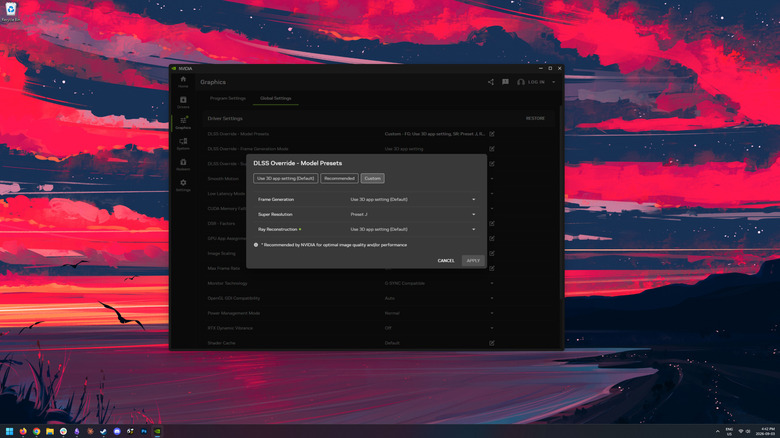
Furthermore, the introduction of Frame Generation with DLSS 3 revolutionized the concept of "fluidity." By generating an interpolated frame for every two rendered frames, RTX 40 series GPUs and beyond can effectively double the perceived frame rate. The subsequent release of DLSS 4.5 pushed this even further, allowing RTX 50 series hardware to generate up to six interpolated frames for every single traditionally rendered frame. When paired with Ray Reconstruction—a denoising algorithm introduced in DLSS 3.5 that replaces traditional manual denoisers to improve the coherence of ray-traced lighting—these technologies have turned ray tracing from a performance-killing feature into a viable, high-fidelity standard.
Looking Toward the Future: DLSS 5
The most recent development in the portfolio, DLSS 5, represents a departure from traditional upscaling. Rather than focusing on pixel reconstruction to improve performance, DLSS 5 utilizes an AI filter to interpret motion vectors and color data to apply photorealistic lighting and materials that are consistent across frames. In early demonstrations, the impact of this technology has been striking, though it introduces a significant shift in philosophy: unlike previous versions, DLSS 5 carries a performance cost, lowering frame rates due to the heavy computational overhead required to process the AI-driven lighting effects.
As of late 2026, DLSS 5 is primarily featured in NBA 2K27, serving as a showcase for its potential to anchor 3D content with more realistic shadows and textures. While the industry is still determining the extent to which developers will adopt this new, more intensive form of AI rendering, the modding community has already begun experimenting with it across a wide range of titles. Whether DLSS 5 becomes a mainstream staple or remains a premium visual enhancement for high-end hardware, it confirms that NVIDIA’s trajectory is firmly locked on integrating AI deeper into the very fabric of how digital worlds are rendered, lit, and perceived. For the average gamer, the evolution of DLSS ensures that regardless of the hardware generation, the tools to push the boundaries of visual fidelity are continuing to advance at a breakneck pace.