









The design community has entered a period of conversational tunnel vision. Because Large Language Models are fundamentally trained on dialogue data, the tech industry has collectively decided that the humble chat bubble is the natural, universal home for every conceivable AI capability. While the chat interface remains a viable and powerful option for many tasks, it is merely one tool in an expansive toolkit. UX and product teams are now being urged to become far more intentional about the modalities they choose for how users provide data and commands, and how intelligent systems present their outputs.
Modality is fundamentally the way a person uses their senses to interact with a system—seeing, hearing, touching, speaking, or typing. To pick the best method for any given interaction, product designers must evaluate what the user wants to accomplish, where they are physically located, and how much cognitive effort they are already expending in that environment.
Industry experts point to a common scenario that illustrates how current AI implementations frequently fail this test. Picture a traveler jogging through a loud airport terminal after a sudden, unexpected gate change. They are dragging a heavy roller bag and carrying a cup of coffee in the other hand, needing to open an airline app to ask an AI assistant where they should go next. The tool immediately fails the input modality test by forcing the traveler to stop walking, balance their coffee, and painstakingly type a long booking reference number into a tiny chat box. When they finally hit send, the system fails the output modality test as well. Instead of flashing a large, high-contrast gate number, the AI returns a dense paragraph explaining the atmospheric weather patterns causing the delay, burying the actual gate number at the very bottom.
While travelers in this predicament might still make their flights, they carry away a sharp moment of anxiety—an experience that validates the widespread consumer perception that large companies often fail to understand or care about the actual conditions underishing their products. In this scenario, the airline built a genuinely smart tool, but the interface fundamentally failed the user. The input required physical dexterity that the traveler lacked at the moment of need, while the output demanded a level of reading focus they simply could not spare.
To avoid these failures, product teams must evaluate the physical and cognitive load of their users to match both input and output modalities to their immediate intent. The allure of the universal chatbot is easy to understand from a product development standpoint because it acts as a blank slate, suggesting that the system can handle anything the user provides. However, a text-heavy interface often causes a high adaptation load, increasing cognitive demands on users. Over time, this cognitive burden turns into a psychological tax that people pay when they are forced to alter their natural thought processes just to accommodate a machine.
When an interface relies solely on conversation, it imposes a dual burden: a linguistic challenge for input and a cognitive challenge for output. A blank chat box creates a major barrier for users who need to discover what a tool can actually do. In a standard graphical interface, menus and buttons provide clear visual cues signaling every available option. A chat box, conversely, often leads to choice paralysis because users are forced to guess what the AI is capable of and remember the exact phrasing or technical terms required to get the result they want.

Consider a data analyst who wants to find a specific trend in a spreadsheet. In a traditional tool, they might simply click a filter or sort button, whereas a chat interface requires them to suddenly become a writer and describe that complex logic in a complete sentence. Similarly, a manager trying to reorganize a team schedule finds that dragging and dropping blocks on a calendar is entirely intuitive, whereas describing those same scheduling shifts in a text prompt adds an unnecessary layer of work that makes the task feel far more difficult than it should be. Designing for input means recognizing that composing a prompt is an active, creative act that requires a person to translate a vague thought into a specific command.
On the other end of the interaction, when an AI responds in long blocks of text, it transfers vital interpretive work directly to the user. Text is a serial medium, meaning the brain has to read one word after the next to extract meaning, which takes time. Sequential reading is necessary for complex legal analysis or reviewing nuanced medical histories, but teams create unnecessary friction when they default to text for data that visual formats can communicate much faster. Visual methods allow for parallel processing, enabling users to view a chart and spot a pattern in under a second.
The cognitive tax of this reading requirement compounds quickly in high-stakes professional environments. A doctor asking for a patient’s vital signs needs a clear numerical display rather than a narrative description of the readings, while a stock trader looking for a price spike needs a line graph immediately rather than a written summary of price movements over the past hour. In both professions, a text response forces users through a slow, error-prone extraction process precisely when speed and accuracy matter most.

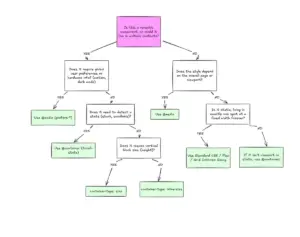
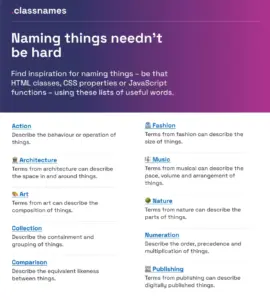
To move beyond these limitations, practitioners need a shared vocabulary of input and output modalities, ranging from single-tap buttons and voice commands to natural language chat, structured forms, graphical user interfaces with sliders and filters, multi-modal image inputs, and spatial gestures. Each modality has a specific role to play in an overarching workflow, and choosing the right one inherently requires a strong focus on accessibility, such as providing screen-reader-optimized audio alternatives for users with visual impairments.
Experts advocate for conducting a formal Task Audit before interface design begins, moving teams away from assumptions and toward evidence gathered directly from user environments. Through contextual inquiry and observation, researchers can capture how people work in their natural settings, identifying hidden workarounds and environmental constraints like screen glare, ambient noise, or physical safety risks. Focused interviews and collaborative workshops further surface mental models, decision points, and necessary task boundaries, ensuring that final design choices are grounded in the physical and social reality of the workplace rather than mere interface convention.
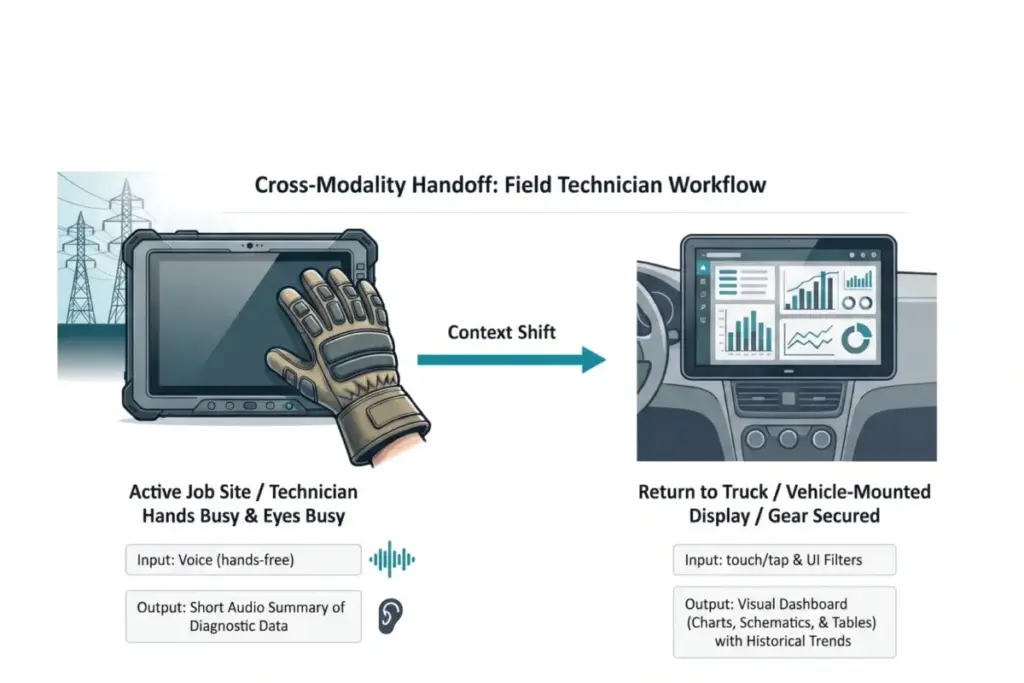
The practical impact of this evidence-based approach is clearly demonstrated in high-risk industrial environments, such as field technicians servicing high-voltage electrical grids. Traditionally, these workers relied on ruggedized tablets to access technical manuals and log status updates, but the physical constraints of the job—wearing heavy protective gloves and working in bucket trucks at significant heights—made interacting with standard touch interfaces nearly impossible. Furthermore, attempting to read complex, text-heavy diagnostic reports on a screen while maintaining situational awareness created a dangerous cognitive load.

Research teams utilizing contextual inquiry and focused interviews discovered that technicians frequently worked in hands-busy, eyes-busy states where manual input was a significant barrier. High-altitude environments also introduced severe screen glare from direct sunlight, while the physical safety risk of holding a heavy tablet while balanced precariously meant workers could not safely dedicate their eyes or hands to a standard display.
To resolve these challenges, engineers developed an adaptive modality solution. While active on a job site, technicians utilize voice input to query the system, allowing them to remain productive while wearing thick protective gloves. The AI responds with a short audio summary of immediate diagnostic data, bypassing screen glare and letting technicians maintain situational awareness of the high-voltage grid without looking away from dangerous equipment. Once the technicians return to their vehicles and secure their safety gear, the system automatically hands off the workflow to a larger, 15-inch visual dashboard mounted inside the truck, which provides adequate screen real estate for complex schematics and historical trend data. For this national utility provider, implementing this adaptive approach reduced diagnostic time by twenty percent and significantly increased daily tool adoption among field crews.
Ultimately, industry leaders emphasize that an AI capability is only as usable as the interface that delivers it. While building a chatbot is fast and familiar, designing an interface that feels like a natural extension of how someone already works requires a deeper commitment to understanding the user’s environment. As the technology evolves, the future of AI interface design points toward a diverse ecosystem of visual, vocal, haptic, and ambient interactions carefully calibrated to human intent and real-world context, ensuring that the chat window remains simply one valuable tool among many rather than a universal default.