











Front-end developers frequently encounter a familiar request from clients and users: making elements take up the entire screen. Whether building a dynamic slide deck, a high-performance video player, a kiosk dashboard, an interactive browser game, or a classroom projector timer, web applications often feel incomplete when standard browser tabs, toolbars, and address bars remain visible along the edges. Fortunately, modern browsers provide a native solution through the Fullscreen API. However, implementing this feature requires navigating several distinct technical hurdles, including strict user gesture requirements, legacy browser prefixes, mobile constraints, and display power-management settings that can dim the screen mid-session.
To achieve a seamless implementation without relying on external libraries or complex build steps, developers must understand how to combine vanilla JavaScript, DOM events, and asynchronous programming patterns. The Fullscreen API is remarkably compact, offering fundamental methods like requestFullscreen() and exitFullscreen(), alongside properties such as document.fullscreenElement. Furthermore, documents support critical event listeners including fullscreenchange, which tracks transitions in and out of full-screen views, and fullscreenerror, which catches failed requests.
A common misconception among developers is that full-screen functionality is restricted to entire web pages. In practice, the API permits any individual DOM element to fill the screen. When a specific container element enters full-screen mode, all other elements in the document are obscured behind it. To expand the entire viewport, developers typically invoke the method directly on the root document element. Because these methods return native JavaScript promises, developers can cleanly await their completion before triggering subsequent code logic. Nonetheless, wrapping these calls in robust error handling blocks remains essential to prevent unhandled promise rejections when browser policies restrict layout changes.

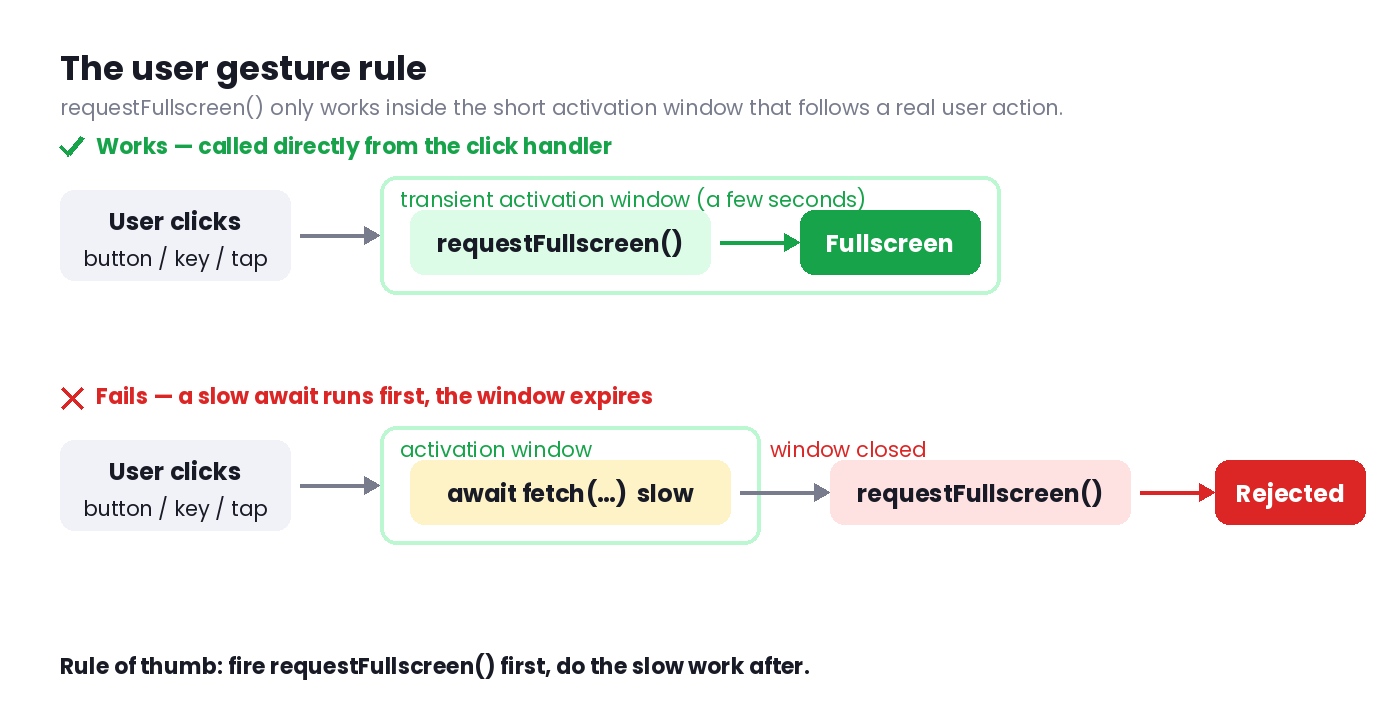
A primary challenge developers encounter is the strict browser security measure known as the user gesture rule. Browsers intentionally prohibit scripts from automatically triggering full-screen mode upon page load, through background timers, or in response to asynchronous network events. Instead, requestFullscreen() requires transient activation, meaning it must execute within a brief execution window immediately following genuine user interaction, such as a mouse click, tap, or keyboard stroke. Without this direct user gesture, the promise automatically rejects, safeguarding users from malicious scripts attempting to hijack display space upon loading.
This security constraint influences how asynchronous tasks and keyboard shortcuts are handled. If a developer attempts to fetch data or run a slow operation before calling the full-screen method within a click event handler, the activation window will expire, causing the browser to reject the request. Consequently, best practices dictate invoking the full-screen method immediately upon user interaction and handling secondary background operations afterward. Additionally, managing keyboard shortcuts requires careful consideration to prevent unintended conflicts, such as accidental exits or triggers while users are actively typing inside form inputs or editable text areas.
Because users can exit full-screen mode independently through mechanisms like pressing the escape key, interacting with browser-level controls, or switching operating system applications, maintaining application state through custom local variables is unreliable. Instead, developers must treat the browser’s native document.fullscreenElement as the absolute source of truth. By listening to the fullscreenchange event on the document, developers can dynamically update user interfaces, toggle toggle-button text and attributes, and synchronize class lists on document bodies whenever the display mode shifts.
Styling elements within full-screen mode relies on targeted CSS hooks. The pseudo-class selector matches elements currently displayed in full-screen mode, allowing developers to reset background colors, manage overflow properties, and even hide cursor pointers during idle states to optimize performance on modern displays. Concurrently, the backdrop pseudo-class controls the styling of layers painted behind elements that fail to cover the entire viewport, effectively managing letterboxing colors. Ensuring backgrounds are explicitly declared on root HTML elements rather than body elements prevents unwanted visual artifacts during browser transitions.
Cross-browser compatibility introduces additional considerations, particularly regarding Apple’s Safari browser. While modern iterations of Chrome, Edge, and Firefox have long supported standardized full-screen methods, older versions of Safari on macOS and iOS required vendor prefixes. Implementing a lightweight compatibility helper layer allows developers to normalize method calls across different browser engines without bloated dependencies. However, developers must account for significant platform limitations, such as iPhone Safari’s historical lack of support for element full-screen requests outside of native video players. On platforms where native APIs are unsupported or restricted by iframe security policies, employing a robust CSS-based fallback using fixed-position overlays ensures consistent layout behavior.
Beyond visual layout adjustments, maintaining an uninterrupted user experience requires preventing the operating system from dimming or locking the display during extended tasks. While browsers automatically manage power states for active video elements, other interactive experiences—such as countdown timers, digital sheet music, and web-based canvas animations—risk screen dimming due to a lack of perceived user input. To address this limitation, the Screen Wake Lock API provides a standardized mechanism supported across all modern browsers.
The wake lock mechanism relies on asynchronous requests that interface directly with the device’s power management system. Because operating systems frequently revoke wake locks when application tabs become hidden or when devices enter power-saving battery modes, robust implementations must listen to visibility changes and automatically re-acquire locks when users return to active tabs. By tightly coupling the wake lock lifecycle with the fullscreenchange event, developers can ensure that screens remain awake precisely as long as the application remains in full-screen mode, gracefully releasing system resources the moment the user exits.