










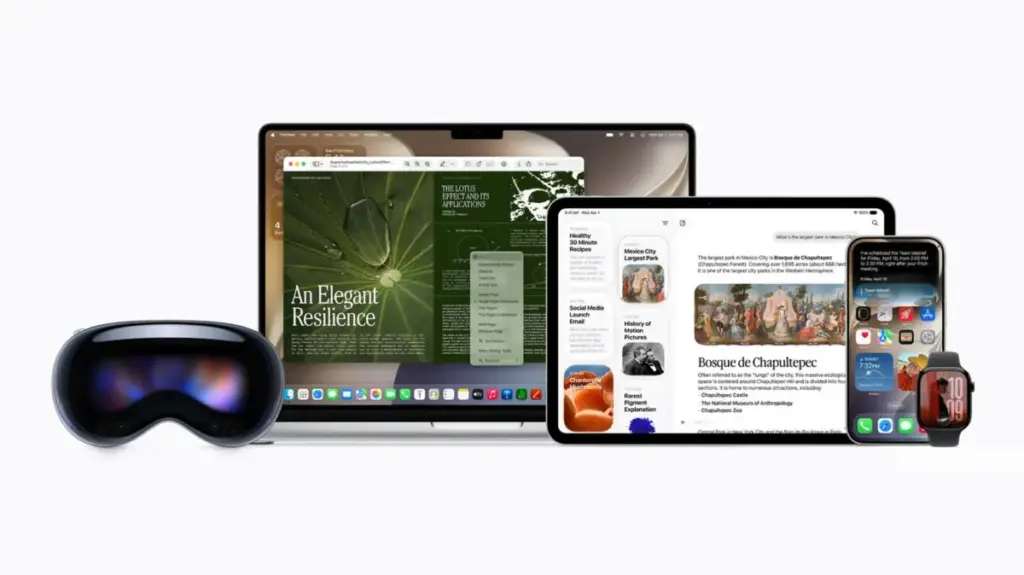
With the highly anticipated release of iOS 27, Apple has officially initiated the rollout of its redesigned digital assistant, signaling a major shift in how the company approaches artificial intelligence. This update, which introduces a significantly more capable version of Siri, represents a departure from the relatively static assistant users have interacted with for over a decade. While the new Siri promises to be a vastly more intuitive and helpful tool, its enhanced performance relies on a deeper integration with the personal data stored on your Apple devices. As users begin to navigate this new landscape, concerns regarding digital privacy have understandably moved to the forefront, prompting a closer look at how Apple handles personal information and, more importantly, how users can reclaim control over what their devices share.
For those eager to experience the upgrade, the process is not as simple as a standard software update. Access to the new Siri AI is currently gated behind a waitlist, a measure likely implemented to manage server loads and ensure a stable experience as the new models are deployed. Once granted access, however, users will find that the assistant is a significant departure from its predecessor. Leveraging advanced large language models—many of which are developed in collaboration with Google—the new Siri is capable of providing nuanced, context-aware, and highly personalized responses. By analyzing data across various apps and services, the assistant can anticipate needs and synthesize information in ways that previous iterations simply could not.
This leap in functionality, however, comes with a trade-off. To provide this level of personalized assistance, the AI requires access to the vast repository of personal information residing on a user’s phone, tablet, or computer. This reality has raised questions about the boundaries of AI data processing. Apple’s architecture relies on a hybrid approach, utilizing both on-device processing and its Private Cloud Compute (PCC) infrastructure. The latter is designed to offload complex tasks to remote servers, a necessity for processes that exceed the computing capabilities of a mobile device. Apple maintains that its PCC system is built with privacy at its core, asserting that data sent to the cloud is never stored after a request is processed and that even Apple itself lacks the ability to access or inspect the information being analyzed. Despite these assurances, many users remain wary of the inherent risks associated with cloud-based AI, leading to a demand for more granular control over what Siri can and cannot index.

The engine powering this personalized experience is a framework known as App Intents. This technology acts as a bridge, allowing Apple Intelligence features to communicate with and extract data from third-party and native applications. When a user enables Siri AI, the device’s search capabilities—previously handled by Spotlight—are unified with the assistant’s interface. By default, the system scans through internal apps like Notes and Messages to pull information relevant to a user’s query. Furthermore, if a third-party developer chooses to integrate App Intents, Siri gains the ability to scan and surface data from those apps as well. This integration is what makes the new Siri feel remarkably "smart," but it also means that the assistant’s reach is potentially as wide as the ecosystem of apps installed on the device.
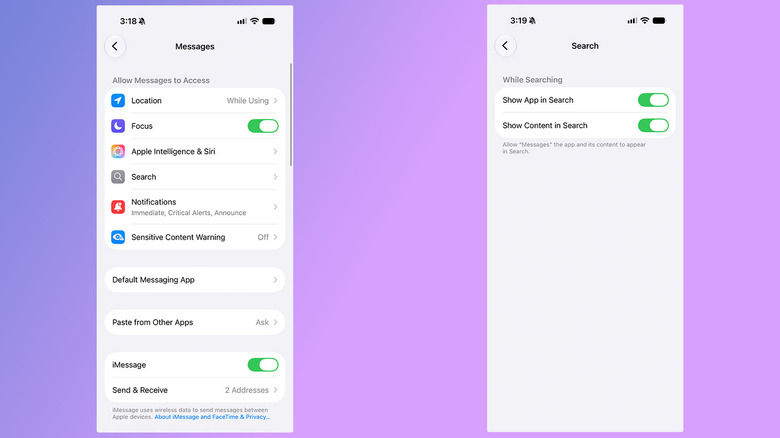
For users who prefer a more conservative approach to their data, Apple has provided mechanisms to restrict this access. The control largely lies in the hands of the developers, who must opt into supporting the App Intents framework. However, as a user, you retain the final authority to dictate whether the system can pull content from specific applications. By navigating to the privacy or search settings, users can toggle the "Show Content in Search" feature for individual apps. Disabling this function effectively walls off that app from the AI, ensuring that even if you specifically ask Siri to summarize a message or find a note, the assistant will report that it cannot locate the information. This provides a robust safety net, allowing users to keep sensitive apps entirely siloed from the AI’s reach.
It is worth noting that some settings, such as those grouped under "Apple Intelligence & Siri" in the apps menu, serve different purposes. These options often control peripheral behaviors, such as whether iOS suggests an app based on usage patterns or surfaces them in the search shade. While these settings might appear to have privacy implications, they are primarily intended to streamline the user interface rather than manage deep data indexing. Understanding the distinction between these convenience-oriented features and the deeper data-access permissions is crucial for anyone looking to curate their experience with the new system.
Beyond the standard indexing of apps, there is also the concept of "on-screen awareness," a feature that allows the AI to interpret visual data from screenshots or active images. This is a powerful tool for accessibility and productivity, enabling users to ask Siri to summarize complex documents or interpret visual information. However, this feature necessitates a higher level of scrutiny. When a user requests an interpretation of a screenshot, that image is often processed through the same Private Cloud Compute infrastructure as other queries. For those concerned about the transmission of visual data, it is a reminder that even ad-hoc requests for assistance can involve external processing.
Another critical area for privacy-conscious users is the training of the AI models themselves. By default, Apple states that it does not use personal interactions to train future versions of its assistant. However, during the initial device setup or subsequent updates, it is possible for users to inadvertently opt into sharing Siri recordings and transcripts with the company. Auditing these settings is a simple yet essential step. By navigating to the privacy settings, users can confirm whether they have enabled the "Improve Siri & Dictation" feature and disable it if they prefer that their voice data not be used for model development.
For those who find that the new AI-powered Siri does not align with their preferences, or who simply prefer the more traditional, less intrusive version of the assistant, there is an option to revert. In a somewhat hidden area of the system—the Screen Time settings—users can find options to limit or disable the more advanced AI features. This allows for the continued use of basic voice-activated functions, such as those used in CarPlay, while maintaining a more traditional privacy footprint. Furthermore, for users who wish to opt out of the ecosystem entirely, Siri can be disabled across the board.
As the industry continues to push toward more integrated, AI-driven experiences, the tension between functionality and privacy will likely persist. Apple’s approach, which blends sophisticated on-device processing with secure cloud computing, is clearly an attempt to strike a balance. However, the ultimate responsibility for data privacy continues to shift toward the user. By staying informed about how features like App Intents operate and proactively managing the permissions granted to the AI, users can continue to enjoy the benefits of modern technology without compromising their personal boundaries. For those who remain uncertain, Apple’s official support documentation continues to serve as the definitive resource for navigating these complex, evolving settings.