








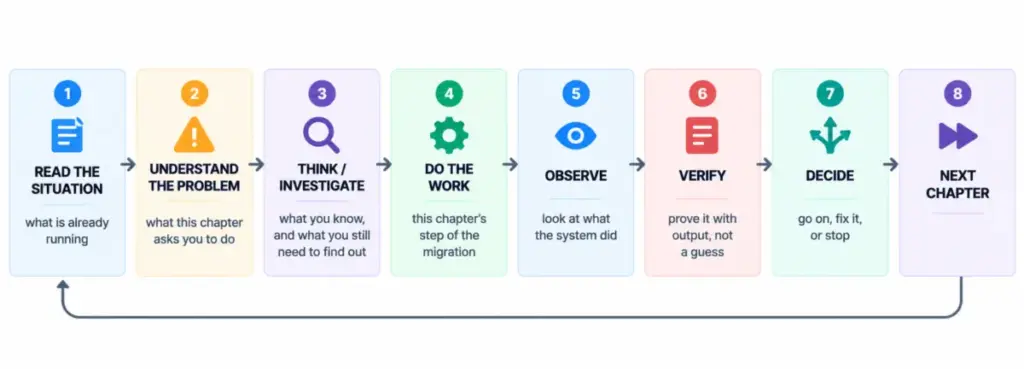
Cloud migrations often present engineers with a high-stakes challenge: modernizing infrastructure while ensuring continuous, uninterrupted service for end users. A detailed case study highlights how a development team successfully migrated a payments application, ClearPay, from an Amazon Web Services (AWS) EC2 instance to Google Kubernetes Engine (GKE) without experiencing customer-facing downtime.
![How to Migrate an Application from AWS to GKE [Full Book]](https://cdn.hashnode.com/uploads/covers/5e1e335a7a1d3fcc59028c64/8a1803ba-c9c9-496d-b2c4-58392cc655eb.png)
The project involved shifting a React frontend and an Express API to GKE while keeping the PostgreSQL database securely hosted on Amazon RDS. By carefully orchestrating the transition through a gradual, weighted traffic-routing strategy, the engineering team maintained strict operational control, protected transaction integrity, and preserved a fast rollback path throughout the process.
![How to Migrate an Application from AWS to GKE [Full Book]](https://cdn.hashnode.com/uploads/covers/698d563262d4ce66226a844a/a72eb451-8e75-4125-ba27-070c73054436.png)
The Starting Point and Architectural Baseline
Before initiating any infrastructure changes in Google Cloud, the team established a reliable operational baseline. ClearPay operated on a standard, single-server AWS setup consisting of an EC2 instance running Nginx, a Node.js API managed by systemd, and a backend PostgreSQL database hosted on Amazon RDS. Because the application relied on a single server without automated scaling or container orchestration, the migration project aimed to introduce a more resilient, containerized architecture on Kubernetes.

![How to Migrate an Application from AWS to GKE [Full Book]](https://cdn.hashnode.com/uploads/covers/698d563262d4ce66226a844a/8abff4c2-ba02-41d0-907f-5c167d485d31.png)
Establishing trust in the initial environment was critical. Engineers ran the application locally using Docker Compose, verifying login functionality and completing end-to-end payment transfers. They rigorously tested transaction idempotency to ensure that repeated network calls—such as a user double-clicking a payment button—never resulted in duplicate charges.
![How to Migrate an Application from AWS to GKE [Full Book]](https://cdn.hashnode.com/uploads/covers/698d563262d4ce66226a844a/6fd0931a-5d4d-44ff-8531-74ce76b75023.png)
Following local validation, the team deployed the application to a dedicated AWS EC2 instance using Terraform, establishing an initial performance baseline. Load-testing metrics, including request latency and error rates, were meticulously recorded. These metrics served as the benchmark against which the new GKE environment would be evaluated, ensuring that the cloud migration did not degrade user experience or transaction reliability.
![How to Migrate an Application from AWS to GKE [Full Book]](https://cdn.hashnode.com/uploads/covers/698d563262d4ce66226a844a/b613b3b6-75c8-4b75-9cca-02750c9bab8a.png)
Designing the Multi-Cloud Transition
Planning the migration required identifying application dependencies and establishing strict operational boundaries. The team determined that the React UI and Express API were stateless, meaning they did not retain user sessions in local memory. Instead, user authentication relied on signed JSON Web Tokens (JWTs), and all transaction history was securely stored in the PostgreSQL database.
![How to Migrate an Application from AWS to GKE [Full Book]](https://cdn.hashnode.com/uploads/covers/698d563262d4ce66226a844a/e734e16e-0bec-4f5e-b542-03b2cecc1980.png)
Because the database represented a complex and data-sensitive component, the architectural design explicitly left PostgreSQL on Amazon RDS within its private AWS VPC. Attempting to migrate the database alongside the application layer would have introduced unnecessary risks and complicated troubleshooting if errors occurred. Instead, the team focused exclusively on containerizing and migrating the stateless API and UI layers to GKE.
![How to Migrate an Application from AWS to GKE [Full Book]](https://cdn.hashnode.com/uploads/covers/698d563262d4ce66226a844a/3dfe597d-2949-4ce8-beae-285d3a5a13f2.png)
To bridge the two cloud environments, engineers configured a secure networking path. The GKE cluster was deployed within private subnets inside a dedicated Google Cloud VPC, utilizing Cloud NAT to manage outbound internet traffic. By assigning a static public IP address to Cloud NAT and updating the AWS security groups to accept incoming database connections strictly from that IP, GKE pods were able to securely communicate with the RDS instance across cloud providers. Furthermore, database connections strictly required Transport Layer Security (TLS), ensuring data in transit remained encrypted over the public internet.
![How to Migrate an Application from AWS to GKE [Full Book]](https://cdn.hashnode.com/uploads/covers/698d563262d4ce66226a844a/fff6c8f3-be7d-4bb3-a525-403f424af320.png)
Building the Google Cloud Infrastructure via Terraform
Infrastructure provisioning in Google Cloud was executed using an incremental, eight-stage Terraform workflow. Breaking the deployment into distinct phases—ranging from foundational API enablement and network creation to GKE cluster provisioning and artifact registry setup—allowed engineers to verify each layer independently before proceeding.
![How to Migrate an Application from AWS to GKE [Full Book]](https://cdn.hashnode.com/uploads/covers/698d563262d4ce66226a844a/30d53ba8-7337-4be6-8b45-3d37955315b2.png)
The GKE cluster itself was deployed in Standard mode, providing the team with explicit visibility into node pools, machine sizing, and autoscaling configurations. Secrets management was handled securely through Google Secret Manager, leveraging Workload Identity to grant GKE pods and CI/CD pipelines access to sensitive credentials without storing plain-text key files on disk.
![How to Migrate an Application from AWS to GKE [Full Book]](https://cdn.hashnode.com/uploads/covers/698d563262d4ce66226a844a/02de98fe-808d-4a5a-8e96-aa9b4fcb5a18.png)
Once the core infrastructure and secrets were configured, engineers established a global HTTP(S) load balancer at the network edge. This load balancer served as a unified public entry point for customers, featuring a weighted traffic-splitting mechanism capable of routing incoming requests dynamically between the legacy AWS EC2 server and the new GKE production environment.
![How to Migrate an Application from AWS to GKE [Full Book]](https://cdn.hashnode.com/uploads/covers/698d563262d4ce66226a844a/fc6cf623-39f3-43f9-8c4b-82cc275a361f.png)
Deploying Staging Workloads and Automating CI/CD
With the destination cluster prepared, the team implemented a continuous integration and deployment (CI/CD) pipeline via GitHub Actions to automate image building, vulnerability scanning, and deployment processes. To eliminate human error and ensure consistency, manual kubectl apply commands were replaced by automated pipelines.
![How to Migrate an Application from AWS to GKE [Full Book]](https://cdn.hashnode.com/uploads/covers/698d563262d4ce66226a844a/23833564-68ec-469e-a404-cf2daca2d22c.png)
The pipeline utilized Trivy to scan container images for security vulnerabilities before pushing them to the Google Artifact Registry. Images that passed security gates were deployed to a private staging namespace within the GKE cluster. To validate staging readiness, engineers executed an automated promotion gate script that tested core application functions, including health checks, database connectivity, user authentication, and transaction idempotency.
![How to Migrate an Application from AWS to GKE [Full Book]](https://cdn.hashnode.com/uploads/covers/698d563262d4ce66226a844a/680819f1-1c81-49b3-9b04-4cfc2aec9cad.png)
By running these validation checks through a secure port-forwarding tunnel, the team confirmed that the staging environment operated correctly before opening it up to real-world traffic.
![How to Migrate an Application from AWS to GKE [Full Book]](https://cdn.hashnode.com/uploads/covers/698d563262d4ce66226a844a/e1df65a6-b164-403e-935b-f7bbd6500682.png)
Executing the Weighted Traffic Shift
The most critical phase of the migration involved moving customer traffic from AWS to GKE gradually. Rather than executing an abrupt DNS cutover—which risks lingering caching delays and prolonged outages if a rollback becomes necessary—the team utilized the weighted routing capabilities of the Google Cloud global load balancer.
![How to Migrate an Application from AWS to GKE [Full Book]](https://cdn.hashnode.com/uploads/covers/698d563262d4ce66226a844a/055183da-5e97-451b-a341-917bd5e1d198.png)
Traffic was shifted incrementally through carefully monitored stages: starting at one percent, then progressing to ten percent, twenty-five percent, fifty percent, seventy-five percent, ninety percent, and finally one hundred percent. At each interval, engineers monitored system telemetry, error rates, latency percentiles, and transaction success metrics.
![How to Migrate an Application from AWS to GKE [Full Book]](https://cdn.hashnode.com/uploads/covers/698d563262d4ce66226a844a/d52f2aab-d663-4081-a645-52871d564020.png)
Throughout the traffic shift, both AWS and GKE operated concurrently, pointing to the same underlying PostgreSQL database. This dual-cloud operational model provided an immediate safety net. If anomalies or elevated error rates were detected, the load-balancer weights could be adjusted instantly to route traffic back to AWS, or an automated rollback script could be executed to restore full service to the legacy server while preserving a clear status banner for visibility.
![How to Migrate an Application from AWS to GKE [Full Book]](https://cdn.hashnode.com/uploads/covers/698d563262d4ce66226a844a/2c0327bb-ec77-4ed5-9dd4-f0ac575e150c.png)
Careful capacity planning also prevented resource exhaustion. By analyzing the maximum database connection limits of the Amazon RDS instance against the potential scaling limits of the GKE Horizontal Pod Autoscaler, the team ensured that the combined connection pools from both active cloud environments never overwhelmed the database.
![How to Migrate an Application from AWS to GKE [Full Book]](https://cdn.hashnode.com/uploads/covers/698d563262d4ce66226a844a/78d0dd12-38ee-4390-a0be-0eecab7f662e.png)
Finalizing the Cutover and Retiring Legacy Infrastructure
Following successful validation at one hundred percent traffic capacity, the GKE environment operated stably under real-world production conditions. Having proven the reliability and performance of the containerized application, the team moved forward with decommissioning the legacy infrastructure.
![How to Migrate an Application from AWS to GKE [Full Book]](https://cdn.hashnode.com/uploads/covers/698d563262d4ce66226a844a/4934e0f5-ed7f-4de7-879d-9e04cec275e1.png)
The AWS EC2 instance and its associated Nginx and systemd configurations were retired using targeted Terraform teardown scripts. True to the original project scope, the Amazon RDS PostgreSQL database remained operational on AWS, serving as the persistent data store for the fully migrated GKE application workloads.
![How to Migrate an Application from AWS to GKE [Full Book]](https://cdn.hashnode.com/uploads/covers/698d563262d4ce66226a844a/fe7ffa07-ae26-4095-91a3-d9a62708c7e5.png)
Reflecting on the project, the engineering team noted that while the migration achieved zero customer downtime and preserved transaction integrity, the cross-cloud network architecture introduced a measurable increase in request latency due to the physical distance between Google Cloud and AWS data centers. This insight established a clear technical roadmap for future infrastructure optimizations, including the potential migration of the database layer into Google Cloud. Overall, the successful execution demonstrated how rigorous planning, incremental traffic shaping, and disciplined operational controls can successfully modernize complex enterprise applications.