











For professionals who spend their professional lives testing and evaluating smart home ecosystems, the daily reality of managing a connected household can often feel surprisingly chaotic. Even industry experts routinely find themselves juggling a dizzying array of hardware from entirely different manufacturers—ranging from smart lighting systems and connected ceiling fans to automated window plugs, security cameras, smart litter boxes, and robotic vacuums. Typically, these disparate devices are tenuously stitched together through a patchwork of integration layers like Amazon Alexa or Google Assistant, resulting in a system that is functional at best, but rarely seamless.
Apple is now stepping into this crowded arena with a promise that its upcoming hardware solution, known as HomeView, will fundamentally change how consumers interact with their automated environments. Following an in-depth, hands-on preview event in New York City, industry reviewers who are normally skeptical of yet another smart screen hitting the market are beginning to reconsider. Spending over an hour interacting with the HomeView across various simulated domestic scenarios revealed a device that appears uniquely equipped to address some of the most persistent pain points in the consumer smart home industry.
No Third-Party Apps Required Is Huge — Everything Goes Through Apple Home
The most compelling and potentially disruptive appeal of the HomeView is its elimination of the tedious requirement to download, install, and create individual accounts for third-party mobile applications every time a new smart home accessory is purchased.

In the current landscape of connected living, consumers are fortunate if a newly acquired gadget natively integrates with their preferred voice assistant. Under the best of circumstances, users only interact with these manufacturer-specific apps when a connection inevitably breaks or a feature malfunctions, forcing them to dig deep into troubleshooting menus to diagnose the root cause. For the average consumer attempting to connect and navigate a variety of smart home products for the very first time, the prospect of managing a dozen or more separate utility apps on a single smartphone is undeniably daunting. By effectively bypassing third-party apps and funneling all device management directly through the native Apple Home ecosystem, Apple has removed what many consider the single greatest barrier to entry for mainstream smart home adoption.
During the New York City demonstration, an Apple representative was observed seamlessly finding, pairing, and registering a brand-new smart home accessory on both an iPhone and the HomeView simultaneously, all while carrying on a casual conversation without missing a beat. The entire operation was handled exclusively within the Apple Home app, mirroring the effortless out-of-the-box pairing experience of AirPods or a HomePod.
Compatibility is expected to extend broadly across the upcoming Apple Home hardware collection—including new offerings from brands like LG and Schneider Electric—alongside any device supporting the universal Matter connectivity standard and standard Apple Home accessories. While the comprehensive ecosystem support list is still unfolding, industry expectations suggest that mainstream devices from major competing ecosystems will ultimately find ways to integrate or communicate effectively within the broader framework.
Face ID Recognition and Personalized Profiles Make a Big Difference
Personalized user profiles have long been an underrated and poorly executed feature across existing smart home hubs. While devices like Amazon Echo hardware allow households to establish multiple profiles for family members and guests, navigating the companion app to configure guest permissions or relying on voice recognition prints to correctly identify users often proves frustratingly unreliable. Despite extensive voice training data, many households report that their current voice assistants regularly struggle to accurately differentiate between family members.

The HomeView approaches this persistent challenge by integrating Face ID technology directly into the hardware experience. In early demonstrations, the facial recognition system operated rapidly and reliably across various environments. Apple representatives showcased potential use cases ranging from a nightstand placement in a master bedroom—where privacy is paramount and unauthorized guests should be restricted from accessing sensitive household controls—to common areas where multi-user access is necessary.
Upon recognizing a registered homeowner, the HomeView immediately pulls up relevant personal information, including synced calendar schedules, upcoming events, and preferred home screen customizations. This user recognition profile seamlessly transitions across multiple HomeView units deployed throughout a simulated home environment. For instance, an entryway unit can display exterior security camera feeds while simultaneously restricting guest privileges to basic environmental controls like room temperature adjustments or web browsing via Safari, while granting full administrative capabilities to recognized residents.
The system is capable of recognizing up to six individual users via facial biometrics, establishing distinct personalized profiles for each person. While Apple representatives did not dive into exhaustive technical specifics during the early briefing, it is widely anticipated that these profiles will support robust parental controls and tailored family accounts.
The 7-Inch Square Liquid Retina Display Works Well for a Kitchen Setup
Countertop space is often at an absolute premium in modern kitchens, making the physical footprint of smart home displays a critical factor for adoption. Many households currently rely on a combination of voice-activated screens and digital calendar displays to coordinate family schedules, track recipes, and set cooking timers. However, these devices frequently consume excessive horizontal counter space, particularly for users who prefer to avoid the permanent commitment of wall mounting.

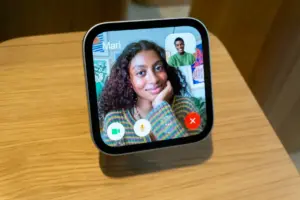
The HomeView features a 7-inch square Liquid Retina display. While some early observers questioned whether the dimensions might feel overly compact, the specific form factor proves exceptionally well-suited for constrained environments such as narrow galley kitchens or crowded countertops. The unique square aspect ratio simplifies the process of viewing and scrolling through recipe instructions, and the adjustable, tiltable hardware design allows users to optimize viewing angles for hands-free operation while preparing meals. Furthermore, the accompanying base elevates the screen safely away from spills and cluttered surfaces.
When positioned on a kitchen counter next to premium espresso equipment during demonstrations, the hardware maintained an understated aesthetic profile without overwhelming the surrounding space. This stands in stark contrast to larger, more obtrusive digital calendars that frequently dominate a room’s visual landscape and broadcast a family’s complete schedule to anyone who walks past.
Wall Mounting Looks Remarkably Good and Not Like You Nailed a Tablet to Your Wall
The concept of a wall-mounted smart home control panel has long appealed to homeowners seeking a centralized command center, but the execution often falls short in practice. Improvised setups utilizing standard consumer tablets mounted to drywall frequently result in unsightly aesthetics, complete with visibly dangling power cords and the undeniable appearance of a portable computer hastily nailed to a partition.
Apple’s approach to wall mounting emphasizes a much more refined architectural integration. During the showcase, several professionally installed HomeView units were displayed with hidden, in-wall wired power connections—a configuration recommended by the manufacturer for permanent installations acting as primary security or climate control dashboards near entryways. For homeowners hesitant to cut into drywall, alternative external adapters and clean cable management solutions are available to route power neatly to nearby electrical outlets. The resulting seamless appearance offers a significant aesthetic upgrade over traditional DIY tablet installations.

Don’t Underestimate How Useful a FaceTime Panel Is for Seniors
As families age, communication preferences often shift, with older relatives frequently relying on video calling features to stay connected with younger generations. However, video calls conducted on the front-facing cameras of older, legacy mobile devices frequently suffer from poor video quality, shaky framing, and complicated interfaces that frustrate less tech-savvy users.
The inclusion of a dedicated FaceTime panel on the HomeView addresses this demographic directly by offering a simplified, stationary communication hub. Families can purchase and preconfigure a HomeView for older relatives, enabling them to initiate video calls using Siri commands without needing to own a standalone iPhone or iPad.
Additionally, the hardware features robust integration with Apple’s Find My network. During demonstrations, users successfully prompted Siri to locate misplaced items such as smartphones, remote controls, or wireless earbud charging cases entirely through voice commands, eliminating the need to physically handle a companion mobile device during the search.
The video system also incorporates intelligent camera framing technology designed to automatically track and focus on the active speaker during a conversation, ignoring background movement from other individuals nearby. These nuanced quality-of-life enhancements collectively contribute to a more intuitive user experience than many legacy smart displays currently on the market.

The Smart Displays I’ve Tested Don’t Work That Well. Is the HomeView Really Different?
Consumers who have spent years navigating the fragmented ecosystem of smart home screens—including various generations of Amazon Echo Show devices, Google Nest Hub units, and Android-powered digital calendars—know that finding a truly frictionless hub experience has historically been difficult. While existing hardware options generally perform their basic functions, setting up and maintaining them rarely qualifies as effortless.
Initial impressions of the HomeView suggest a noticeably smoother operational experience than many earlier industry attempts. Although minor environmental hiccups—such as voice recognition delays in crowded, noisy demo spaces—are to be expected during early preview events, the overarching hardware and software integration points toward a cohesive vision for connected living.
If Apple successfully delivers on its promise to unify disparate third-party applications and complex device hodgepodges into a single, cohesive interface at a targeted price point of $299, the device may well find a receptive audience among consumers weary of app fatigue and system fragmentation.